.. brave.
My rule #1: never run a ‘point zero’ release 
.. brave.
My rule #1: never run a ‘point zero’ release
They explain. They were out of regulatory compliance previous to 4.8.4. They corrected that so that users become compliant again. They will not advise clients to move out of compliance. If you choose that path, they are not responsible. This is really not different than trying to use 2watts of power when regulation says no more than 1watt for a radio. You can do it. It will likely work better (for you). But you risk charges doing it. It is your decision, but GL will not provide you a way and advice on how to break the laws in your jurisdiction.
I don’t think anyone has a problem with aligning to jurisdiction (at least I don’t). The question is why the massive difference in performance in comparison to comparable (or arguably lesser) hardware from other vendors that also abide by the regulations. My cheap-ass ISP supplied unit that they give away (I literally have 3) can do better.
The issue I have got with any firmware after 4.8.3 is to me they have degraded the signal too much, I have 2 routers and when I'm checking the signal from both of them (Asus and TPLinik and they're giving me much better signal than what this supposedly regulated one is then something isn't right, I literally am getting 1 bar upstairs in a little 2 bed terrace where I get full 4 bars on both my other routers which are stock, Same in the same room, I am literally 5ft away from the router and my signal dbm is 55-65 in the same room whereas it's in the 40’s with the other 2 routers, Same again in the next room it drops to 1 or bars WiFi whereas the other 2 routers are 3 bars.
So this is not a case of pushing beyond regulatory limits, Something is not right or it is not configured correctly for the region's it's supposed to, There is no other answer to it when clients are dropping to 2.4ghz just upstairs about 20ft away, This is not normal.
I guess my previous post got lost in the noise.
They are not and I repeat not following the rule. Don't believe me look for yourself
This is reg download it and look for yourself
https://www.kernel.org/pub/software/network/wireless-regdb/wireless-regdb-2026.03.18.tar.gz
Can you point to what they are not meeting specifically here? There are a lot of rules and you are asserting they are not following them. Which ones? I am not being argumentative, but your assertion is very clear.
Also, I only found 1 post in this thread by you and it only discussed channels in use and how to select / deselect them. Is that what your are referring to or did you delete your post / they deleted your post?
Upgraded from 4.8.3 to 4.9.0 with no impact to WiFi performance I can notice. My WiFi country code is GB (as that is my location).
If you download that file it will tell you the maximum milliwatts you are allowed to use, I think I noticed you said you were in GB If you download the file from the link I posted there is a compressed file I used 7 zip to do it. NOTE: you have to uncompres the file 2 times one for .gz and the other .tar.
Inside that file will be a folder called wireless-regdb-2026.03.18 now open db.txt
Inside that search for GB you will see some channels are up 500 milliwatts ans some are 200 miliwatts
GB as part of EU/CEPT accepted decisions 2005/513/EC (5GHz RLAN, EN 301 893)
and 2006/771/EC (amended by 2008/432/EC, Short-Range Devices, EN 300 440)
EU decision 2005/513/EC: EUR-Lex - 02005D0513-20070213 - EN - EUR-Lex
EU decision 2006/771/EC: EUR-Lex - 02008D0432-20080611 - EN - EUR-Lex
Harmonized CEPT countries (July 2019): https://www.ecodocdb.dk/download/25c41779-cd6e/Rec7003e.pdf
GB: https://www.ofcom.org.uk/__data/assets/pdf_file/0019/136009/Ofcom-Information-Sheet-5-GHz-RLANs.pdf
GB: https://www.ofcom.org.uk/__data/assets/pdf_file/0028/84970/ir-2030.pdf
GB: https://www.ofcom.org.uk/__data/assets/pdf_file/0013/126121/Statement_Implementing-Ofcoms-decision-on-the-57-71GHz-band.pdf
country GB: DFS-ETSI
(2400 - 2483.5 @ 40), (100 mW)
(5150 - 5250 @ 80), (200 mW), NO-OUTDOOR, AUTO-BW, wmmrule=ETSI
(5250 - 5350 @ 80), (100 mW), NO-OUTDOOR, DFS, AUTO-BW, wmmrule=ETSI
(5470 - 5730 @ 160), (500 mW), DFS, wmmrule=ETSI
short range devices (ETSI EN 300 440-1)
(5725 - 5850 @ 80), (200 mW), NO-OUTDOOR
(5925 - 6425 @ 320), (250 mW), NO-OUTDOOR, wmmrule=ETSI
60 GHz band channels 1-6
(57000 - 71000 @ 2160), (40)
I am not sure where you get that idea. I have not said anything to indicate I am in GB.
I think GL.iNet stopped monitoring this thread a long time ago - those who are enraged by this issue, would probably do better by engaging with their support.
There are a lot of people stating that the device performs worse, than other hardware - but very few people actually providing comparable data to show that. Without data, GL.iNet will not investigate further as they believe the device is now operating as it should.
There are also a lot of assumptions that other devices are also compliant - TP-Link themselves were fined some time ago.
I was going to add something similar, but you beat me to it. Thanks @imimimx
This is true and quite frankly if I had the time to connect and disconnect 3 different routers I would do some comparisons unfortunately looking after a 10yr old Autistic child it's just not possible for me to do that because of unrest etc.
However what is certain is that the signal since 4.8.4 onwards has degraded beyond what the limits should be available going off my testing of the TPLink ISP supplied router and the Asus BQ16 quad band router I sent back.
Both those routers allowed all my clients to connect at 5ghz around my very small home, Now I was struggling with 2.4ghz upstairs getting only 1 or 2 bars WiFi signal, This is a band which is highly penetrable through walls and I'm talking about 20ft away, As far as I am concerned this is not normal for any router.
My only basic testing so far is with all 3 routers in exactly the same spot only 1 powered up at a time though.
Then I recommend you focus what time you do have available, to engage with GL.inet directly.
As I’m reasonably confident they are not reading your experiences here, which is then likely a waste of the time you do have available.
That’s quite possible, I think from what I can gather it is what they think is correct and it’s not going to change anything from what I gather no matter how much evidence they have put forward to them.
I can see it’s already been done by other users here previously anyway.
Dumb question - why does the country code matter from an end-user perspective, tx rate and channel availability aside?
For the US, was the higher power transmission rate restored in 4.8.5 onwards, or is it still lower, and I should set my country code to the UK to get the old power transmit rate back?
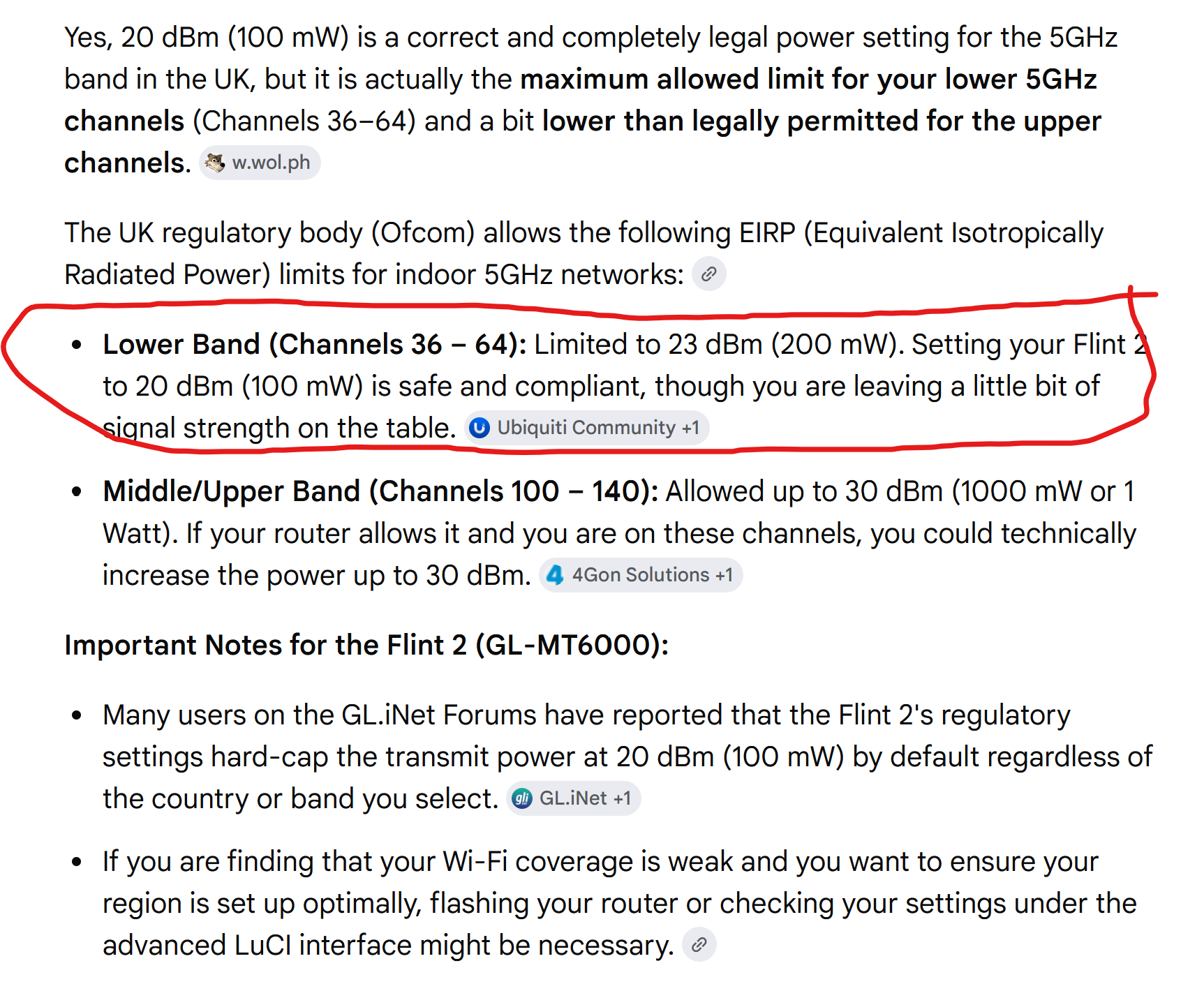
My last post on this as I have done enough research to know the quick fix which was done in 4.8.4 and above is NOT configured per region properly for example in the UK when using the lower bands ie NOT DFS we are allowed 23dbm 200mw and it is capping out at 20dbm 100mw.
This 100% explains why my signal is weaker than other routers I have tested here.
I hope Glinet staff monitor here and configure each region properly so we can update our firmware going forward with confidence that each region is what they should.
Likely further incorrect assumptions, I’m afraid.
Quote:
“Router has 3dBm antenna gain programmed in calibration data… it is lawful requirement to discount antenna gain and limit signal (cf 5GHz where radio power is limited in next line)”
Source:
Total output, up to 23, yes.
But it also has to take into account antenna gain - so 20 is likely correct, 20+3.
Also discussed before in this thread.
Yes I understand that but you're missing the point, They ship all routers out for Europe defaulting to DE and not region specific for the UK for example where we are allowed higher signal and power in lower bands of 5ghz as per ofcom and changing the region to DE on their stock firmware to GB as is correct is not working beca
use they have hard coded it probably in the Eeprom with the updated firmware.
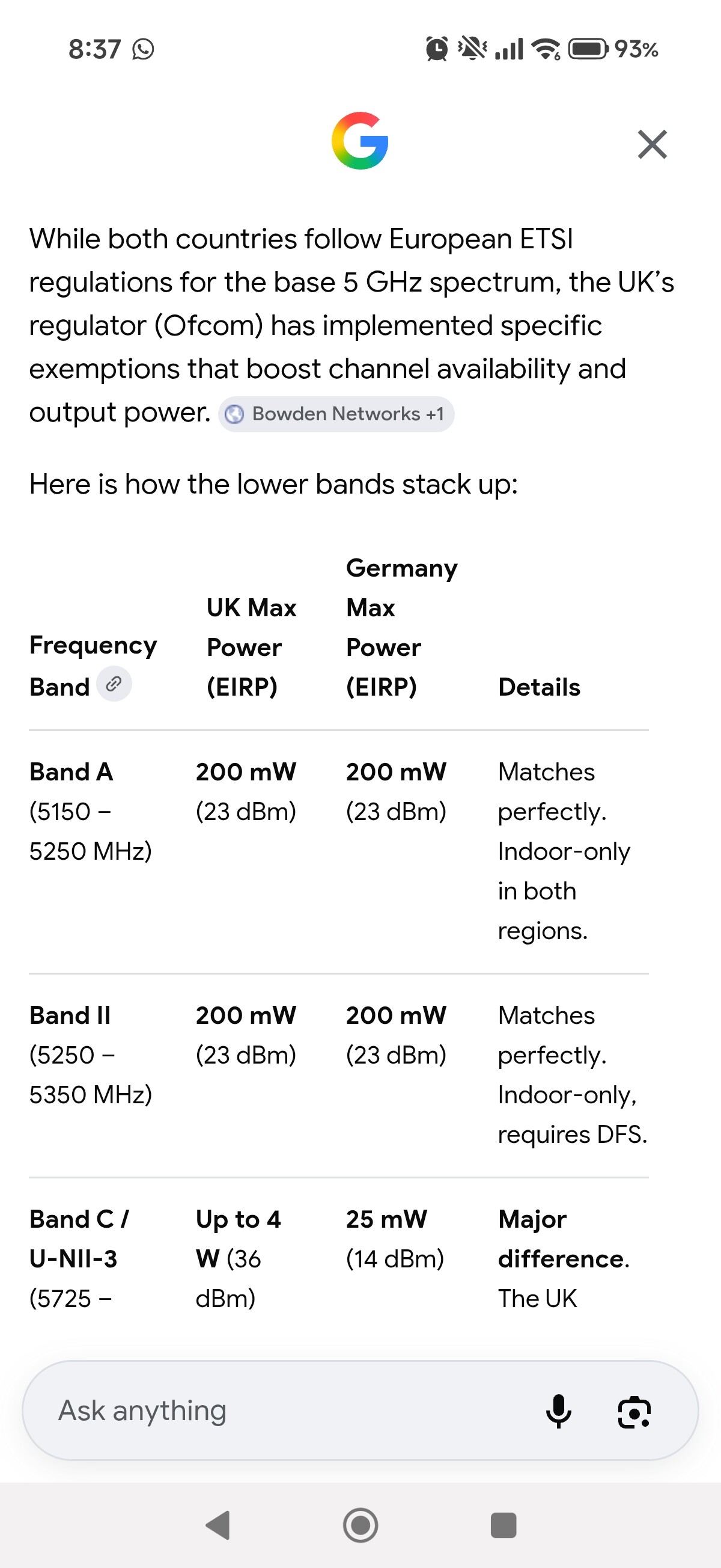
Are we now saying that Google is wrong, And Ubiquiti is wrong, And Asus is wrong and an ISP supplied TpLink router is wrong?
What is it you believe you’re demonstrating with the screenshot above? The Band C figures?
Band C, 4W, is licensed/registered outdoor fixed - not consumer wifi.