I can confirm the issue with output as well. But this does not excuse the kind-of-rude posts of some ppl above. Am sure stuff will revert with a solution.
1 Like
Well I can see why though, they just changed it with the notes for the firmware as: bug fixes.
No details of what bug fixes and no mention of the reduction. It’s very sneaky and for a company to be so actively involved with the community on here to fix bugs and enhance their products it’s like a kick in the teeth.
3 Likes
Hello
For now, the solution if you update is to set the country to USA or GB?
147
Eventually to downgrade is it enough to load the 4.8.3 firmware to return everything to how it was before and then load the backup of 4.8.3?
Best solution i think is try vanilla openwrt. Doesnt look like the regulatory issue is present in openwrt firmware.
@Costas Have you done any Wi-Fi scans to check out the differences? As you have both?
For me, I can compare Flint 1 and Flint 2 - with the stock/factory settings on the latest firmware versions, Wi-Fi reach is now more or less the same between them.
But given the ‘same room’ power level on 4.8.3 I do suspect/believe that it was actually operating above the legal limits.
I’ve just flashed openwrt 25.12.2 and running well. Waiting over 5 months for promised regular glinet op updates is not acceptable. Full WiFi range as well so I would suggest everybody flashes it!
2 Likes
They’re likely trying to prevent this:
https://transition.fcc.gov/Daily_Releases/Daily_Business/2016/db0801/DOC-340564A1.pdf
As part of that settlement, TP-Link agreed to:
TP-Link has also agreed to take steps to support innovation in third-party router firmware by committing to investigate security solutions for certain 5 GHz band routers that would permit the use of third-party firmware while meeting the Commission’s security requirements and maintaining the integrity of critical radio parameters.
.. too much ‘hey, install OpenWRT it gets around it’ and it might not any more 
Yes, I have seen exactly the same - poor WiFi coverage on 4.8.4.
I encurage everyone using the lame 4.8.4 firmware to try 4.8.5 Beta.
1 Like
It also appears that it is not included in snapshot 4.8.4 (nightly)
Does it fix it automatically or do you still have to go in and edit stuff? I'm still on 4.8.3 on my Flint 2.
Auto all the way. It seems the “new” regulatory compliance exists only on the final versions. (and this is promising…)
Oh ok so since it's still in beta it doesn't have to comply with the new ridiculous regulations? If that's the case then I'll never have a final version again lol. I hope 4.8.5 beta is stable enough. I will download 4.8.3 and keep it on hand.
Beta has a release of before the latest stable release.
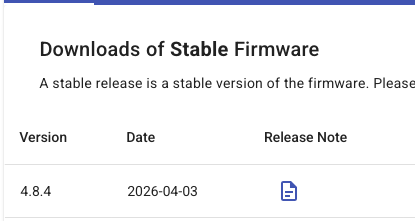
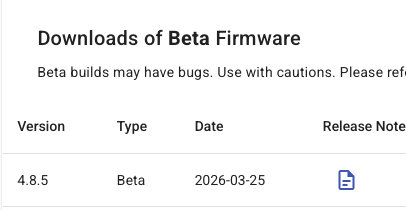
Changes likely made only to the stable branch and not yet rebased onto main/dev.
…. interesting it’s not in Snapshot/Nightly - but probably also likely it hasn't been rebased onto Snapshot/Nightly from stable yet.
1 Like
That makes sense. I don't know if I should try it or just stay on 4.8.3. I'm assuming if this is a new mandate then company will have to comply. I wonder if the open wrt firmwares are going to have to comply too?
Me personally, I’d rather stay on 4.8.3 that is more of a ‘known’ - than run a beta or snapshot, that quite possibly has unfinished code included.
But if you change the Wi-Fi country in LuCi to something other than DE (or JP) then the power levels seem to be restored even on 4.8.4, the same as 4.8.3.
Might not technically be legal, if you don’t choose your actual country - but then if you’re wanting to run a firmware with higher than permitted regulatory levels anyway, that’s probably not a concern
Ok thank you. I'll just stay where I'm at. If it ain't broke don't fix it lol
Mine stays at 20dBm no matter what country I choose even on 4.8.3 - Not sure how you guys can change to 30dBm. I never tried 4.8.4
I am in Australia and purchased on Amazon. Country code was set to US when I checked.
1 Like
Same here
Where do you see the dbm?