I’m following these instructions for Flint 3 ( How to Add a LAN Port to the Guest or IoT Network via LuCI ) to change chassis LAN4 to be in the Guest Network but when I get to Add the VLAN Device to the IoT Network Go to Network → Interfaces → Devices. Find br-guest br-guest is not there. If I try to manually make one it says br-guest is already used…. so if I jump over to Network > Interfaces I see it in the gui and can edit and add it via that but when I do so routing all “guest network” devices via VPN doesnt work for the items on the LAN they do get the guest network IP’s of 192.168.9.XXX but are not being routed to the VPN.
Hi,
You do not need to create a separate interface for eth1.2. If you previously created one manually, please delete only that newly created interface and keep the built-in Guest interface.
Based on the current port mapping, the chassis LAN4 port is displayed as LAN1 on the LuCI Switch page.
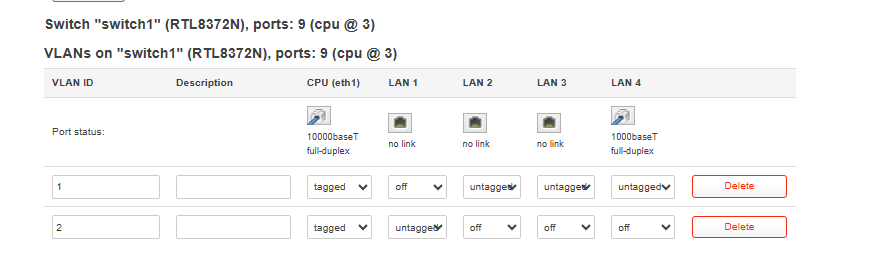
After saving the VLAN configuration, connect to the router through SSH and add
eth1.2 to the existing Guest interface:
uci -q del_list network.guest.ports='eth1.2'
uci add_list network.guest.ports='eth1.2'
uci set network.guest.type='bridge'
uci set network.guest.bridge_empty='1'
uci commit network
/etc/init.d/network restart
The SSH connection may be temporarily interrupted while the network service restarts.
After reconnecting the Ethernet cable, a device connected to chassis LAN4 should receive an address from the Guest Network, normally 192.168.9.x.
You may confirm its current status with:
ip link show br-guest
ls -1 /sys/class/net/br-guest/brif/
If the configuration is correct, eth1.2 should be listed as a member of br-guest.
Hey Charles,
I had already reverted what I did so it was back the way I had it and just now tried the steps you outlined. Unfortunately the SSH session ran into several issues:
root@GL-BE9300:~# uci -q del_list network.guest.ports='eth1.2'
root@GL-BE9300:~# uci add_list network.guest.ports='eth1.2'
root@GL-BE9300:~# uci set network.guest.type='bridge'
root@GL-BE9300:~# uci set network.guest.bridge_empty='1'
root@GL-BE9300:~# uci commit network
root@GL-BE9300:~# /etc/init.d/network restart
1
Disable ol_stats for Lithium platforms
/sbin/wifi: eval: line 3148: : Permission denied
OK
1
Disable ol_stats for Lithium platforms
/sbin/wifi: eval: line 3148: : Permission denied
OK
1
Disable ol_stats for Lithium platforms
/sbin/wifi: eval: line 3148: : Permission denied
command failed: Operation not permitted (-1)
device: wifi0 vifs: wifi2g guest2g wlanmld2g wlanmldguest2g iot2g
device: wifi1 vifs: wifi5g guest5g wlanmld5g wlanmldguest5g iot5g sta sta
device: wifi2 vifs: wifi6g guest6g wlanmld6g wlanmldguest6g
Read from remote host 192.168.8.1: Connection reset by peer
Connection to 192.168.8.1 closed.
client_loop: send disconnect: Broken pipe
snoots@Snoots-Pi:~ $ ip link show br-guest
Device "br-guest" does not exist.
Hi,
Thank you for update.
The SSH connection was disconnected because /etc/init.d/network restart restarted the router’s network interfaces. This is expected and does not necessarily indicate that the configuration failed.
After the connection was closed, the command prompt changed to snoots@Snoots-Pi, so the subsequent ip link show br-guest command was executed on your Pi rather than on the Flint 3. Therefore, the message that br-guest does not exist is expected.
Could you please connect a device to the chassis LAN4 port and check whether it receives a 192.168.9.x address and is routed through the VPN as expected?
If it is working correctly, no further commands are required.
If it is still not working, please reconnect to the Flint 3 via SSH and run the following commands so that we can check the current br-guest configuration:
uci show network.guest
ip link show br-guest
ls -1 /sys/class/net/br-guest/brif/
ubus call network.interface.guest status
Thank you for your cooperation and patience.
Hey Charles,
I see my mistake there I needed to SSH back in to check. Sadly, it still didnt work the clients are still getting the 192.168.8.XXX ips from the main network. See corrected output.
root@GL-BE9300:~# uci -q del_list network.guest.ports='eth1.2'
root@GL-BE9300:~# uci add_list network.guest.ports='eth1.2'
root@GL-BE9300:~# uci set network.guest.type='bridge'
root@GL-BE9300:~# uci set network.guest.bridge_empty='1'
root@GL-BE9300:~# uci commit network
root@GL-BE9300:~# /etc/init.d/network restart
1
Disable ol_stats for Lithium platforms
/sbin/wifi: eval: line 3148: : Permission denied
OK
1
Disable ol_stats for Lithium platforms
/sbin/wifi: eval: line 3148: : Permission denied
OK
1
Disable ol_stats for Lithium platforms
/sbin/wifi: eval: line 3148: : Permission denied
command failed: Operation not permitted (-1)
device: wifi0 vifs: wifi2g guest2g wlanmld2g wlanmldguest2g iot2g
device: wifi1 vifs: wifi5g guest5g wlanmld5g wlanmldguest5g iot5g sta sta
device: wifi2 vifs: wifi6g guest6g wlanmld6g wlanmldguest6g
Read from remote host 192.168.8.1: Connection reset by peer
Connection to 192.168.8.1 closed.
client_loop: send disconnect: Broken pipe
snoots@Snoots-Pi:~ $ ssh root@192.168.8.1
root@192.168.8.1's password:
BusyBox v1.36.1 (2026-05-15 10:27:50 UTC) built-in shell (ash)
root@GL-BE9300:~# ip link show br-guest
Device "br-guest" does not exist.
root@GL-BE9300:~# ls -1 /sys/class/net/br-guest/brif/
ls: /sys/class/net/br-guest/brif/: No such file or directory
root@GL-BE9300:~# ^C
root@GL-BE9300:~#
Hey Charles,
Just tried again WIN11 PC hardwired into a open lan port on flint 3 SSH via putty still no luck: login as: root
root@192.168.8.1's password:
BusyBox v1.36.1 (2026-05-15 10:27:50 UTC) built-in shell (ash)
MM NM MMMMMMM M M
$MMMMM MMMMM MMMMMMMMMMM MMM MMM
MMMMMMMM MM MMMMM. MMMMM:MMMMMM: MMMM MMMMM
MMMM= MMMMMM MMM MMMM MMMMM MMMM MMMMMM MMMM MMMMM'
MMMM= MMMMM MMMM MM MMMMM MMMM MMMM MMMMNMMMMM
MMMM= MMMM MMMMM MMMMM MMMM MMMM MMMMMMMM
MMMM= MMMM MMMMMM MMMMM MMMM MMMM MMMMMMMMM
MMMM= MMMM MMMMM, NMMMMMMMM MMMM MMMM MMMMMMMMMMM
MMMM= MMMM MMMMMM MMMMMMMM MMMM MMMM MMMM MMMMMM
MMMM= MMMM MM MMMM MMMM MMMM MMMM MMMM MMMM
MMMM$ ,MMMMM MMMMM MMMM MMM MMMM MMMMM MMMM MMMM
MMMMMMM: MMMMMMM M MMMMMMMMMMMM MMMMMMM MMMMMMM
MMMMMM MMMMN M MMMMMMMMM MMMM MMMM
MMMM M MMMMMMM M M
M
For those about to rock... OpenWrt 23.05-SNAPSHOT,
root@GL-BE9300:~# uci -q del_list network.guest.ports='eth1.2'
root@GL-BE9300:~# uci add_list network.guest.ports='eth1.2'
root@GL-BE9300:~# uci set network.guest.type='bridge'
root@GL-BE9300:~# uci set network.guest.bridge_empty='1'
root@GL-BE9300:~# uci commit network
root@GL-BE9300:~# /etc/init.d/network restart
1
Disable ol_stats for Lithium platforms
/sbin/wifi: eval: line 3148: : Permission denied
OK
OK
1
Disable ol_stats for Lithium platforms
/sbin/wifi: eval: line 3148: : Permission denied
OK
1
Disable ol_stats for Lithium platforms
/sbin/wifi: eval: line 3148: : Permission denied
command failed: Operation not permitted (-1)
device: wifi0 vifs: wifi2g guest2g wlanmld2g wlanmldguest2g iot2g
device: wifi1 vifs: wifi5g guest5g wlanmld5g wlanmldguest5g iot5g sta sta
device: wifi2 vifs: wifi6g guest6g wlanmld6g wlanmldguest6g
/etc/rc.common: line 21: end: not found
1
Disable ol_stats for Lithium platforms
/sbin/wifi: eval: line 3148: : Permission denied
1
Disable ol_stats for Lithium platforms
/sbin/wifi: eval: line 3148: : Permission denied
1
Disable ol_stats for Lithium platforms
/sbin/wifi: eval: line 3148: : Permission denied
command failed: Operation not permitted (-1)
device: wifi0 vifs: wifi2g guest2g wlanmld2g wlanmldguest2g iot2g
device: wifi1 vifs: wifi5g guest5g wlanmld5g wlanmldguest5g iot5g sta sta
device: wifi2 vifs: wifi6g guest6g wlanmld6g wlanmldguest6g
1
/sbin/wifi: eval: line 1617: can't create /sys/kernel/debug/ecm/ecm_classifier_emesh/sawf_enabled: nonexistent directory
/sbin/wifi: eval: line 1618: can't create /sys/kernel/debug/ecm/ecm_classifier_dscp/enabled: nonexistent directory
/sbin/wifi: eval: line 1825: can't create /sys/kernel/debug/ecm/ecm_classifier_emesh/sawf_enabled: nonexistent directory
/sbin/wifi: eval: line 1826: can't create /sys/kernel/debug/ecm/ecm_classifier_dscp/enabled: nonexistent directory
sh: out of range
sh: out of range
/sbin/wifi: eval: line 2762: /etc/init.d/rsrcmgr: not found
Enable ol_stats by default for Lithium platforms
Enable ol_stats by default for Lithium platforms
cfg80211: wlanconfig wlan0 create wlandev wifi0 wlanmode ap -bssid 3A:A3:67:B6:D
cfg80211: ifname: wlan0 mode: __ap cfgphy: phy1
cfg80211: ifname: wlan0 mode: __ap cfgphy: phy1
failed to insert /lib/modules/5.4.213/ecm-wifi-plugin.ko
/sbin/wifi: eval: line 7831: can't create /sys/kernel/debug/ecm/ecm_classifier_e
/sbin/wifi: eval: line 7832: can't create /sys/kernel/debug/ecm/ecm_classifier_d
/sbin/wifi: eval: line 7833: can't create /sys/kernel/debug/ecm/ecm_classifier_m
/sbin/wifi: eval: line 7834: can't create /sys/kernel/debug/ecm/ecm_classifier_e
/sbin/wifi: eval: line 7866: can't create /sys/kernel/debug/ecm/ecm_classifier_e
/sbin/wifi: eval: line 7867: can't create /sys/kernel/debug/ecm/ecm_classifier_d
cfg80211: wlanconfig wlan01 create wlandev wifi0 wlanmode ap -bssid B2:9A:70:F1:
cfg80211: ifname: wlan01 mode: __ap cfgphy: phy1
cfg80211: ifname: wlan01 mode: __ap cfgphy: phy1
failed to insert /lib/modules/5.4.213/ecm-wifi-plugin.ko
/sbin/wifi: eval: line 7831: can't create /sys/kernel/debug/ecm/ecm_classifier_emesh/sawf_enabled: nonexistent directory
/sbin/wifi: eval: line 7832: can't create /sys/kernel/debug/ecm/ecm_classifier_dscp/enabled: nonexistent directory
/sbin/wifi: eval: line 7833: can't create /sys/kernel/debug/ecm/ecm_classifier_mscs/udp_ipsec_port: nonexistent directory
/sbin/wifi: eval: line 7834: can't create /sys/kernel/debug/ecm/ecm_classifier_emesh/udp_ipsec_port: nonexistent directory
/sbin/wifi: eval: line 7866: can't create /sys/kernel/debug/ecm/ecm_classifier_emesh/sawf_enabled: nonexistent directory
/sbin/wifi: eval: line 7867: can't create /sys/kernel/debug/ecm/ecm_classifier_dscp/enabled: nonexistent directory
1
/sbin/wifi: eval: line 1617: can't create /sys/kernel/debug/ecm/ecm_classifier_emesh/sawf_enabled: nonexistent directory
/sbin/wifi: eval: line 1618: can't create /sys/kernel/debug/ecm/ecm_classifier_dscp/enabled: nonexistent directory
/sbin/wifi: eval: line 1825: can't create /sys/kernel/debug/ecm/ecm_classifier_emesh/sawf_enabled: nonexistent directory
/sbin/wifi: eval: line 1826: can't create /sys/kernel/debug/ecm/ecm_classifier_dscp/enabled: nonexistent directory
sh: out of range
sh: out of range
/sbin/wifi: eval: line 2762: /etc/init.d/rsrcmgr: not found
Enable ol_stats by default for Lithium platforms
Enable ol_stats by default for Lithium platforms
cfg80211: wlanconfig wlan1 create wlandev wifi1 wlanmode ap -bssid 94:83:c4:af:60:72 -cfg80211
cfg80211: ifname: wlan1 mode: __ap cfgphy: phy2
cfg80211: ifname: wlan1 mode: __ap cfgphy: phy2
sh: 1: unknown operand
Following channels are blocked from Channel selection algorithm
[52] [56] [60] [64] [100] [104] [108] [112] [116] [120] [124] [128] [132] [136] [140] [144] [149] [153] [157] [161] [165]
failed to insert /lib/modules/5.4.213/ecm-wifi-plugin.ko
/sbin/wifi: eval: line 7831: can't create /sys/kernel/debug/ecm/ecm_classifier_emesh/sawf_enabled: nonexistent directory
/sbin/wifi: eval: line 7832: can't create /sys/kernel/debug/ecm/ecm_classifier_dscp/enabled: nonexistent directory
/sbin/wifi: eval: line 7833: can't create /sys/kernel/debug/ecm/ecm_classifier_mscs/udp_ipsec_port: nonexistent directory
/sbin/wifi: eval: line 7834: can't create /sys/kernel/debug/ecm/ecm_classifier_emesh/udp_ipsec_port: nonexistent directory
/sbin/wifi: eval: line 7866: can't create /sys/kernel/debug/ecm/ecm_classifier_emesh/sawf_enabled: nonexistent directory
/sbin/wifi: eval: line 7867: can't create /sys/kernel/debug/ecm/ecm_classifier_dscp/enabled: nonexistent directory
1
/sbin/wifi: eval: line 1617: can't create /sys/kernel/debug/ecm/ecm_classifier_emesh/sawf_enabled: nonexistent directory
/sbin/wifi: eval: line 1618: can't create /sys/kernel/debug/ecm/ecm_classifier_dscp/enabled: nonexistent directory
/sbin/wifi: eval: line 1825: can't create /sys/kernel/debug/ecm/ecm_classifier_emesh/sawf_enabled: nonexistent directory
/sbin/wifi: eval: line 1826: can't create /sys/kernel/debug/ecm/ecm_classifier_dscp/enabled: nonexistent directory
sh: out of range
sh: out of range
/sbin/wifi: eval: line 2762: /etc/init.d/rsrcmgr: not found
Enable ol_stats by default for Lithium platforms
error_handler received : -16
Failed to send message to driver Error:-16
Enable ol_stats by default for Lithium platforms
1
sh: ]: unknown operand
sh: 2: unknown operand
1
sh: out of range
FAIL
OK
sh: ]: unknown operand
sh: 2: unknown operand
1
sh: out of range
FAIL
OK
1
sh: ]: unknown operand
sh: 2: unknown operand
sh: 160: unknown operand
1
sh: out of range
FAIL
OK
1
uci: Entry not found
awk: /tmp/stavap_ssids.txt: No such file or directory
awk: /tmp/stavap_ssids.txt: No such file or directory
awk: /tmp/stavap_ssids.txt: No such file or directory
126 95 X X X 0 0 0
127 95 X X X 0 0 0
128 95 X X X 0 0 0
Configure affinity for DS
Configured the IRQ affinity for DS mode in ap-mi01.6
device: wifi0 vifs: wifi2g guest2g wlanmld2g wlanmldguest2g iot2g
device: wifi1 vifs: wifi5g guest5g wlanmld5g wlanmldguest5g iot5g sta sta
device: wifi2 vifs: wifi6g guest6g wlanmld6g wlanmldguest6g
Command failed: Not found
root@GL-BE9300:~# ip link show br-guest
42: br-guest: <BROADCAST,MULTICAST,UP,LOWER_UP> mtu 1500 qdisc noqueue state UP mode DEFAULT group default qlen 1000
link/ether 94:83:c4:af:60:6f brd ff:ff:ff:ff:ff:ff
root@GL-BE9300:~# ls -1 /sys/class/net/br-guest/brif/
Ok I figured it out. The instructions assumed I was not using the LAN to WAN feature of which I am. So physical LAN1 port has a secondary internet feeding into the Flint3. This meant that the 1.2 commands were conflicting with the existing 1.2 “second WAN” function. By resetting to the start again and using and updated set of commands (uci add network switch_vlan
uci set network.@switch_vlan[-1].device='switch1'
uci set network.@switch_vlan[-1].vlan='20'
uci set network.@switch_vlan[-1].ports='3t 4'
uci commit network
/etc/init.d/network restart) I was able to get up and running. Now all devices on LAN 4 and guest WIFI are getting 192.168.9.XXX ip’s and are being routed through the VPN. Now the new feature request comes in  to be able to manage guest network and VPN independent of the main network. Example I still want to route main lan/wlan items specific ones through their own wireguard client as well.
Hi,
Glad to hear that you were able to configure LAN4 as part of the Guest Network and that devices on both LAN4 and Guest Wi-Fi are now working as expected.
For the additional VPN setup you mentioned, this can be configured through the VPN Dashboard in Policy Mode.
When configuring the second tunnel, select Specified Devices as the client source and choose the specific devices that you want to route through the other WireGuard client.
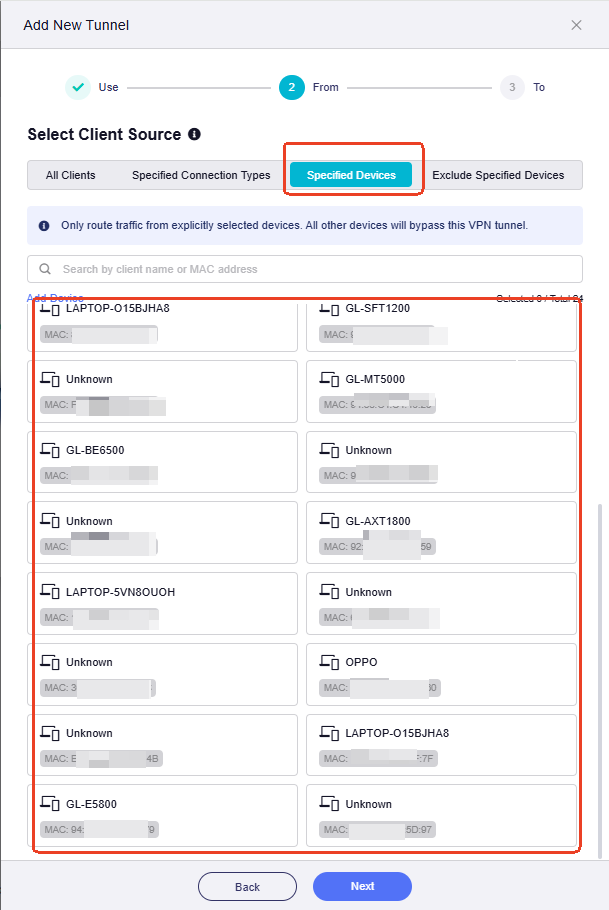
Devices on the Main Network that are not selected can continue to use the normal WAN connection.
Hope this helps with the setup.