So as the title suggests, ive set up an IoT network on my Flint 3, this has devices like a couple of smart plug sockets, various light bulbs, 2 Google Home Hubs, Doorbell, Internal Camera’s, Kettle etc connected to it, everything else like my PC, phones, TV, Amp, laptops etc are all connected to my main network.
So the issue im having is when I ask my google home hub to turn on the TV, she cant do it as shes on the isolated IoT network, where the TV is on the main network, is there anyway around this ?
I get that I could connect the Home hub to the main network instead, but then she’ll stop controlling devices on the IoT network and vise versa.
So far the only waork around ive found for it is to just use the main 2.4ghz network for IoT devicess and completely dissable the IoT feature, but for obvious reasons this isnt as secure.
I don’t use IoT network on GL.iNET but is this not one of its most important features (isolation from main network)? If not wanting this, then why use it in the first place and why not just put everything on the same network?
Smart devices are the easiest way into you network, so to put IoT devices on a seperate network, (especailly if you have a lot of IoT devices like I do), keeps tthem segrigated from you main network, ie if a hacker finds a way into your IoT devices, because they are effectivly on a seperate network its no threat to devices on your main network, like you PC or Smart Phones where you generally keep sensetive information.
Its just a shame there isnt some easy way to link certain devices on the IoT to devices on the main networks, like my Google Nest Max (IoT) to the TV (5ghz), or my Printer on the IoT network to my PC on the main network, I actually just sold my printer and brought a new Dual Band WiFi printer for this very reason, so I could have the printer on the 5ghz which my previous printer wasnt able to do.
Generally speaking, network isolation is the whole point of using an IoT network. An IoT network that can communicate with main network offers no protection from compromised devices.
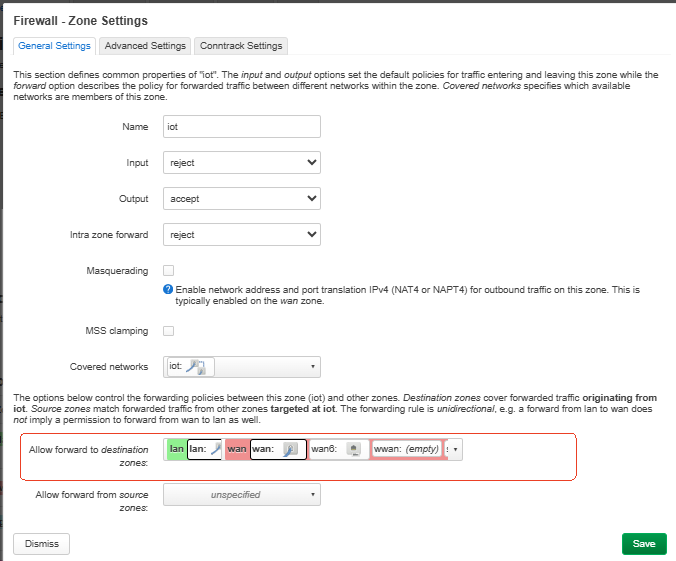
I have the same issue using a Flint 2 router. I just started, but know that I’ll need to access a couple of my IOT devices from LAN connected devices. Using the LUCI interface, I’ve gone into the Firewall settings and added iot to the lan zone. Initial testing shows that IOT devices can be pinged from LAN devices, but LAN devices can't be pinged from IOT devices. If I'm missing something here, please let me know. I still have a lot of testing to do, as I have several types of devices to migrate from the LAN network to the IOT network, each type with its own set of issues which may prevent them from surviving the move.
Based on your test result, the current behavior is expected. After adding the IoT zone to the LAN zone forwarding rules, LAN devices can access IoT devices, while IoT devices still cannot initiate connections to LAN devices by default.
If you also need IoT devices to access LAN devices, there are two possible ways:
Allow IoT → LAN forwarding.
You can add an additional forwarding rule from the IoT zone to the LAN zone in the firewall settings.
This will allow devices in the IoT network to communicate with devices in the LAN network. Please note that this allows all IoT devices to access the LAN network.
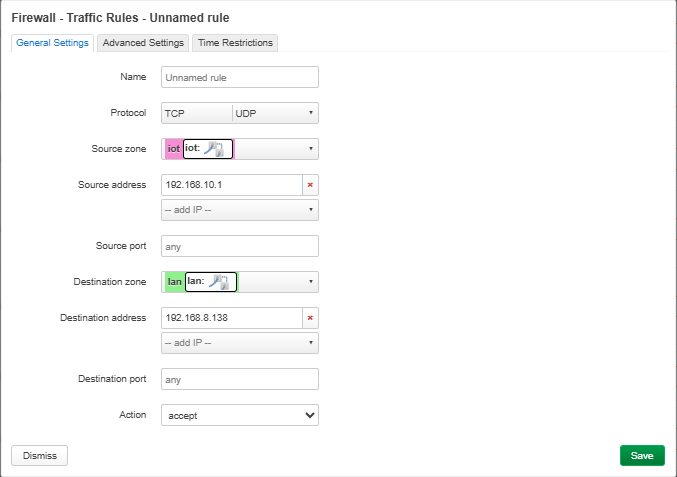
Add firewall rules for specific devices.
If you only need certain IoT devices to access specific LAN devices, you can create individual firewall rules.
For example, if an IoT camera with IP address 192.168.10.20 needs to access a NAS device with IP address 192.168.8.50 in the LAN network, you can create a rule like:
Thank you for your reply, as the provided information will likely be useful at some point in the future. I agree with the others in this thread, that the point of placing devices in a separate zone is to ensure that they can't access devices on the rest of the network. However, there are always exceptions this. Again, many thanks.
Well, ideally wifi printers and scanners should go to main network, what’s the point of isolating them? IoT network is fundamentally used for devices you don’t trust “security wise”, because some can be generic brands with no security reputation and because of that easily to be compromised, or because you don’t need the main network devices to communicate with them.
Printers and scanners don’t fall into this scenario.
In the end I've decided to move most of my IOT devices back to the LAN network, as this makes them much easier to manage. The only exceptions are the cameras that can only be managed using the manufacturer's mobile app. These I've left on the IOT network, as they don't need to be accessed directly by other LAN connected devices, and represent the greatest security risk (I fully understand the irony here).
As most of my IOT devices now have unrestricted access to my LAN network, I've isolated them from the outside world, so that they can't phone home. I've done this by using the LUCI interface, and adding a new Traffic Rule to the Firewall settings with the following configuration:
Protocol: Any Source zone: lan Source address: (required device addresses) Destination zone: wan Destination address: (none selected) Action: reject
Testing shows that all devices connected to the LAN network can talk to each other, but those added to this new Traffic Rule are unable to access the outside world.
I understand that this doesn't protect my trusted devices from more devious malware, such as embedded worms, but at this point that's getting a little too tinfoil hat, even for me. Finally, if you're tired of your printer's manufacturer spying on you, or updating its firmware without your permission, this might be worth a try.
I have a similar issue. I have configured a ethernet VLAN and I have all my entertainment devices on that VLAN via a switch.
I now have the issue where the HDHR TV tuner cannot be used by devices outside the VLAN. I think I can make a firewall rule to allow access to the tuner but I do not have the skills to do that - I will have to read the posts in this thread to see if that applies to me.
Of course the other question is do I need to have my entertainment devices on a VLAN. My Samsung TV is alway trying to phone home and who know what else it wants to do on my network hence the VLAN.... Of course you could say I am being to aranoid about this.
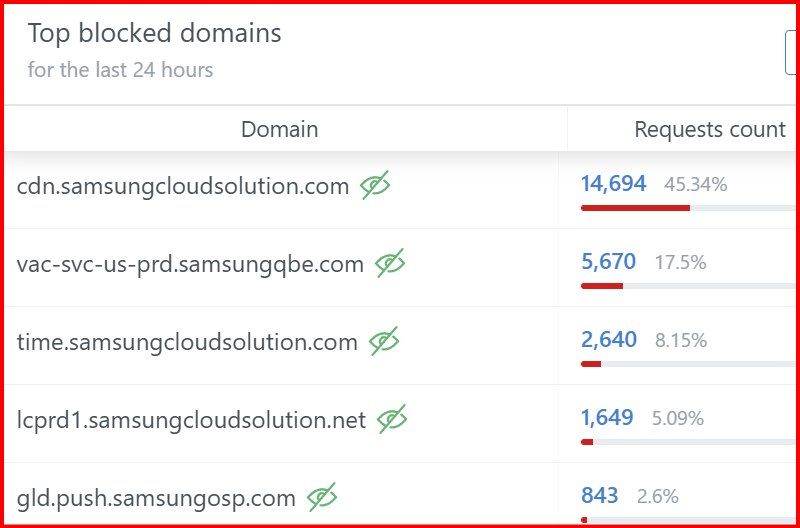
I do block every Samsung DNS request via AdGuard.
This is how much (pluss many more) Samsung wants to phone home that I have blocked and I can still use the TV the way I want - I use streaming devices rather than than the TV Apps.
I think it would be easier to put all of your entertainment devices back on your LAN network and block their access to the outside world using a simple Traffic Rule (like I have).
I also have a Samsung Smart TV, which I've never connected to my network. I understand that that won't work for you, so blocking its access to the outside world would prevent it from phoning home, without having to block the associated DNS requests. I know how time consuming this can be, as I used Pi-hole to do the same thing for the consumer-grade D-Link router I had just prior to getting the Flint 2.
Again, using a Traffic Rule to isolate devices from the outside world may not be the ideal solution, but it's a lot simpler than other methods, and probably gets you most of the security you're trying to achieve. And that's not to say that putting devices on an isolated network doesn't have its place, as I use that method as well. It all depends on your situation.
I like that idea. I take blocking specific devices is done through LUCI firewall? I am not the full bottle on LUCI, would you be able to give me an example the device blocking you use?
I was playing with the VLAN just to see what it was / is like and to build up a bit of knowledge.
As I said above I am not sure how much use it is to use for my entertainment devices.
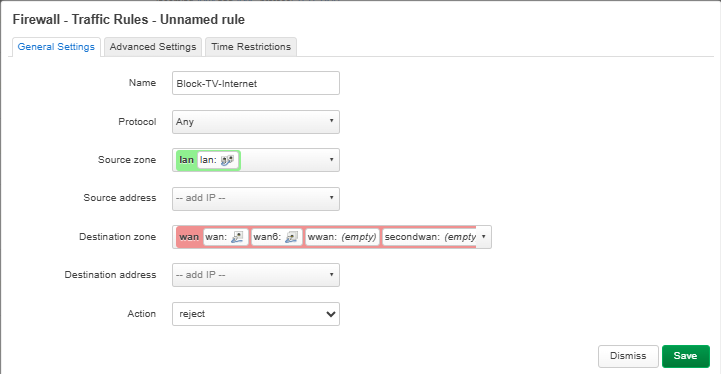
The blocking mentioned above can be configured through LuCI → Network → Firewall → Traffic Rules.
This blocks the selected device from accessing the Internet while still allowing it to communicate with other devices on the LAN.
For example, if the TV has a reserved IP address of 192.168.8.100, you can create a rule like this: