i think if u go into Luci and check wifi region, if they're set to US then you should get 30dbm.
At least i was playing around with different country settings, and AU only gave me 19dbm or something and US was 29.
Hello, I followed the tutorials but it didn't work. I think it's a problem with the ONT itself. I will contact the manufacturer. Thank you for your help.
What is your current wireless country code and channel? You can switch to band 1 (36-48).
I just got my Flint 3 today. Looking to see how to install OpenWRT on it, I realized that I should have checked this before ordering. 
Is there a way to install OpenWRT on it? I'm sort of used to doing this since I use these devices for development. I don't see any support for the device on the OpenWRT web site, nor any info here on how to do it. Not casting any blame here—it's my own stupid fault for not checking the docs before ordering—but this is a really nice router and I'd like to be able to use it.
I totally get the frustration, it’s easy to miss these details when ordering. 
To clarify, when you mention OpenWRT, I assume you're talking about the official version, right? Most GL.iNet devices actually use a custom fork of OpenWRT. If you're looking for full compatibility with official OpenWRT, the Flint 2 might be a better option since it uses a MediaTek SoC, which is open-source and works well with the official OpenWRT builds.
The Flint 3, on the other hand, uses a Qualcomm SoC, which isn’t as open-source friendly at the moment. It’s not officially supported by OpenWRT unless the hardware vendor releases the documentation and code. So, unless that happens, it might be difficult for the OpenWRT team to support it.
One thing to consider is the expected product lifecycle. For some devices, it’s about 2-4 years depending on manufacturer policies. With MediaTek-based devices, you generally have more flexibility. Even if official support ends, you can reflash with OpenWRT, giving you access to modern kernels and continued security updates. That’s one reason I personally prefer MediaTek devices.
GL.iNet’s custom firmware is great for their added features, but if you want the "vanilla" OpenWRT experience and flexibility for the long term, I’d recommend going with devices that have MediaTek chipsets or those listed on the OpenWRT website.
TL;DR: If long-term OpenWRT support is a priority, you might want to return the Flint 3 and go for the Flint 2.
3 Likes
Indeed. It's frustrating, though—the Flint 3 ticks all the right boxes except that one.
thanks, i'll keep my flint 3
Over here too.
I assume they will figure it out to get better support on OpenWrt and improve the firmware.
Well, we will see how the support from Qualcomm will develop.
I can't imagine that GLi.Net developed the Flint 3 based on a Qualcomm chipset without any support from Qualcomm, that would be stupid because the sales of this model will decline rapidly when reviews around this globe come with the verdict that there is no real support from Qualcomm.
But look at Asus, their firmware is as closed as possible and they get away with that for many years already.
GLi.Net 4sure knows that the support from Qualcomm is essential for the succes of the Flint 3 so we have to wait to see if they can achieve decent support.
1 Like
I'm returning my Flint 3. This model is a lemon, my reasons are NAT Loopback doesn't work with Hardware Acceleration turned on and weird WiFi (Ring Doorbell refuses to connect) compatibility. I don't trust Qualcomm to actually resolve these bugs in a timely manner and I don't trust promises.
2 Likes
Ive got a noob question about this Flint 3 router (maybe i should get Flint 2 after reading this thread).
I want to create separate SSIDs for separate things, like:
- SSID with Tailscale
- SSID with Mullvad
- SSID with Guest network
- SSID with Local IP
And the networks should not have any contact between eachother, so that a unit on one of the SSIDs cannot crosstalk to another SSID or the LAN cable attached devices.
Is this possible with these routers? I treid posting some questions on other forums, and watched youtube videos and asked chatGPT but i dont get proper answers. As of today i have older ASUS router and it is to complicated for me to set that up.
You guys know if this is possible?
Thanks !
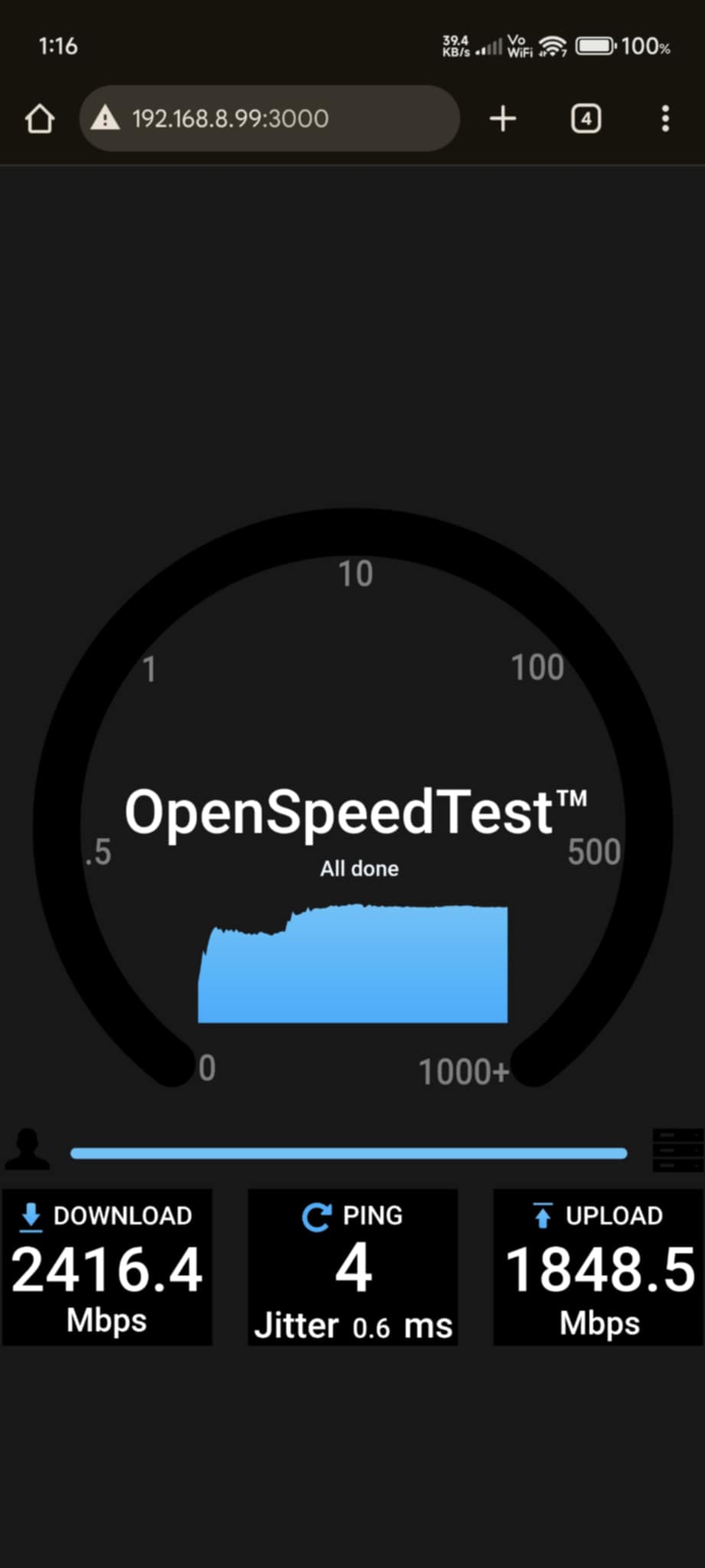
Is this speed test via LAN or WLAN? 
local lan test.
From my phone (xiaomi ultra 14 eu rom) to NAS (hosting openspeedtest)
5Ghz / 6Ghz MLO (without 2.4Ghz)
4.8.1 beta4
again, MLO isn't that always stable. sometimes it stuck on 6Ghz only or 5Ghz only even 6Ghz still has -70dbm on my second floor.
found out thats the current flint3 is using DE country code, while my old rbk50 is on US.
is it safe to change the country code using Luci?
Yes, you can change it in Luci by yourself.
SSID with Tailscale, no, unless custom modify the tailscale startup script and add custom routing table, as this is a special requirement.
SSID with Mullvad can be implemented, but SSH or Luci configuration are required.
Other SSIDs are standard functions.
1 Like
Hello Bruce!
As i understand this is a technically advanced alteration of the router.
Is this a common WRT feature, or something special for the GL-iNet routers, to have this possibility?
How would a person that does not have this skill go about to get this feature configured in to the router. Is there any support service that can be hired to get help with this? I assume its like a 10-15 minute job for anyone who has the skills for this.
Thanks kindly for your respons, best regards
What function are you referring to?
There is no paid support service for the time being.
You can consult or discuss by creating new thread in the forum.
I think SSID with Tailscale is difficult to implement.
And SSID with Mullvad has ready-made experience:
Will the Tailscale version be updated and will it be able to update as well on the Flint 3?