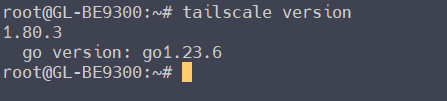
The preinstalled Tailsacle version is v1.80.3 in GL firmware v4.8.1, which is a newer version.
Is there any expected release date for firmware v4.8.0 or v4.8.1 stable? Currently with v4.7.14 I’m having a lot of drops using MLO.
2 Likes
Hi Miles,
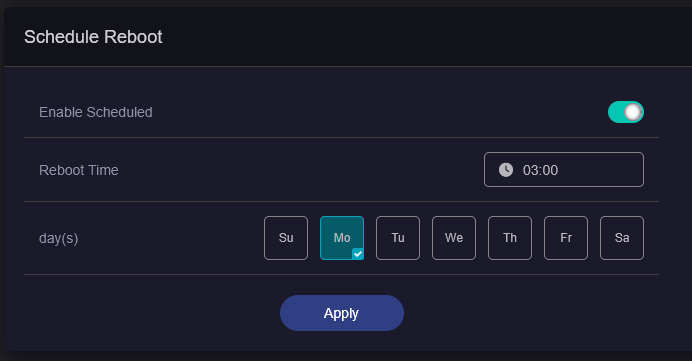
Further to my previous issues reported in July, another issue arises through scheduled reboots set at once a week in Admin Panel, System, Scheduled Tasks.
The issue observed is that Flint 3 and downstream routers (used as LAN client providing Wireless Mesh with no DHCP servers) does not successfully allow DHCP client registrations or DNS resolutions.
This means any network devices wired directly to Flint 3 or wireless through downstream routers wireless mesh do not have any local or internet access.
When this has occurred, one (or sometimes two) manual reboots using Admin Panel are required to get the DHCP server and DNS resolutions working again.
Please can you confirm if this issue can be recreated on f/w 4.7.14 release4?
Also, what is the status of previous issues reported and their resolutions?
1 Like
Hi, do you have AdGuard Home enabled? I've tested it, but I can't reproduce the issue. Could you share the log files?
Regarding the impact of hardware acceleration on CPU load, we've confirmed that CPU usage isn't high, just the load. We're still determining the specific cause.
Regarding the previously mentioned requests, some of them are planned for implementation in v 4.9.
Hi Miles is their an ETA for release of 4.9?
GL-BE9300 stable firmware is 4.7.14.
Are you worried about the 4.9? Slow down a bit... Don't put the cart before the horse.
Glinet staff put the comment up saying fixes were coming in 4.9 directly above my post. How is it putting the cart before the horse to enquire the ETA for that release when they explicitly mention it?
No AdGuard Home enabled. Next time it happens I will share the log files.
I just bought the GL-MT6000 hoping to configure it to work like i want.
I want to run separate SSIDs for separate things. Just like having 3-4 different routers set up but i want to use just 1 router.
i want:
- 1 SSID that works with VPN (NordVPN) and that VPN should not affect other SSIDs. SSID name should be like "VPN network".
- 1 SSID that is Guest Network and has no access at all to local network, just local IP internet SSID: "Guest network"
- 1 SSID that is local network with full local access
- 1 SSID that is tailscale and gives another Exit Route, and does not affect other networks, also full local access just another exit node
Guest, and VPN should have their own IP subnets. Not same as the local network. That way tailscale can share IP range that is not confused with guest network or VPN network.
None of these WiFi networks should be allowed to reach web configuration UI. So configuration should only be possible via Ethernet..
After spending 2 days now, trying to configure this router using Chat GPT (that really is usless, as bad as can be) i still didnt get anywhere.
Even the Tailscale support is really weak and does not work because even when connected to the Tailscale network it will not advertize the correct exit nodes. Actually no exit node shows up at all in the GUI even after pressing reaload 100 times..
is there anyone who sells support on this unit or do i have to go the long route and just buy 4 cheap routers and set them up individually and have a switch on the internet connection?
I see that the latest stable firmware is listed as 4.8.3.
Is this OK to use now in normal environment?
Thanks
I see 4.8.1, the firmware 4.8.3 is Snapshot.
4.8.1 is stable and therefore the most suitable for a router in a standard/production environment.
4.8.3 is a snapshot and may contain bugs that in some cases can block navigation or other functions, so it is recommended for test environments or for those who want to test new firmware in any case.
2 Likes
Just got this a few days ago setup yesterday - connected to an ISP Modem with FTTP, using Flint 3 from a lan port on ISP modem to use the 2.5G LAN ports on Flint 3 for a NAS and miniPC with 2.5G ports. I can not connect to web interface of Flint 3 unless laptop is directly plugged into Flint 3 LAN port, and it seems impossible to to access it any other way Does anyone have an idea about how to access Flint 3 through my ISP router? As an aside it seems good as a 2.5G switch, and is good at repeating wifi from ISP router, although it can only do one band at a time
I am getting WIFI "blips" which is similar I think.. Youtube does pause for me once in a while but it is most notable when I am in a teams call and video and audio tank as it is reconnecting.. I know I was taking a step back from my ASUS WIFI mesh setup but I decided to change becuase of the great reputation of previous devices (and the great early adopter pricing) but it kinda hurts some.. I think culprit is Adguard home..
Thanks.. Zis..
The Wi-Fi standard (especially on consumer grade routers) is just not designed for that. GL.inet would be reinventing the wheel in implementing it. That's more a function for VLANs, which can be setup in LuCi by LAN port filtering.
2 Likes
Suddenly works to access Web Interface through ISP modem LAN address- dont have to use 192.168.8.1 anymore! YAY!!! Maybe becasue yesterday sent an email directly to support?
It’s not wise, to access the web interface of the flint 3 through the ISP modem via the WAN port.
why not?
Because without other settings, allowing this will allow the rest of the internet to also access your GUI. Without specific firewall rules, there is no difference to the router from the cable modem ip and other public IPs.
2 Likes
I recently became the owner of this router. I don't have any 6 GHz devices yet, but I plan to. That's why I only work on 5 GHz, I left 2.4 only for smart things.
I have problems setting up the router at 5 GHz. You can't select a specific channel because of DFS, the router itself selects the channel that others routers use (channels 36-54), and on these channels the speeds jump from 100 Mbps to 1.2 Gbps. Which is very disappointing. Is there any way to change this? I tried to reduce the channel width to 80 Hz and set channels from 149 to 165, but the speed there is a tragedy. I rarely see a speed higher than 300 Mbps, more often within 200-250 Mbps.
The TX signal strength is set to maximum, and the signal level jumps from 45 to 70 dBm at a distance of up to 3 meters from the router. Which is a very bad result. A friend's signal is within 20-35. How can you even configure it to work when its level is worse than that of the neighbors through the wall and at the same time does not allow you to select unused channels? Is it possible to bypass this at all?
- You can change the WIFI Country Code in Luci.
- You try to manually fix one of the channels 36-48 for 5GHz, with bandwidth 160MHz to see if the WIFI speed improves.
1 Like