Hello,
Could you please send me the WiFi issue syslog? I would like to check it in log first.
Hello,
Could you please send me the WiFi issue syslog? I would like to check it in log first.
Hi.
Yes. I have already sent you via DM the syslog.
i tired reset and installed 4-6 times, VPN wireguard server with obfuscation works for the 1st time for few devices test together and not working at all after next, also realized DDNS have update issue (after reboot with new WAN IP, after waiting many minutes, need to do a Off and On to see updated WAN IP via DDNS Test), give up and go back to v4.8.1 now
Had the BE9300 for a few days now.
Coming from an entirely custom openwrt setup to this, I don’t hate it, but I do wish there were a “debloated” version where GL iNet’s stuff is just an overlay – due to all of it there’s a constant ~5% load just doing things like checking for SIM cards, etc. and when attempting to copy some of the settings I had previously I very easily broke the system because the applications are so deeply embedded.
Still pretty happy with it tho..
echo performance > /sys/devices/system/cpu/cpufreq/policy0/scaling_governor
Add to startup script, enjoy free™ performance.
I checked the syslog you shared and found no logs of wireless client disconnection or new connections, without any issue.
Try to uncheck the 2.4GHz of MLO WiFi and observe one more time.
Exactly the same observation here. Whats the root cause and how to fix it? Tried everything and looked around everywhere - but seems to be a known problem the manufacturer doesn't really care about 
Seems to be a cultural thing (misunderstanding) to me: Coming from the same cultural background like mainufer (greetings from “niddaufer”) but having lived in NA and Eurasia for some significant time I understand both sides very well!
Constructive criticism is always welcome and beneficial for all involved, frustration is well understandable (same here) but we all work for the sake of a better customer experience and to get a ROI in sync with manufacturer’s advertisement and promises given to its customers (us) !
Collaboration is key and I'm happy to have this opportunity in this forum.
Best regards and there's some light at the end of the tunnel for sure 
Some plug-ins (in order to process network packets) may call the CPU, resulting in abnormal load display.
You can install a plugin in router to check which processes are taking up higher usage:
opkg update && opkg install htop
And execute htop to check
Hello everyone,
I read the entire forum about the problems that existed in Flint 3 and I would like to ask if all the problems have been solved when it interrupted and the signal dropped. Have the problems been solved so that I can proceed with the purchase?
Really depends on your precise situation and network you intend to make. I am my case my parents have been using the Flint 3 for a few month without issue. It performs much better than previous gear (bit more high-end, so not fair comparison). Connectivity issues they had were gone.
They are happy. Their setup is basic. Just modem supplying internet using DHCP and Flint 3 doing its thing. No VPNs, adguard or other advanced things. Hell, not even any port forwarding. (So no NAT loopback issues!)
The only custom thing is having a guest network and IoT SSID that get extended by a Flint 3e running in AP mode using a few VLANs and 802.11r BSS Fast Transition between all those SSIDs.
One last question..I read that the newest version Flint 3e (BE6500) will be released or that it is already released..is it better to buy this version or the 9300?
Thanks.
Thank you very much for the answer, I will proceed with the purchase.
Although this thread is very long and a lot of content, we have followed up all issues, and most of the functional issues have been solved on the newer firmware.
We sincerely appreciate your feedback.
If you have any questions, please feel free to let us know, like create a new topic in the forum, or email to support@gl-inet.com.
They are nearly identical, but the Flint 3 is tri-band. That has 2.4GHz (2x2), 5GHz (2x2) @ 2882 Mbps and 6GHz (2x2) @ 5765 Mbps.
The Flint 3E is dual-band and has only 2.4GHz (2x2) and 5GHz (4x4). As you can see the 5GHz band is 4x4 (compared to 2x2 on Flint 3), which means it is quicker on 5GHz @ 5764Mbps.
Only other difference is 8GB eMMC in the Flint 3 vs 1GB NAND in Flint 3e.
So the choice between those 2 will be: Do you have devices supporting that 6GHz frequency?
The Flint 3e is in pre-order and is expected to ship in December.
Thanks for the information, I'll get the 9300...it's worth it for future uses.
is the external storage works?
I put an external hdd → not recognized, tried external ssd –> not recognized.
I’m having the exact same issue, please let us know if you get this resolved, i will do the same. 22 TB hdd didn’t work, 1 TB SSD didn’t work either. Both formatted to Exfat, was hoping to have the router see them, then format to EXT4.
EDIT
I can get both my ssd and hdd drives to be seen when formatted as Exfat, however ONLY when using usb2.0 as selected in the System:Overview page in the web gui.
Here’s some info from my powershell:
root@GL-BE9300:~# logread -f
Sat Dec 13 03:02:42 2025 kern.info kernel: [ 359.160290] usb 1-1: new high-speed USB device number 2 using xhci-hcd
Sat Dec 13 03:02:42 2025 kern.info kernel: [ 359.365269] scsi host0: uas
Sat Dec 13 03:02:42 2025 kern.notice kernel: [ 359.377224] scsi 0:0:0:0: Direct-Access Seagate Expansion HDD 1802 PQ: 0 ANSI: 6
Sat Dec 13 03:02:42 2025 kern.notice kernel: [ 359.388949] sd 0:0:0:0: [sda] Spinning up disk...
Sat Dec 13 03:03:01 2025 kern.warn kernel: [ 360.410281] ..................ready
Sat Dec 13 03:03:01 2025 kern.notice kernel: [ 378.101096] sd 0:0:0:0: [sda] 42970644479 512-byte logical blocks: (22.0 TB/20.0 TiB)
Sat Dec 13 03:03:01 2025 kern.notice kernel: [ 378.102775] sd 0:0:0:0: [sda] 4096-byte physical blocks
Sat Dec 13 03:03:01 2025 kern.notice kernel: [ 378.121578] sd 0:0:0:0: [sda] Write Protect is off
Sat Dec 13 03:03:01 2025 kern.debug kernel: [ 378.121604] sd 0:0:0:0: [sda] Mode Sense: 53 00 00 08
Sat Dec 13 03:03:01 2025 kern.notice kernel: [ 378.121994] sd 0:0:0:0: [sda] Write cache: enabled, read cache: enabled, doesn't support DPO or FUA
Sat Dec 13 03:03:01 2025 kern.warn kernel: [ 378.135623] sd 0:0:0:0: [sda] Optimal transfer size 33553920 bytes not a multiple of physical block size (4096 bytes)
Sat Dec 13 03:03:01 2025 kern.info kernel: [ 378.197017] sda: sda1 sda2
Sat Dec 13 03:03:01 2025 kern.notice kernel: [ 378.220546] sd 0:0:0:0: [sda] Attached SCSI disk
Sat Dec 13 03:03:01 2025 daemon.err nmbd[9292]: [2025/12/13 03:03:01.358341, 0] ../../source3/nmbd/nmbd.c:59(terminate)
Sat Dec 13 03:03:01 2025 daemon.err nmbd[9292]: Got SIGTERM: going down...
Sat Dec 13 03:03:02 2025 daemon.err nmbd[27331]: [2025/12/13 03:03:02.045753, 0] ../../source3/nmbd/nmbd.c:901(main)
Sat Dec 13 03:03:02 2025 daemon.err nmbd[27331]: nmbd version 4.18.8 started.
Sat Dec 13 03:03:02 2025 daemon.err nmbd[27331]: Copyright Andrew Tridgell and the Samba Team 1992-2023
Sat Dec 13 03:03:02 2025 daemon.err nmbd[27331]: [2025/12/13 03:03:02.055488, 0] ../../source3/nmbd/nmbd_become_dmb.c:294(become_domain_master_browser_bcast)
Sat Dec 13 03:03:02 2025 daemon.err nmbd[27331]: become_domain_master_browser_bcast:
Sat Dec 13 03:03:02 2025 daemon.err nmbd[27331]: Attempting to become domain master browser on workgroup WORKGROUP on subnet 192.168.8.1
Sat Dec 13 03:03:02 2025 daemon.err nmbd[27331]: [2025/12/13 03:03:02.055806, 0] ../../source3/nmbd/nmbd_become_dmb.c:306(become_domain_master_browser_bcast)
Sat Dec 13 03:03:02 2025 daemon.err nmbd[27331]: become_domain_master_browser_bcast: querying subnet 192.168.8.1 for domain master browser on workgroup WORKGROUP
Sat Dec 13 03:03:02 2025 daemon.err smbd[27330]: [2025/12/13 03:03:02.114781, 0] ../../source3/smbd/server.c:1746(main)
Sat Dec 13 03:03:02 2025 daemon.err smbd[27330]: smbd version 4.18.8 started.
Sat Dec 13 03:03:02 2025 daemon.err smbd[27330]: Copyright Andrew Tridgell and the Samba Team 1992-2023
Sat Dec 13 03:03:04 2025 kern.info kernel: [ 381.482645] [EXFAT] trying to mount...
Sat Dec 13 03:03:04 2025 kern.info kernel: [ 381.615799] [EXFAT] mounted successfully
Sat Dec 13 03:03:10 2025 daemon.err nmbd[27331]: [2025/12/13 03:03:10.075437, 0] ../../source3/nmbd/nmbd_become_dmb.c:112(become_domain_master_stage2)
Sat Dec 13 03:03:10 2025 daemon.err nmbd[27331]: *****
Sat Dec 13 03:03:10 2025 daemon.err nmbd[27331]:
Sat Dec 13 03:03:10 2025 daemon.err nmbd[27331]: Samba server GL-BE9300 is now a domain master browser for workgroup WORKGROUP on subnet 192.168.8.1
Sat Dec 13 03:03:10 2025 daemon.err nmbd[27331]:
Sat Dec 13 03:03:10 2025 daemon.err nmbd[27331]: *****
^Z[1]+ Stopped logread -f
root@GL-BE9300:~# lsusb
Bus 002 Device 001: ID 1d6b:0003 Linux 5.4.213 xhci-hcd xHCI Host Controller
Bus 001 Device 002: ID 0bc2:2038 Seagate Expansion HDD
Bus 001 Device 001: ID 1d6b:0002 Linux 5.4.213 xhci-hcd xHCI Host Controller
root@GL-BE9300:~# lsusb -t
/: Bus 02.Port 1: Dev 1, Class=root_hub, Driver=xhci-hcd/1p, 5000M
/: Bus 01.Port 1: Dev 1, Class=root_hub, Driver=xhci-hcd/1p, 480M
|__ Port 1: Dev 2, If 0, Class=, Driver=uas, 480M
I hope the Flint 3 works for you. I bought it and tried using it for a while but eventually exchanged it for the Flint 2. I am just using the router as a simple access point and could never get the Flint 3 to work well at moderate ranges (next room about 40 ft away). The Flint 2 is rock solid and covers my whole house so will continue using it until a better WiFi 7 router becomes available. (It might just be due to the fact that Flint 2 is 4x4 on all bands but Flint 3 is only 2x2 but I am really not sure.)
Hi. I’m new here.
A pair of issues.
AdGuard Home app and DynDNS are not compatible. Once you enable AdGuard Home, the xxxxx.glddns.com stops working. Ping to google(.)com didn’t work even from the ssh.
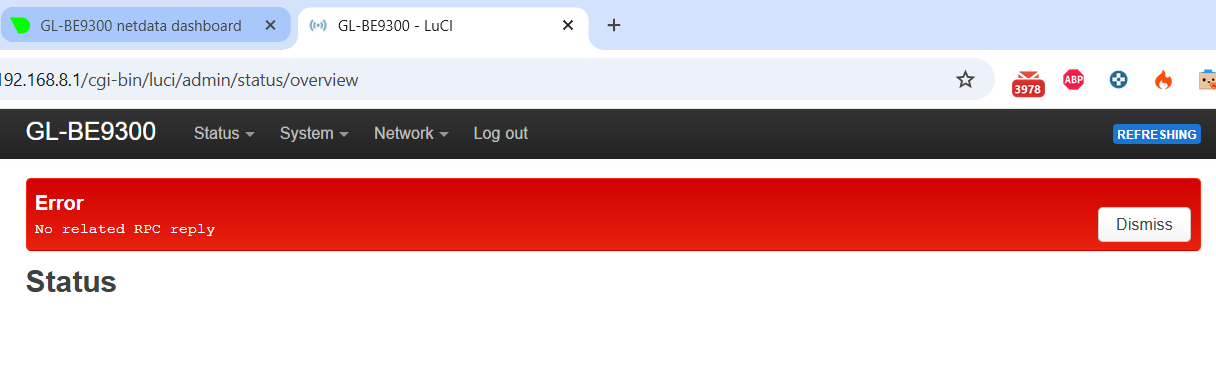
My OpenWRT Luci interface refuses to load,
“Error: No related RPC reply”
it’s the only stuff i get.