Flint 3 v4.9.0 Wifi Page Blank and call wifi.get_config fail with http code: 500

I’ve just updated my Flint 3 to version v4.9.0 and as soon as I access the management link, I get an error: Unknown error occurred. Please check the netwotk environment or reboot the device.
What’s more, when I go to the Wi-Fi section, I only see the dedicated IoT network and that error pop-up again.
Furthermore, the following message keeps appearing in the logs every second:

Thu May 21 12:21:10 2026 daemon.err eco[14094]: call wifi.get_config fail with http code: 500
Thu May 21 12:21:12 2026 daemon.err eco[14111]: call wifi.get_config failed with HTTP code: 500
Thu 21 May 12:21:14 2026 daemon.err echo[14138]: call wifi.get_config failed with HTTP code: 500

What can I do to avoid a factory reset? I really don’t want to have to manually re-enter the millions of settings and IP reserves I’ve configured?
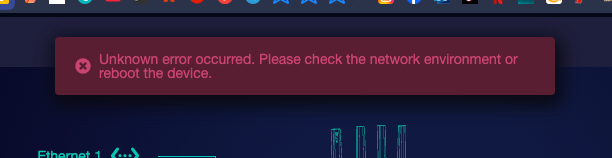
All is working well, i have all my wifi network up and running, it’s only a web problem, in this case with the Wifi page blank, i can’t turn on/off a wifi network or change the password…

Please help me to fix this web inteface issue :slight_smile:

Is this present across multiple browsers or devices? Clearing browser cache might help.

Hi,

Could you please help provide the following information:

  1. Which firmware version did you upgrade from?
  2. Did you choose to keep the configuration during the upgrade? (We assume you did.)
  3. Please follow the tutorial below to export the backup file and send it to us via private message so we can investigate further locally.

How to Export/Import Backup Configuration Files via LuCI
