My GL.iNet Flint 4 detects an ODI DFP-34X-2IY3 GPON ONU SFP module only at 1 Gbps, and I cannot establish a working 2.5 Gbps connection.
Router firmware: GL.iNet 4.11.0
ONU: ODI DFP-34X-2IY3, HW V2.0
ONU firmware: V1.1.8-240408, modified build rel250326
At 1 Gbps, internet and the ONU’s management interface work normally. Selecting 2.5 Gbps on the ONU does not establish a working connection with Flint 4.
Does the Flint 4 SFP driver support this module’s 2.5 Gbps modes? Is there a supported way to select 2500BASE-X or HiSGMII, or a firmware update that addresses this compatibility issue?
I can provide logs and module identification data if needed.
Does this router even support multi-gig connections? Generally, with most SFP+ ports that I have worked with, if it says 10gig, then it will work with a 10gig SFP+ module or a 1gig SFP module, no multigig module support (like 2.5gig or 5gig)
I’m the author of the issue thread. I was in contact with GL.iNet support a few weeks ago, and they have fixed the problem (I tested it with a firmware they sent me, which is not yet public). They said they will soon release a new stable version for everyone.
However, I’m not sure if it will work with your ONU. On my side, I have the Huawei MA5671A.
I hope this fix will work for you too. Otherwise, the support team will need to deliver a new fix specifically for this new ONU.
Thanks for your reply. That is what I would like GL.iNet to clarify: does the Flint 4 SFP+ port support 2500BASE-X or HiSGMII with GPON ONU modules such as the ODI DFP-34X-2IY3? If so, is any specific configuration or firmware version required?
Thank you for sharing this! It’s encouraging that GL.iNet fixed the issue with your Huawei MA5671A. Mine is an ODI DFP-34X-2IY3, so I understand the same fix may not apply. Which firmware version/build did they provide? I’d like to ask support whether it also supports my module.
Update: I got a working 2.5 Gbps connection and found a separate cause of the low throughput.
1. Getting the module detected at 2.5 Gbps
My ODI DFP-34X-2IY3 advertised 1G information in its host-facing SFP EEPROM. We backed up the EEPROM, unlocked writes using the ESFP password (45 53 46 50 at A2 offsets 0x7B–0x7E), and changed these A0 bytes:
0x06: 02 → 00
0x0C: 0D → 1F
0x3F: A1 → B1 — updated checksum for my EEPROM.
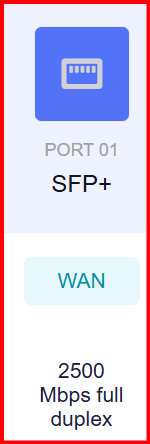
After physically removing and reinserting the module, the stock Flint 4 driver reported 2500 Mbps/full duplex, and both internet and ONU management worked. No custom Flint kernel module was needed for this successful test.
The ONU runs Anime4000 M110, base V1.1.8-240408 / rel250326. Its saved LAN speed setting is Auto; the runtime mode is 4, HiSGMII PHY.
2. Fixing low throughput
Despite the working 2.5G link, download was around 600–735 Mbps. Network Acceleration was disabled on the Flint.
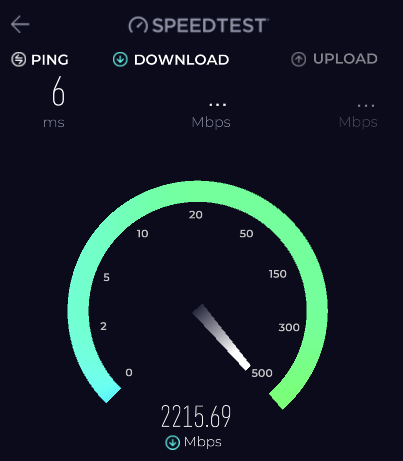
After enabling Network → Network Acceleration → Enable → Apply, the next Speedtest showed approximately 2.20 Gbps download.
Router: Flint 4 GL-BE14000, firmware 4.11.0. ONU: ODI DFP-34X-2IY3.
The EEPROM modification is a workaround tested on my module, not an official GL.iNet fix. EEPROM contents and checksums can differ, so please back up your own data and do not blindly copy these bytes. Upload and long-term stability testing are still ongoing.