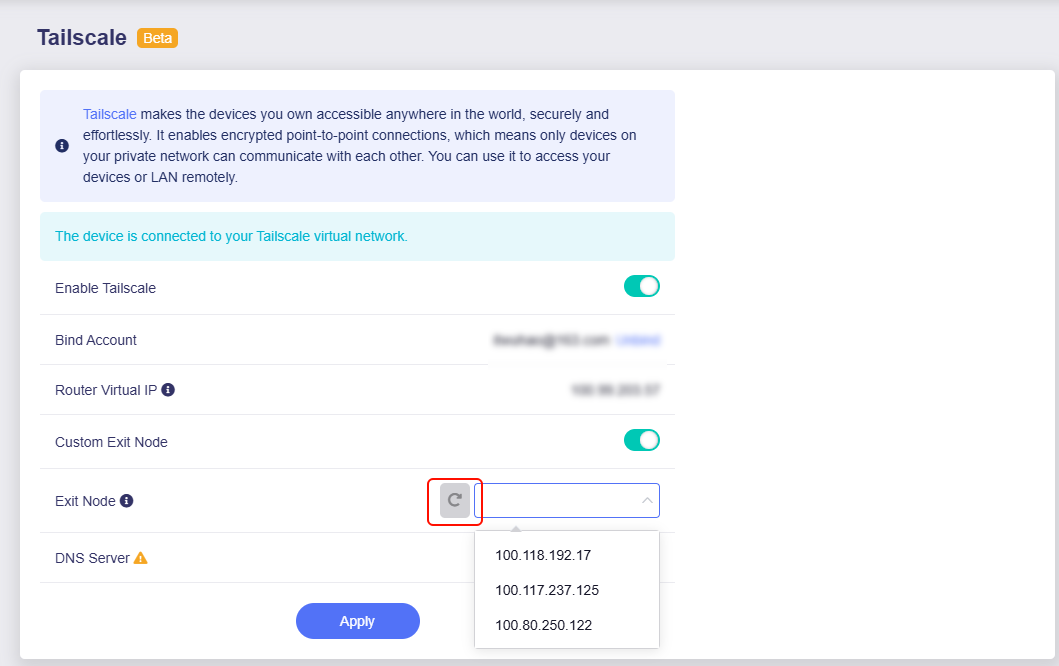
When I enable custom exit node and set it to any exit node available, internet stop working completely

I have subnet routes configured.
I have next DNS settings
When I enable custom exit node and set it to any exit node available, internet stop working completely
Hi,
curl https://ip.gs
curl https://www.gl-inet.cn

curl https://ip.me
curl https://www.gl-inet.com
ip route
ifconfig
tailscale status
ping <exit node IP>
enable the exit node, and check:
ping 8.8.8.8
ping www.google.com
I have not reproduced this issue, Tailscale on the test MT6000 (enable exit node) and MT3000 (hosted exit node), and the client Internet works ok:
I can confirm that MT3000 works well when connected to MT6000 as exit node.
It doesn't work when tailscale has Mulvad plugin enabled. Mulvad exit nodes are not working when selected as custom exit node
Hello,
What is the Mulvad plugin?
If say it is the VPN client using Mullvad, it may conflict with the Tailscale custom exit node.
Mullvad plugin is Taiscale specific plugin that enables Mullvad VPN exit nodes. Unfortunately they are not supported and not working correctly when being used in Glinet routers.
Hello,
We haven't tested this tailscale feature yet.
BTW, how to enable plugin "Mullvad VPN" in tailscale center?
It seems that Tailscale's Mullvad does not support linking the subscribed Mullvad account, but purchases them separately.
If we have the opportunity to get this function later, we will do a test again.
Any update on this? I just made a new post about it. Can we use the vpn policies and run them thru this mullvad exit node feature?
There is no issue with the Tailscale exit node using Mullvad VPN node/server.
However, Tailscale does not support configuring VPN policies so it cannot use VPN policies.
If future Tailscale support this feature, we will submit it to the R&D for review and implement in firmware.
Just found this thread also when having problems with this.
@bruce Can you re-word the description of what the problem is with using Mulvad exit nodes? It is not clear what is required from R&D/Tailscale to support these differently from any other linux client? I would expect the GL.inet router side to. not know the difference so it is not clear to me why this doesn’t work?
I never said that.
Custom Exit Node to Mullvad is fine. But the list of exit nodes only shows IP addresses in v4.8.x, so can't know the region. This will be improved in v4.9.
Interesting, I could not get it to work at all. IT also seems like the. default setup wouldn’t work as it’s trying to route the LAN subnet and not NAT behind the tailscale IP on the device.
The Mullvad plugin is ‘user’ based so Mullvad only accept a single address. As best as I can tell this doesn’t work at all currently in 4.8.4? You see traffic go out of the tailscale0 interface without Nat and never get a response and get no internet access at all when using a Mullvad exit node.
Have you approved the router’s LAN & WAN subnet in the Tailscale Console?
Yes, the subnet is permitted via the console. However in normal setup the other devices would also need to set the subnets to accepted to use the routes, with Mullvad these nodes are out of our control and I believe potentially not accepting the subnet routes due to the intention of the ‘per-user’ licensing?
Hello,
Looks like reproduced the issue locally, but I'm not sure it's consistent.
The router under test is an MT6000 and running v4.8.3 with a fresh configuration.
In the GL GUI, enable Tailscale and sign in to the Tailscale account to add the GL router to the Tailscale network.
In the GL GUI, enable "Allow Remote Access LAN" and "Allow Remote Access WAN".
In the Tailscale console, approve all subnets for the GL router.
In the Tailscale console, add Mullvad VPN so the GL router can use it as exit nodes.
In the GL GUI, enable Custom Exit Node, refresh the list, and select any Mullvad node.
On a client (PC) of the GL router, verify that Internet is unavailable.
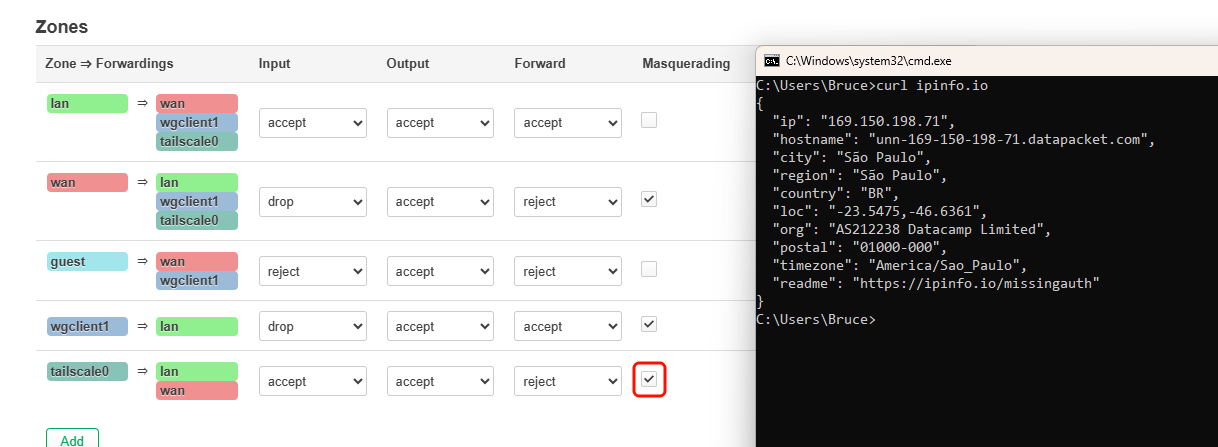
In the LuCI, enable Masquerading for "tailscale0 > lan&wan".
On a client (PC) of the GL router, vverify that Internet is working fine.
Please follow step 7, enable Masquerading for "tailscale0 > lan&wan" in LuCI, and test again.
Thanks will check this and confirm. I tired using the tailscale NAT options but not through the OpenWRT firewall.
Are there any plans to add a switch to the default tailscale GUI to enable SNAT option?
Yes, there are plans for developing masq option in GL GUI.
I have the exit node enabled in Tailscale however there is not options for me in my GL INET admin panel under exit nodes when I check it off theres is no IP address Why?