Hello,
Looks like reproduced the issue locally, but I'm not sure it's consistent.
The router under test is an MT6000 and running v4.8.3 with a fresh configuration.
-
In the GL GUI, enable Tailscale and sign in to the Tailscale account to add the GL router to the Tailscale network.
-
In the GL GUI, enable "Allow Remote Access LAN" and "Allow Remote Access WAN".
-
In the Tailscale console, approve all subnets for the GL router.
-
In the Tailscale console, add Mullvad VPN so the GL router can use it as exit nodes.
-
In the GL GUI, enable Custom Exit Node, refresh the list, and select any Mullvad node.
-
On a client (PC) of the GL router, verify that Internet is unavailable.
-
In the LuCI, enable Masquerading for "tailscale0 > lan&wan".
-
On a client (PC) of the GL router, vverify that Internet is working fine.

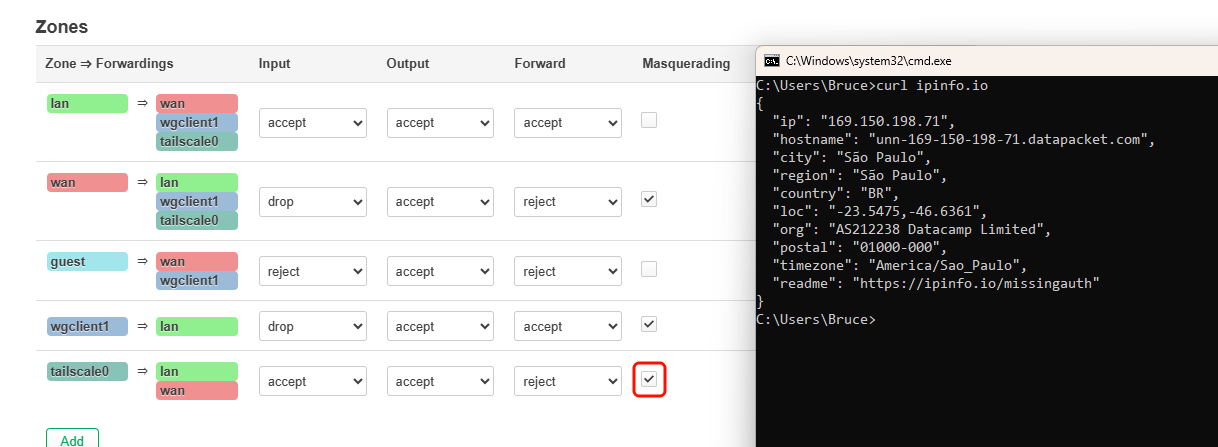
Please follow step 7, enable Masquerading for "tailscale0 > lan&wan" in LuCI, and test again.