-
Version4.0
-
Firmware Type0704release5
-
Update Time2025-03-17 09:47:44 (UTC+00:00)
Thanks for the quick response! Is this sufficient?
Version4.0
Firmware Type0704release5
Update Time2025-03-17 09:47:44 (UTC+00:00)
Thanks for the quick response! Is this sufficient?
Worked great, thanks. I must have had formatting issues copying and pasting the script. The one line format without rollover worked perfectly.
Can anyone confirm if using this script method will result in the public wan ip from the sim card service provider being presented to the device plugged into the lan port? or, will it still be double natted?
@bruce What IP address does the admin GUI (web) page respond to when the device is in pass through mode? I can’t seem to access it.
@jamster it is 192.168.8.1. if you did not change the default ip adress in the router mode.
Thanks - I’ve had a further look at this. I did change the default IP address, but cannot access it from behind my router (which is admittedly set up in a quite complex way).
However, I’ve found that the Spitz also responds on its gateway address:
I use multiple routing tables on my Mikrotik router, so I have to update them all with the new gateway IP address via a script.
I’ve also noticed that my carrier occasionally updates the IP address but it does not look like this is picked up by the Mikrotik, and is causing the routing to fail an therefore my WAN failover to kick in to my other (non-Spitz) connection. Cycling the interface to cause (1) new IP and (2) route refresh seems to do the trick but I’ve not debugged this in detail yet.
Present the IP (public or CG-NAT) provided by the operator to the device plugged into the LAN port. no double NAT.
Hello, Is it possible to add the IP passthrough option in the next firmware version? It would be easier to enable this option with no questions...
Just wanted to reply here and say I was able to enable IP passthrough with zero issues.
It seems like most/all of the caveats/issues people were experiencing in this thread have been fixed at this point, save yourself the trouble of reading the entire thread as most of those are irrelevant.
Puli AX: plugged Puli LAN into Unifi gateway’s WAN port, visit 192.168.8.1, click to auto setup 5G (T-Mobile Business SIM), updated to latest firmware from the web UI, SSH’d in and ran the one line command from bruce’s latest message. SSH terminal will show lost connection, this is normal, wait ~30 seconds or so and check your router (Unifi in my case) and you should have the WAN IP from your ISP. I did not need to set manual DNS on my Unifi setup but I read that others may need to before they can load pages on their devices.
I am still able to access the GL.iNet interface from the original 192.168.8.1 with zero issues, and I can also still SSH into it at the same IP without any changes in the UI or Luci.
Big thanks to the GL.iNet team for all your firmware work and for helping people out in the thread.
Hi, I followed the passthrough instructions and it seems to be showing my T-Mobile service public IP to my UDM SE. But I found a couple of caveats for other to be aware:
I had my GL-X3000 WAN port converted to a LAN port to take advantage of the 2.5Gbps speeds into my UDM SE WAN Port 9. But when you run the curl command, please be aware that it sets the WAN port back to WAN mode, hence the UDM cannot connect. What I ended up doing is moving my cable from WAN to LAN just before executing the passthrough command.
I then wanted to connect to the GL-X3000 to change the WAN port to LAN mode. But could not connect to the GL-X3000. Before, I was able to connect to 192.168.8.1 right from my UDM network once connected, but after running the passthrough command, I can’t. Would not find my GL-X3000, even though it is showing as active in my UDM console with T-Mobile’s “public” IP. Any advice or help on figuring this out would be appreciated.
IP Passthrough doesn't work with firmware 4.8.3! Is there a chance to keep this functionality?
Is there any change to enable this option?
I tested firmware 4.8.3 and it does work, but you may have to reboot your router. I have to setup my router with an auto-reboot script whenever it does not detect an internet connection.
I used these steps and connected my router to the LAN port with the WAN port unplugged. My router receives IP 192.0.0.2 instead of the Public IP from the SIM card. I am using Google Fi (T-Mobile). Previously, I was using this exact same SIM Card in a MikroTik wAP-R and with passthrough enabled on that device, my router was getting the Public IP. I am not sure why it doesn’t do the same on the GL-X3000, I used the exact same APN setting of h2g2. Any ideas?
Can anyone confirm if IP Passthrough works with firmware 4.8.3?
it works with lastest frimware for me
Vor me, too
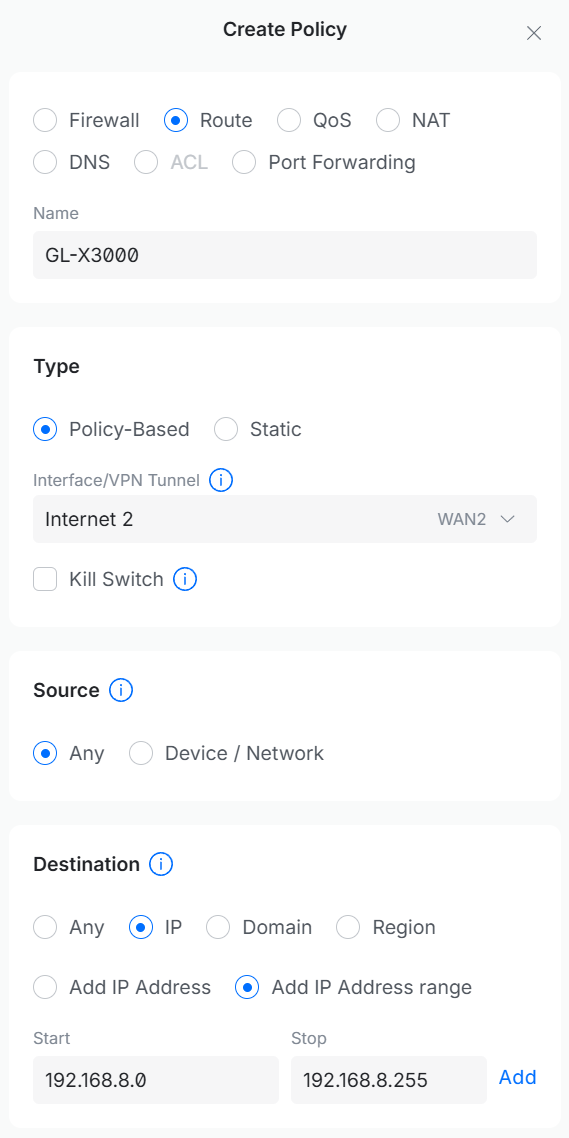
If you’re using it as a secondary WAN, you have to manually create a policy-based route to route 192.168.8.1 to it, as UDM can no longer automatically detect its LAN subnet:
Just tried this using the latest nightly with no issues. It did for some reason take a few mins to be able to talk to the x-3000 at 192.168.2.1 in my case. But after the short wait everything works as expected on the latest snapshot build.
i am wanting to give this a try, as the primary use for my spitz ax is home backup into my PFsense router and right now i’m just using it behind double NAT…but i figure it can’t hurt to just let it pass through. the catch though is that i do sometimes take the spitz with me on the road, so i’d need to put it back in router mode when it goes with me…
without reading through the entire thread (which i’m doing right now but i figured i’d ask just in case someone can answer quickly): how easy is it to turn this off when i’m on the road?
I have the same use case as you. The Spitz can be reset to router mode simply by pressing the reset button.