I have a network with a 10.32.10.0/24 address, which is wired in ethernet only.
I want to use the Opal to connect to this wired network, to give wireless functionality.
When I connect the Opal, it is given address 10.32.10.64, and all is well.
When I now connect to the Opal (either through wireless, or through the ethernet sockets), I get a 192.168.8.0/24 address.
However, any device inside the 192.168.8.0/24 network, is not able to access any device inside the 10.32.10.0/24 network.
Is there a way I can set a static route on the Opal, so that this is possible?
If I turn the Opal to AP Mode only, everything works correctly, but, I lose the VPN functionality on the Opal, which I would like to be able to keep.
You're 'double NAT'd' when running the Opal as a router/repeater. Typically you'd have to open whatever ports you need to forward/redirect on whatever side of the subnets if you want to keep the Opal's VPN.
That’s a shame. Not having access to the ISP router/modem may cause an issue with this approach.
Would it make a difference if I just use the Opal in AP mode, so essentially it act’s as a switch (with wireless capabilities)? Would I then be able to run a VPN server on the Opal, to allow connected VPN clients to access the network the Opal is connected to?
First thing that comes to mind, is how clients would access the VPN server, if there are no ports forwarded from the ISP router to the Opal, but I’m curious if I am able to be able to do it via GoodCloud.
Setting to AP Mode removes the VPN options from the Opal GUI, but maybe it would be possible to start the VPN server via an SSH terminal?
Using the VPN function requires routing. Routing requires NAT. APs just get their IP from whatever router/DHCP server is upstream in that subnet before serving up the Wi-Fi.
If the ISP modem is one of these 'modem/router' combo units you'd want to ideally set it to 'bridge mode' to have it act as just a modem. If that's not possible putting your primary router in its DMZ is the next best choice. That way it'll be fully exposed to the WAN/Internet. If that's the Opal then you'll be able to do what you're looking to do as it won't be behind that primary/upstream NAT.
Note I'm assuming your ISP doesn't use CGNAT. You'd have to look into a SDN VPN like TailScale if that was the case though based on what you describe you're probably going to want to do that anyway. IDK what is the extent of TS on the Opal, however.
From your description, when Opal is in AP mode, I assume that devices which on the WAN "10.32.10.0/24" subnet should be available to access.
When Opal is in Router mode and the VPN Client disabled, can the WAN subnet "10.32.10.0/24" be accessed?
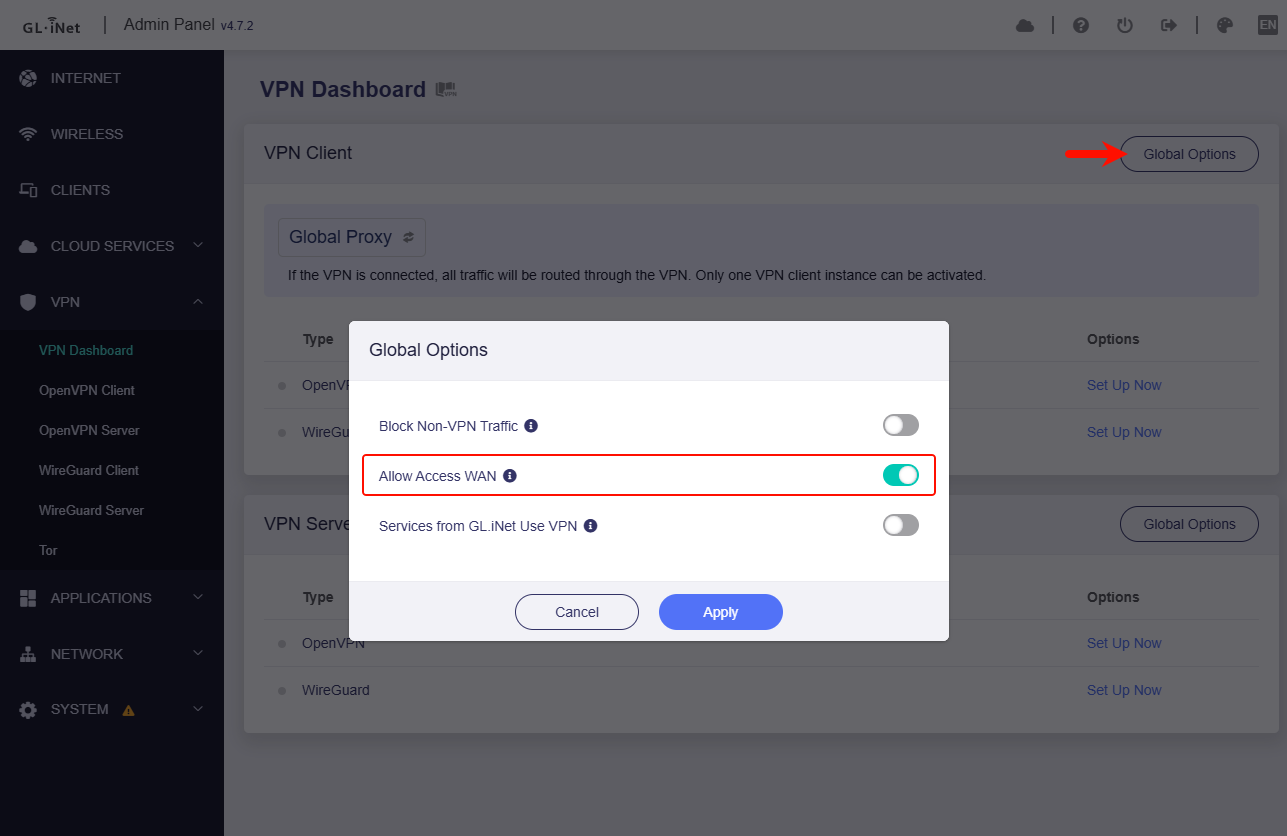
If the VPN Client is enabled, the WAN subnet "10.32.10.0/24" cannot be accessed, please enable option "Allow Access WAN"