Hi, not sure if this has been already asked, if so please point me to it.
I'm trying to set up my home WLAN with a Flint 2 (4.7.7) and a Beryl AX (4.8).
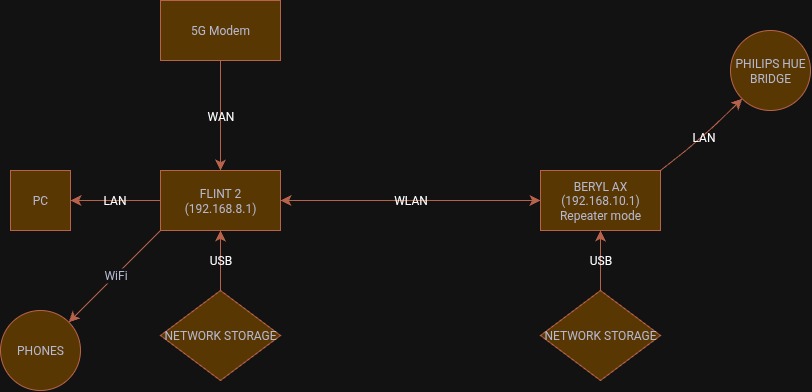
The current setup is my 5G modem connected to the Flint 2 WAN port, then the Flint 2 connected to one PC via LAN port and one over WiFi I also have the network storage setup in the Flint 2.
The Beryl AX is connected to a Phillips hue bridge over LAN at the other end of my house (my lights are they only thing that won't receive the signal from the Flint 2). I also have a network storage setup in the Beryl AX.
I would like the Flint 2 to be my main WiFi point, as it can reach all through my house and I've set up tailscale on that too.
I'm wondering how I can access the both network storage setups while connected to the Flint 2 WiFi.
I tried the extender mode on the Beryl AX, which didn't work unless I was connected to its WiFi.
I've also want to try and access both drives on the network through my one tailscale access point. But, I think if the first problem is solved then the second will probably be solved too.
Currently I have turned off the extender option on the Beryl AX and rest it to factory with the exclusion of setting back up the network storage and updating the firmware.
Sorry, first time setting up a network like this, but have a basic understanding.
Yes it is I beleive, the Beryl is on 192.168.10.1 and the Flint is on 192.168.8.1 . The only connection is between the bridge and the Flint is the WLAN, provided by the Beryl.
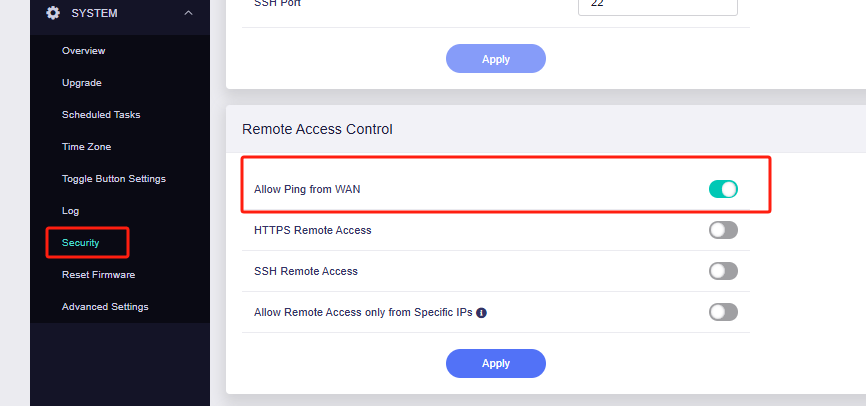
I am able to ping from the Beryl to the Flint but not the Flint to the Beryl.
This is currently how I have it set up, I would like to be able to access both network storages no matter what WiFi I am connected too, but can only connect to both when connected to the Beryl AX.
Well, you have two different subnets. I'd say a WireGuard-based S2S is one way to go. You'd be limited to the Beryl AX's 300 Mbps over WG but you can set a policy on the latest firmware versions (v4.8.x) to direct any traffic to the NAS on either end over WG. (This won't work with TailScale)
If you want 'raw' speed you're going to want to set up a mess of port forwards to whatever (both) side's services are running on the NAS(s) given the current configuration is a double NAT (on the repeater's side).
Slightly older screen shots but still relevant for S2S:
Given your Beryl AX is currently set as a repeater I wonder if 'extender' mode wouldn't be the quick & easy answer. It should put it all on the same 192.168.8.0/24 subnet but it's been some number of years since I used a wireless bridge configuration:
Extender. Extend the Wi-Fi coverage of an existing wireless network.