Hi,
Where in the UK can I buy one of these Power Adapters as its states USD so guessing its just in the US?
Thanks
At the X3000 product page are external antennas from WaveForm and MobileMark linked. These are links to 4x4 antennas.
But at least one of them (I'd think it was WaveForm) also offers good external 2x2 antenna for use with the X2000.
For example: https://www.waveform.com/a/b/guides/hotspots/gl-inet-spitz-plus-gl-x2000
Hi @bobmclane , GL-X2000 compra da Shoppify
► UK:Spitz Plus (GL-X2000) Wi-Fi 6 4G LTE CAT 12 Router — GL.iNet UK
► EU:Spitz Plus (GL-X2000) Wi-Fi 6 4G LTE CAT 12 Router — GL.iNet EU
► US:Spitz Plus (GL-X2000) Wi-Fi 6 4G LTE CAT 12 Router — GL.iNet US
► CA:Spitz Plus (GL-X2000) Wi-Fi 6 4G LTE CAT 12 Router — GL.iNet CA
Type-C to DC Cable compra da Shoppify
► EU:Power Adapter Cable - Type-C PD to DC 5.5mm x 2.5mm (65W Max) — GL.iNet EU
► US:Power Adapter Cable - Type-C PD to DC 5.5mm x 2.5mm (65W Max) — GL.iNet US
Note: Type-C to DC Cable is currently available only on EU and US stores.
1 Like
For X3000
RV Use:
- OmniRoam-420: 6-in-1 Low-Profile Mobile Antenna (4G/5G & WiFi). https://www.waveform.com/products/omniroam-420
- Mobilemark: Model: LTMWG942 (Black / White). 5G Ready (6-2-6) Antenna Design and Industry | Mobile Mark
Home Use:
- QuadMini: Low-Profile Omni 4x4 MIMO Antenna. https://www.waveform.com/products/quadmini
- QuadPro: High-Gain Directional 4x4 MIMO Antenna. https://www.waveform.com/products/quadpro
For X2000
RV Use:
- OmniRoam-220: 4-in-1 Low-Profile Mobile Antenna (4G/5G & WiFi). https://www.waveform.com/products/omniroam-220
Home Use:
- 2x2 Panel Kit: MIMO 2x2 Panel External Antenna Kit for 4G LTE/5G Hotspots & Routers. https://www.waveform.com/products/2x2-mimo-panel-kit
1 Like
Any idea when this will come now? @Summer
Holiday season (= travelling) ahead! 
@TeWe The travel bag arrival time of travel bags at overseas warehouses is mid-July, and sales from overseas warehouses will start after that.
All clear, thanks for confiming @Summer 
Hi there - any updates on AstroWarp for Spitz Plus? I bought one assuming it would be supported but now I see it's not. 
Hi @jgs ,
We’ve just updated the firmware to add AstroWarp support for your Spitz Plus.
You can download the latest firmware here: https://fw.gl-inet.com/firmware/x2000/testing/openwrt-x2000-4.8.2-0929-1759137581.img?_gl=1*4400gj*_gcl_au*MjEzNTkxMDM4MS4xNzU5MjA0NzUw*_ga*NDIyMDg3OTk1LjE3MjUwMDQ1ODI.*_ga_34T6Q5NL0V*czE3NjAwMDE1NTUkbzMwMyRnMSR0MTc2MDAwMzU4NyRqNTkkbDAkaDA.
1 Like
Hello, I just bought new GL-X2000. I have setup it as Cellular only, because no other means of connections exists. My area has a very weak signal due to frontline therefore close stations are destroyed. The problem is i don’t see the settings to change network mode to 3G Only or like 4g+3G. Due to weak signal i got pretty strong 3G but not 4G which sometimes not available at all, so i just want to force 3G to have stable uninterruptible connection.
Hello,
The GL firmware GUI does not support locking to 3G. When 4G signal is weak, it will auto fall back to 3G to maintain the connection.
When there is no 4G and the 3G signal is strong enough, will it fall back to 3G?
If it does fall back, does it sometimes reconnect to 4G afterward and cause the Internet unstable?
@bruce , yesterday i played with settings and found a way to lock to 3G only.
I'm not yet installed router in that unstable signal area, so cant exactly tell you X2000 behaviour, but it happened on other brand router as you described, e.g. if Auto mode was enabled it tried to switch back to the highest version causing connection drop. Also it stayed on very weak 4G signal and having no internet connection at all.
So regarding locking X2000 to 3G. You need enable Masking mode and set it to Block,
then we need block all LTE bands and left at least one which is not broadcasted, therefore we are forcing modem to use 3G.
p.s. Instead of Block mode we may also use Allow mode therefore allowing non-broadcasted band.
So far it works, but as you see it is not straight-forward, it is handy just to have quick buttons - Auto(Default), 3G Only, 4G Only.
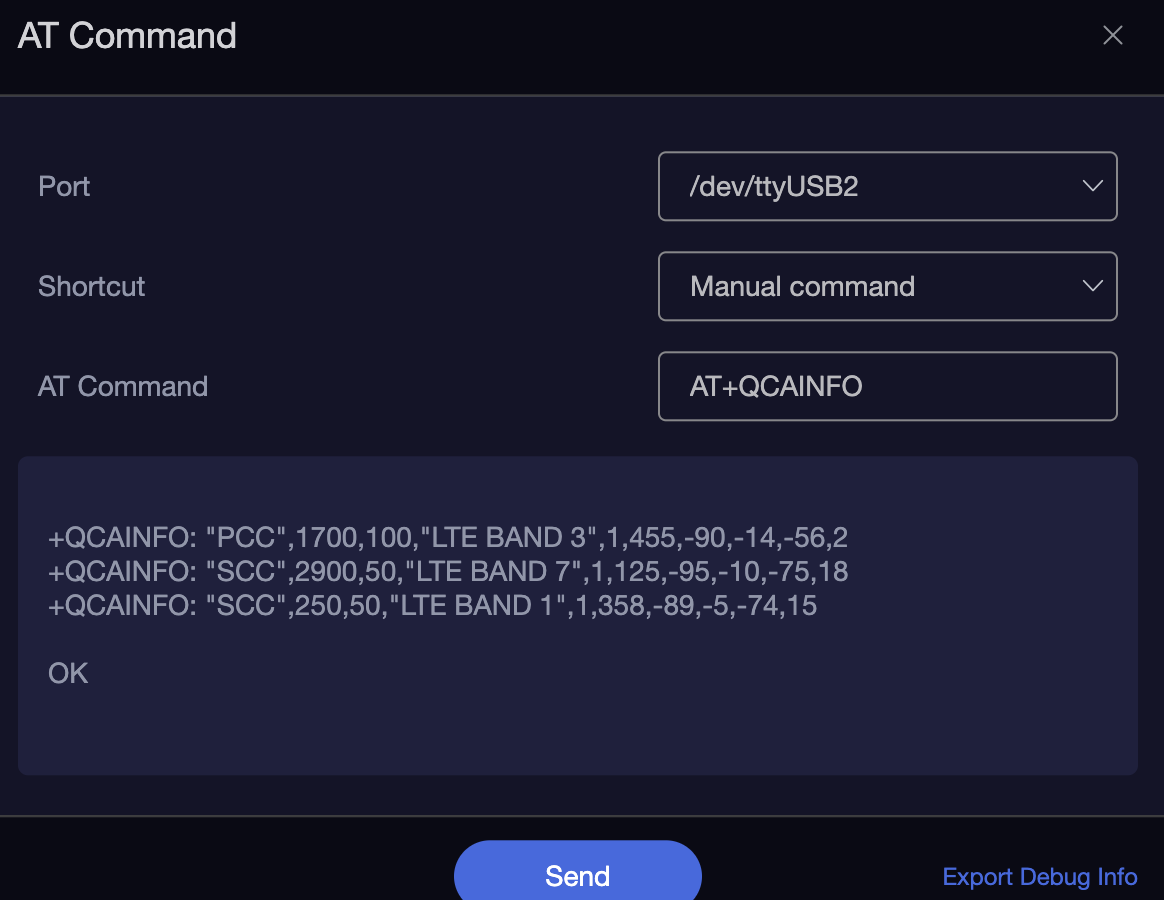
Also i didn't find GUI evidence that modem is using carrier aggregation, it showing only a Band 3 or Band 7 connection only in 4G Mode, however manual AT command showing that 3 Bands aggregated.
So i assume GUI should display Band 3+7+1, or B3+B7+B1
1 Like
I’m using this for my X2000
@bruce Now i moved GL-X2000 in weak signal area and may confirm that it has same behavior as other brand router, e.g. it trying o switch to 4G even if there are no data available. So i was forcing 3G mode to have stable internet connection.
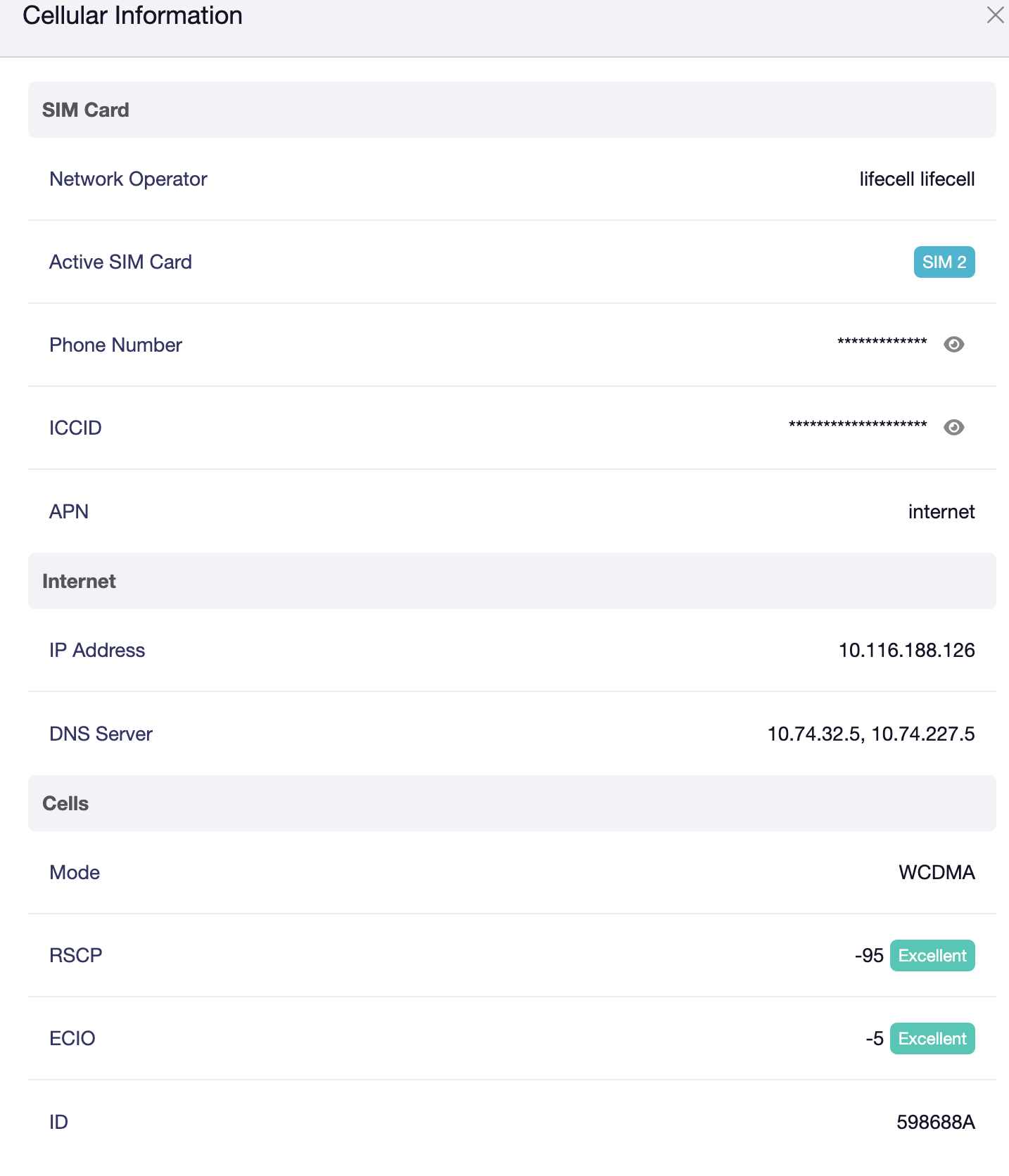
Above screenshot i have made from beta firmware (0802beta2) and i found it doesnt have Internet Profile feature anymore, which was very handy in release version. Profile allowed to save internet connection for each SIM card, so i dont need manually choose Band Masking every SIM swap. Probably i will consider to ge back to release again.
Thank you very much for the updates! Thanks to share the info about AT commands is able to lock the 3G/WCDMA bands and keep the device running stably on 3G networks.
We are aware of this request. In the upcoming v4.9 firmware, we will re-add the APN functionality in the GL GUI.
In the meantime of v4.8, APN information is actually still being recorded, but those operations are handled on the backend (not shown in the GUI). The system records corresponding SIM card information and APNs, and automatically cycles through available APNs until registration succeeds and the network becomes available.
@bruce Thanks, that’s will be very nice to have AP profiles. I switched back to release firmware,
here profiles works as expected.
If it possible it is also good to have gui functionality to list network operators and locking to desired one.
Backend AT command allows to list available operators
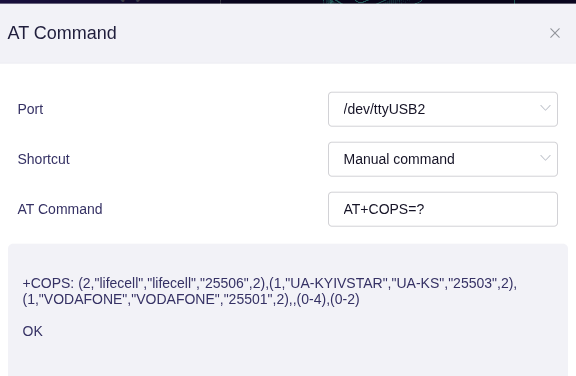
For example Ukrainian operators allowing national roaming, if native operator has a weak signal i may switch to a neighbor with better signal.
Hello,
Thank you for the suggestion! The operator search in the GL GUI may be difficult.
Since searching for available operators takes a relatively long time (only some advanced users or developer know to search on different bands and different generations), most ordinary users may mistakenly think the router has stopped responding and won't wait for the search results, which leads to a poor user experience.
For this part of the request, will leave it open for now, if there are more needs in the future, we will consider adding it to the GL GUI.
Hi everyone! I'm new here and thrilled to join this forum. Looking forward to learning from you all."
1 Like