I Just received this setup, the RM1PE and the ATX board. The actual KVM device is fantastic. However the ATX is not functioning at all. I read through the forums and attempted to reverse polarity as suggested but its not working, both the power and reset are non-functional. Also looking on the board itself, I see 2 LEDs I assume are status LEDs that dont light up at all. Whats crazy is the RM1 sees the board and thinks its functional when I hit buttons but it doesnt do anything on the physical machine… Help? The Front Panel buttons work on the pass through.
Could you please run the command below at terminal and inform us of the outcome.
atxpower /dev/ttyACM0 power_stat
atxpower /dev/ttyACM0 power_state
on
Tried some of the manual commands for the device in terminal, Says success but again physical server does nothing.
This sounds like a wiring issue. First, reseat the DuPont cables to ensure a proper connection. Then, in the terminal, run the command atxpower /dev/ttyACM0 click_power_short to control the power switch. If that has no effect, try inverting the polarity again.
If still not work, please take some pictures of the wiring connections between your ATX board and the host computer. Thanks for your cooperation.
Apologies for the delayed response. I have reseated the connectors multiple times. swapped them around. reversed polarity etc. Like I said the status LEDs on the atx board dont even illuminate at all or during any actions as I assume they should. It should also be noted that I saw various pads on the board with no components. Currently the server is racked and in use so its difficult and time consuming to bring it down. I would prefer to not take this server offline until I have some sort of replacement board to exchange.
I’m also interested in another RM1 Poe and ATX board for a second server depending on the outcome of this issue.
I wonder if you are convenient to take some picture of the connection to our engineer for analysis?
I have the same issue. I’ve swapped ports around, flipped polarity, but remote access doesn’t work. Pass-through works fine. The blue/green LED is lit only when the computer’s power is on. All terminal commands say they are successful, but nothing happens. Power state is on. The Comet is on firmware 1.5.0 release1.
I downgraded to 1.4.2 release 1, with no effect.
Sorry for that. It’s China's National Day holiday. I forward this issue to RD team. will back to you when they are back to work.
1 Like
At this point it would not be convenient. I would prefer to take this server offline and unrack it as little as possible. So if I was sent a replacement I could take as many pictures in the chassis and of the board as you want.
If it makes it easier give me a discount code and I'll just order the other KVM I want and 2 of the atx boards
Has there been any update on this?
atxpower click_* returns success but does not actuate the relay; get_sn works. UART /dev/ttyACM0 reachable.
Host MCU firmware mismatch?
I havent been updated. Been waiting for a resolution before I purchase another set or two of these..
I get they want pics but taking a 4u chassis out of a rack with 14 hard drives isnt an easy ask, especially knowing Ill have to do it again when a replacement comes in..
atxpower /dev/ttyACM0 power_state
on
This indicates that the RM1PE and ATX connections are normal, and the problem lies in the connection between the ATX and the computer.
-
Try re-plugging all the DuPont cables to avoid the problem of poor contact.
-
Try to execute atxpower /dev/ttyACM0 click_power_short, and observe whether the controlled computer turns on/off. If not, try the following steps.
-
Try reversing the polarity of POWER SW, Try step 2 again.
image
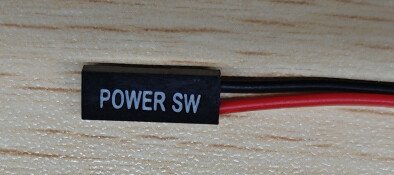
If the ATX still doesn't work, try using a multimeter to measure the connectivity between the ATX and the computer.
Tried all the troubleshooting steps already. Took a multimeter to the board directly and nothing is happening on the outputs when you execute a command. Where you would expect a relay to temporarily close the circuit as is the case with the front panel buttons.
Also on the board itself, the indicator LEDs are non functional. It appears to be a defective board. Looking back this was 18 days ago. Be nice to get some resolution on this..
Have you tried reversing the polarity of the POWER SW?
In most cases, the ATX power supply fails to work properly due to an issue with the POWER SW connection.
Regarding the onboard ATX LED, it is used to indicate the power status of the controlled computer.
If the controlled computer is powered on but the ATX onboard LED does not light up, you can try reversing the connection of POWER LED+ and POWER LED-.
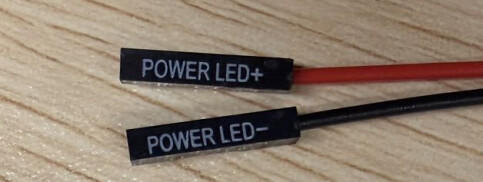
Could you tell me your motherboard model? I can look up the relevant information for you.
My ATX board has also never worked right. What does it mean when you run atxpower /dev/ttyACM0 power_stat and it says Error: Invalid parameter. ?
Hello, same Problem here. Ordered two ATX Boards. One is working normal. The other one seems Dead on Arrival. Leds and Reset function ist ok but Power Switch never work tried everything. 
Hello, have you tried installing the ATX board that isn’t working properly onto the computer that was previously working correctly to check if it functions normally there?
Hello Slippy, the correct command is atxpower /dev/ttyACM0 power_state.
Which specific function of the ATX is not working properly: Power On/Off or Reset?