I installed a Brume 2 as the main router with an R6400 Netgear as the wireless AP to keep things convenient. I started up Both Wireguard and OpenVPN servers, and have been able to access the USB drive via the LAN and, over the VPN. All good.
Then I tried to access LAN devices over the VPN as well. With Wireguard I was able to access the Lan devices via IP address but not using host.lan names. Foraging around on the internet it appeared name servers could be the issue. I looked at the WG client config and deleted 64.6.64.6 from this record DNS = 64.6.64.6,10.0.0.1. Presuming that would at least focus the requests to the tunnel.
Now I can access a camera via host.domain as well as ip address. I am wondering if I should add the local lan router ip address to the DNS = record.
OpenVPN is another story as I have come up dry with a path to take on that server’s configuration.
On both of them, I cannot access the wireless AP over the VPN regardless of using the ip address or host.domain name. This is connected via the AP WAN port. Remote access was enabled. This worked fine with a different mfg router.
OpenWrt Version OpenWrt 21.02-SNAPSHO
Kernel Version 5.4.211
I assume you have already referred to the following tutorial and correctly configured the initial settings:
Regarding the issue where devices under the Netgear R6400 cannot be accessed: does it create its own subnet , or has it been configured in AP (Access Point) mode so that devices connected to it obtain the same network address range as the Brume 2 ?
Ugh. I have to enter all of the devices manually. If I add something I have to re-enter everything again? That right there is enough to put this back in the box and return it.
Will thank you I had not since this was automatic with the “brand X” router I was attempting to get squared away. This exercise with the Brume is in parallel with our regular network on which OpenVPN and Wireguard allowed access over the VPN via host.domain but not the USB that was attached to the router.
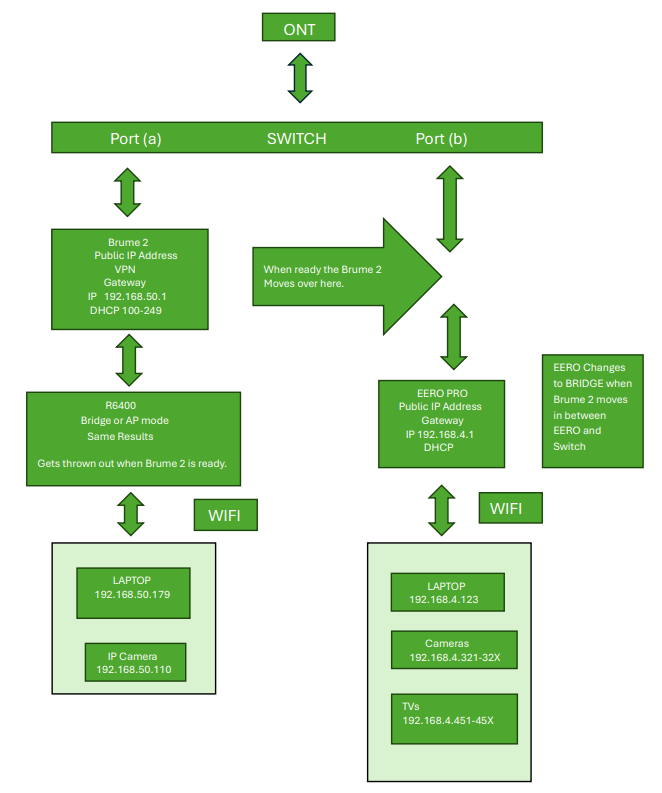
We have an ONT going to a switch where the networks diverge, one for the Brume 2 with test devices and one for the “brand X” router with all of our LAN.
I was concerned that the device IP addresses will change forcing a reconfiguration. Given I am blowing this out on a separate line I will be forced to load them all up if/when I move this router into the regular network we use.
Yes, the R6400 is in AP mode and the devices are all in the Brume’s subnet. I moved that router over to this network from the other where it was only serving as the NAS with a USB drive. Brand X (DHCP and VPN) drove an Eero Pro (in bridge) which handled the LAN. Everything in the condo except one TV was associated with the Eero and addressable with host.domain over its VPN.
Presumably, given there is only discussion solving the Wireguard path, OpenVPN will not have a solution to the addressability issue?
Could you please draw a network topology—including IP addresses and device roles (such as the VPN server and the sub-router running in AP mode)—so that we can better understand your scenario?
Accessing devices behind the router remotely via WireGuard or OpenVPN is certainly possible; it may just require some configuration adjustments.
So on Port (a) I can use Wireguard with the recommended fix, and address devices after the R6400, as well as the Brume 2 using host.domain over the VPN. If I use OpenVPN I cannot address anything with host.domain. I must use the IP address.
Using the EBG15, I can address everything via host.domain over the VPN except the wireless AP.
Ok Wil, hopefully this adequately illustrates the topology. There really is not much to it. Right now this is how things are configured so I can test the VPN etc.. The ports on the switch get unique public IP addresses which sets up the environment quickly and easily. The topology hung off port (a) will go away when the Brume 2 is ready and I am comfortable with it.
No worries.
I have decided to send it back.
Too much input required for function I have by default with the EBG15. If I have to go into Luci to specify the domain name for the router that says it all.
While it would seem your issue is more complex, I have wasted enough time on this box. I am done with it.
In your application scenario, we believe that you only need to enable “Allow Remote Access LAN on Server” and set the VPN client’s DNS to the router’s VPN IP.
The former allows VPN client devices to access LAN devices behind the router, while the latter allows DNS requests to be sent to the router so it can handle local domain name resolution.
The step of configuring Host in the tutorial is unnecessary. That step is intended for devices that cannot properly handle local domain names (do not support mDNS or do not advertise their hostname via DHCP).
For WireGuard, you had already configured it correctly before:
Enable “Allow Remote Access LAN on Server”
Change the DNS in the WireGuard client profile to the router’s VPN address only
For OpenVPN, you can perform similar operations:
Enable “Allow Remote Access LAN on Server”
In the exported .ovpn file, add a configuration specifying the DNS server as the router’s VPN IP:
# On OpenVPN 2.6
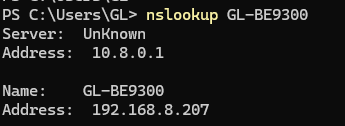
dns server 1 address 10.8.0.1

# obsolete on OpenVPN 2.6
dhcp-option DNS 10.8.0.1
The main reason we require these operations is security.
Some customers only want to use the VPN to obtain their home network’s internet exit, rather than to access home LAN devices.
Therefore, we provide these options to balance security and flexibility.
”If I use OpenVPN I cannot address anything with host.domain. I must use the IP address.”
So, yes, I had enabled remote access for both VPN servers. I was always able to use the IP address to access the LAN with either VPN server.
P.S.
I retired in ‘08 so it has been a while since I worked on the Z/os security server for IBM. IMHO if one opens the remote access there is no reason to prevent host.domain references if the IP address is exposed but that is subjective.
Maybe I will check out Brume 3 at another time in the future but I chose the A version of the 2 because I felt the aluminum box was a better heat sink.
I have reservations about the next iteration given the lack of ventilation.
Brume 2 is on the way back to Amazon since yesterday afternoon our time.
Actually, we have acknowledged this requirement.
In the v4.8 firmware, the VPN IP will be configured as DNS server in the exported WireGuard client configuration file and been pushed as the DNS server for OpenVPN.
After that, simply enable the “Allow server remote access to LAN” feature to access the server-side LAN devices via local domain names.