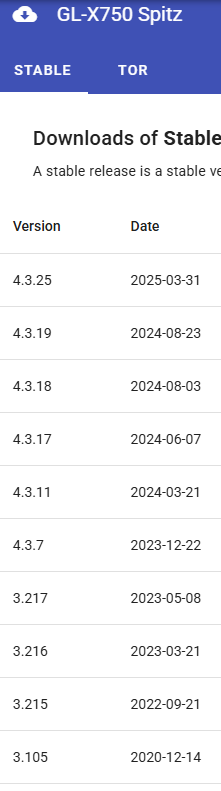
There will certainly be at least 5 years of the Mudi 7 firmware support. Even if the SDK can’t be updated with new features after 4 years, they will still be maintaining security updates, for example Spitz:
2 Likes
Yep, if sell the batteries individually, I think a battery charging dock should be considered for sale.
3 Likes
Oh just sell me a parasol made out of solar panels to charge it whilst I’m out 
1 Like
Hi Bruce, Will pricing for Mudi 7 be announced at CES.
Thank you
1 Like
I heard rumors that it won’t have Openwrt support… so for Tailscale configuration etc it might be a tricky one, can someone confirm if this is true?
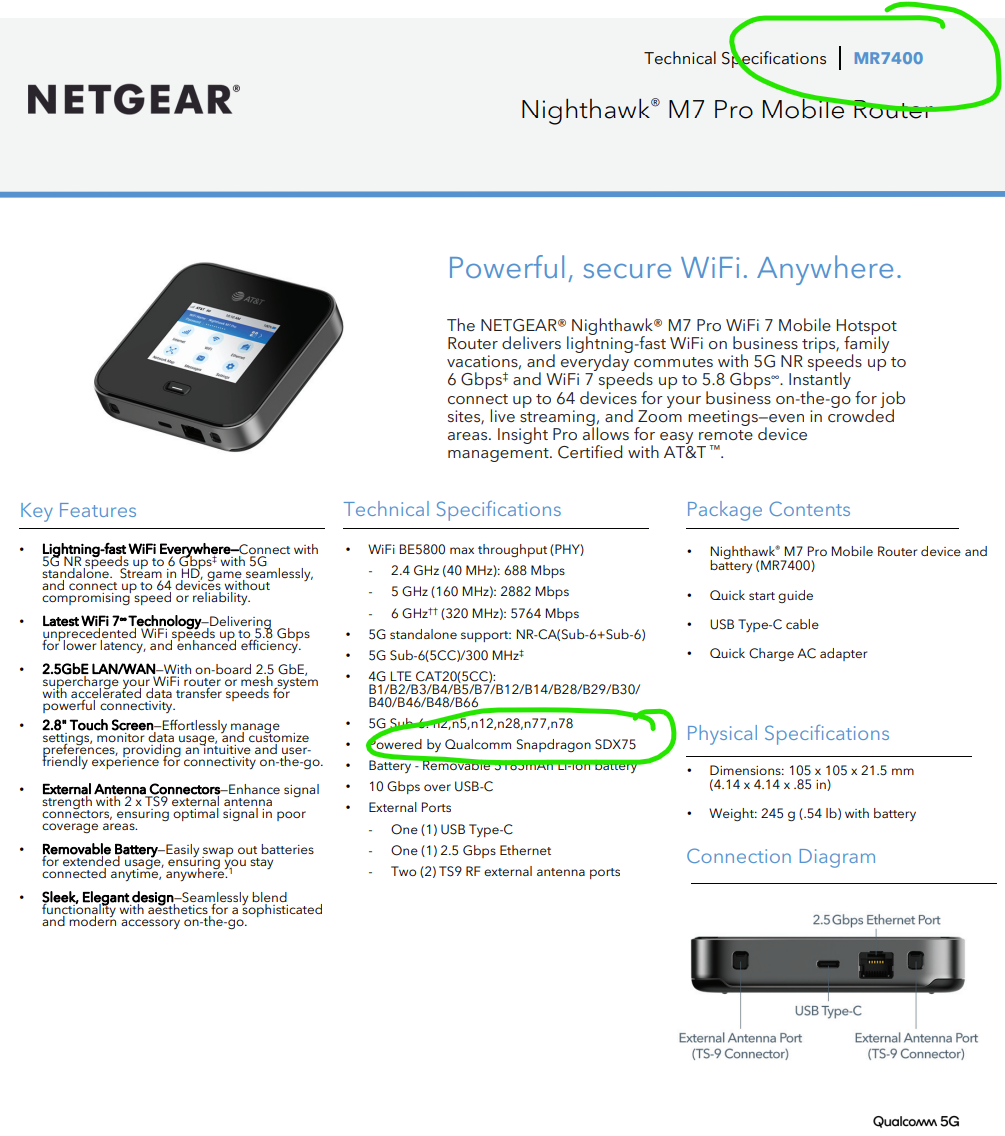
Netgear MR7400 has a Qualcomm X75 integrated. It was already stated that Mudi 7 will come with Qualcomm X72. But maybe we get to hear the final specs with the launch at CES from @bruce ?
Mentioned Model by @hecatae was Netgear MR7400 earlier - which is the Netgear M7 Pro and has X75.
What you shared now is the new Model Netgear M7 MH7150 (follow up model of Netgear M6 (without “Pro”). Mudi 7 should easily beat the new Netgear M7 MH7150  Mudi 7 has more features, more ports. It is a mix of M6 Pro / M7 but at a much better price point (I assume).
Netgear M7 Pro is better with its X75 but lacks e-SIM. I assume Netgear will launch a M8 Pro with X85 (or X80) at some point of time - but again it will be most likely double as expensive than Mudi 7
1 Like
Here is a first video of Mudi 7 on Youtube from a blogger:
No. It is set to make its debut at CES! But the price will only be revealed when it officially goes on sale.
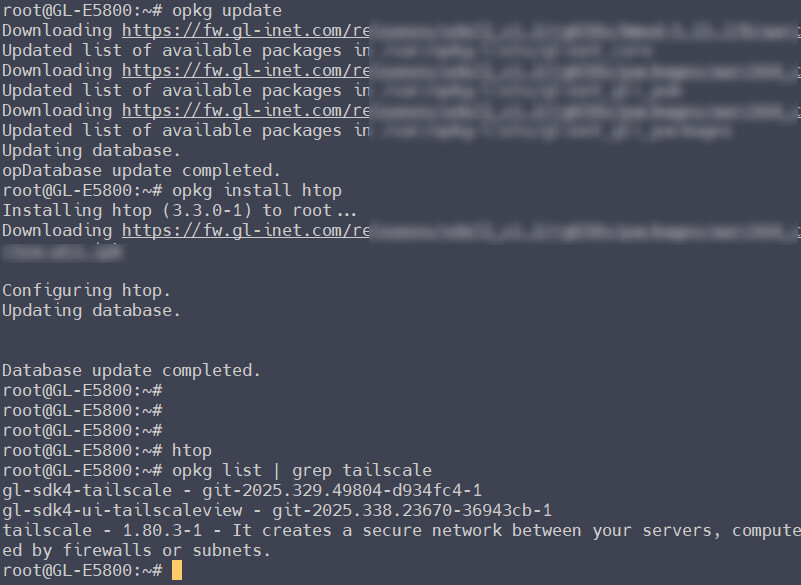
I can confirm that it has the full GL firmware, so it also has full GL functionality.
Attached a screenshot so you can clearly see that it has full GL functionality, OpenWrt, SSH, and opkg management!
3 Likes
@bruce Will the Mudi 7 have an option for automated restart with a given time setting? i.e. a restart of the device once per week?
I have noticed that mobile routers if used for long periods “untouched” with low data throughput sometimes lose the mobile network signal and don´t log in automatically again. I think it has more to do with how network providers manage their network (i.e. automatic kick out of devices not used for a certain period of time). So such a functionality makes sense in survailance situations in offsite locations.
Hello,
We have added numerous cellular detection rules in our firmware to handle these situation (implemented on the backend). For example, when the link is unavailable, it will force redial; after a certain number of failures or a certain period, will force restart module. I think these new rules introduce greatly improve the availability of the cellular link.
If you encounter any cellular issues, please feel free to contact us.
3 Likes
Thanks. Sounds good 
1 Like
@bruce
Mudi 7 states it is capable being fast charged with up to 30W using the USB-C port on the bottom - thats clear to me.
There is a USB-C 3.1 port on the side and a USB-C PD Port on the bottom. Can both USB ports be used for charging and reverse charging? What is the reverse charging capability for both? Can two devices be charged simultaneously from the Mudi 7?
Can Mudi 7 handle also USB Tethering simultaneously to using the LAN port? (Could it even support 3 devices using 2x USB Tethering and 1x RJ45/LAN?) I know this is all a bit extreme, but if 3 devices could be connected, this would almost be like a small switch. I´m just curious
1 Like
Thanks Bruce
The USB-C PD at the bottom is the Mudi 7’s charging port and does not support reverse power delivery.
The USB-C PD on the side is bidirectional. Cannot reveal more, but I think it is amazing!
Actually a usb hub with 2x tethering device on USB-C, right? I think it can, and not affect the RJ45 (LAN/WAN).
Update:
The USB-C port at the bottom can also support power supply output, but not transmit data.
2 Likes
Thanks. Sounds promising I assume then the USB-C Port on the side will also support reverse charging
Any news on expected availability date and decisions on the beta testing program? Cannot wait to hold one in my hands 
1 Like
@bruce So here one more suggestion:
As the Mudi 7 has no eyelet or loop to attach a lanyard, maybe you could provide a wall mount (see example of Asus 5G-Go) ?
…or even better: Provide 3D print files for different wall mount solutions or hard case protection purposes? That would enable your customers to take choices on their own
…alternatively provide the exact measurements (incl. port positions) or dummy units here in the GL.iNet forum and make a competition among 3D print enthusiasts: The 3 best case / wall mount solutions get a Mudi 7 for free. Condition is that they provide the 3D print files for free including all rights.
FYI me personally I usually use self adhesive velcro to mount or fix mobile routers in my camper. This is a very easy, practical solution and leaves all ports accessible but it doesn't look too professional though.
Sure, yes!
It might take a little more time, since we are working hard to perfect it before its official release.
2 Likes
There is no eyelet in the body to attach a lanyard.
hahh the suggestion below is a good idea. If there are many users in need, we can hold some activities to let everyone share 3D printed cases, wall mount bracket, etc.
3 Likes