I just upgraded MT-3000 firmware from version 4.7.4 to version 4.8.1. After the upgrade; though I was able to connect to the wireguard server I was no longer able to access devices on the remote network. I reverted to firmware 4.7.4 and all returned to 'normal.' This all went down within the last hour or so. It was easier to revert to previous firmware version so users could regain network access. I noted the wireguard server setup interface has changed. I presume it to be a routing issue. I did not begin from scratch when I upgraded the firmware. Has anyone else experienced this challenge? Recommendations for a smooth/quick upgrade appreciated? I will commence looking through updated documentation for answers Thank You
Yeah, there's been some changes to the VPN feature as new capabilities have been added & seems to be previous setup breaking ones. If you have a backup tarball/tar.gz the files withing are just UTF-8/LF encoded text files so the details are still able to be retrieved.
I do have a backup. I just will need to spend some time figuring out how the new interface and features 'interface' with the settings file. I have a spare router so I can play there.
Thank You.
Thanks for the link. Makes viewing differences between folders/files straightforward. I intentionally use the moniker "naive" because I am a self taught senior. Though I can see the differences, how I would go about editing the config files so I could upload new settings is beyond my skillset at this time. The other gl.inet routers I have on hand that I thought I could play with are not compatible with 4.8.1. I have since ordered a ringer router and will work to expand my skillset when it arrives. Besides it is always good to have backup hardware on hand when possible.
We all started somewhere. I specifically like to recommend those tools because, while everything is really just a text file, the coloring provided by the syntax checking (eg: 'Ruby' vs 'Shell script' in VSCodium) make it much, much, easier to identify differences without having to study every single character... it really helps remove the cognitive load, if you will.
I'd suggest Beyond Compare if nothing else. One can edit the text directly there if need be.
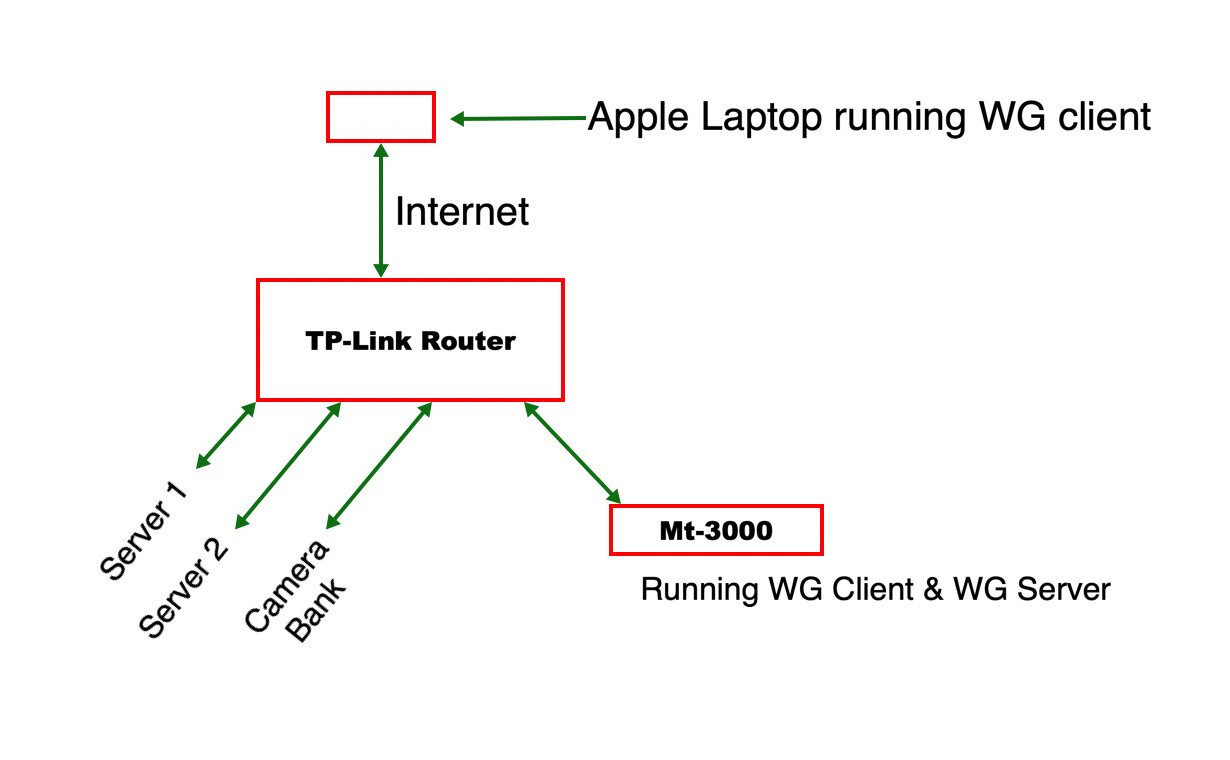
Travel Laptop running WG client is able to successfully access Server1, Server 2, Camera Bank when MT-3000 is running firmware version 4.7.4. When MT-3000 firmware was upgraded to version 4.8.1 the traveling laptop though successfully connected to MT-3000 WG server was no longer able to access devices on the LAN. The settings were saved when the firmware was upgraded. When the firmware was downgraded back to 4.7.4 LAN access was restored. I presume the existing settings did not transfer properly given the new features/interface of 4.8.1. Given that I have a working router and the device is being actively used. I am waiting the arrival of an additional router so I am able to troubleshoot.
In v4.8.x firmware, VPN features big improvements.
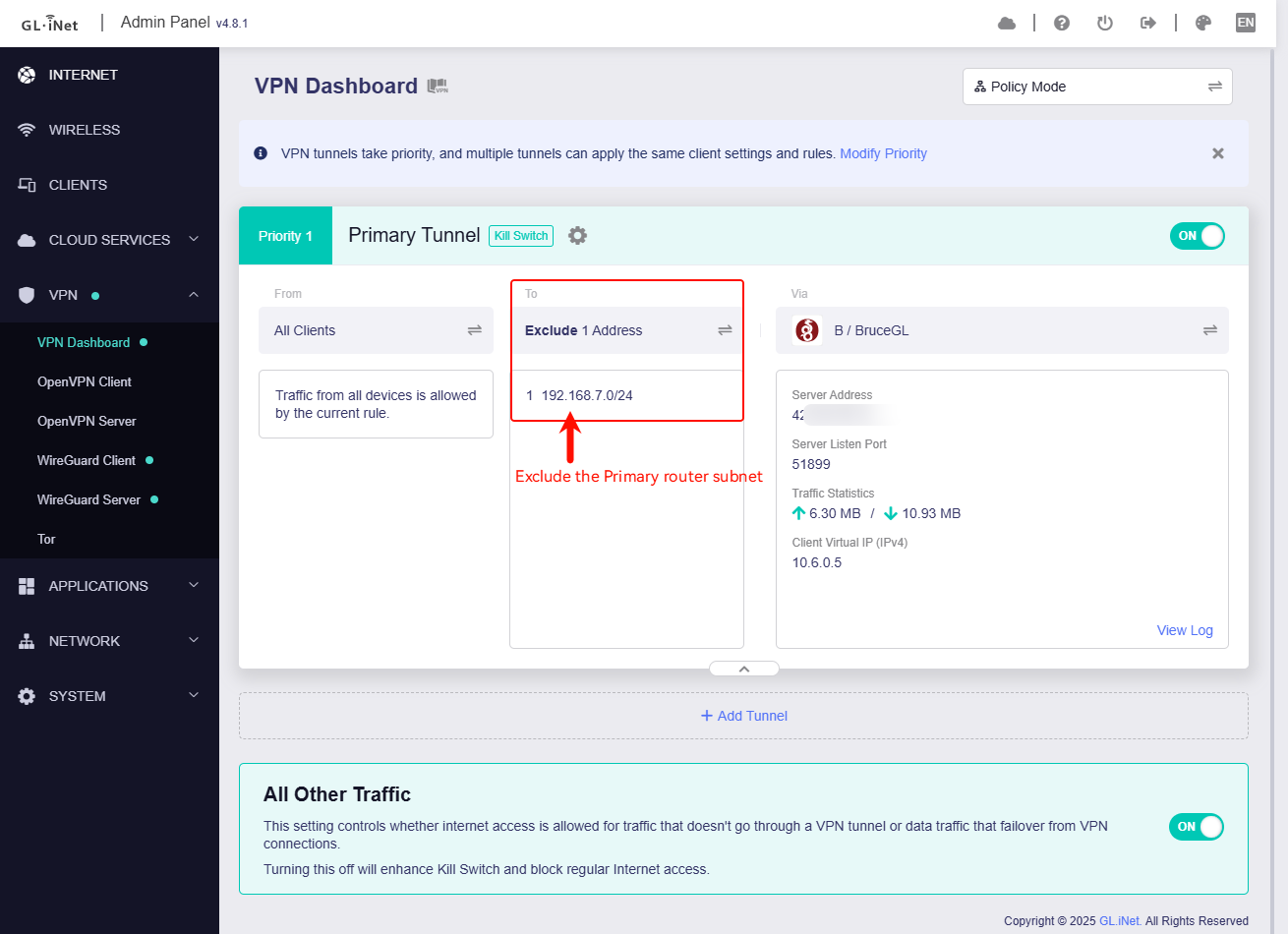
When GL router enables VPN server and VPN client at the same time, if the remote laptop (client) is connected to MT3000 server, and access the primary router (i.e. TP LAN subnet) through MT3000 server, you need to switch to Policy mode on the VPN Dashboard, and then manually add the primary route's LAN subnet to To with Exclude:
My remote laptop connected to MT3000 server, when I did not add the exclude subnet (primary router LAN subnet is 192.168.7.0/24), laptop cannot access anymore:
when I add the exclude subnet, laptop can be accessed to primary router LAN client:
 'Shell script' or 'Ini' are much more appropriate. Use tabs to match the formatting.