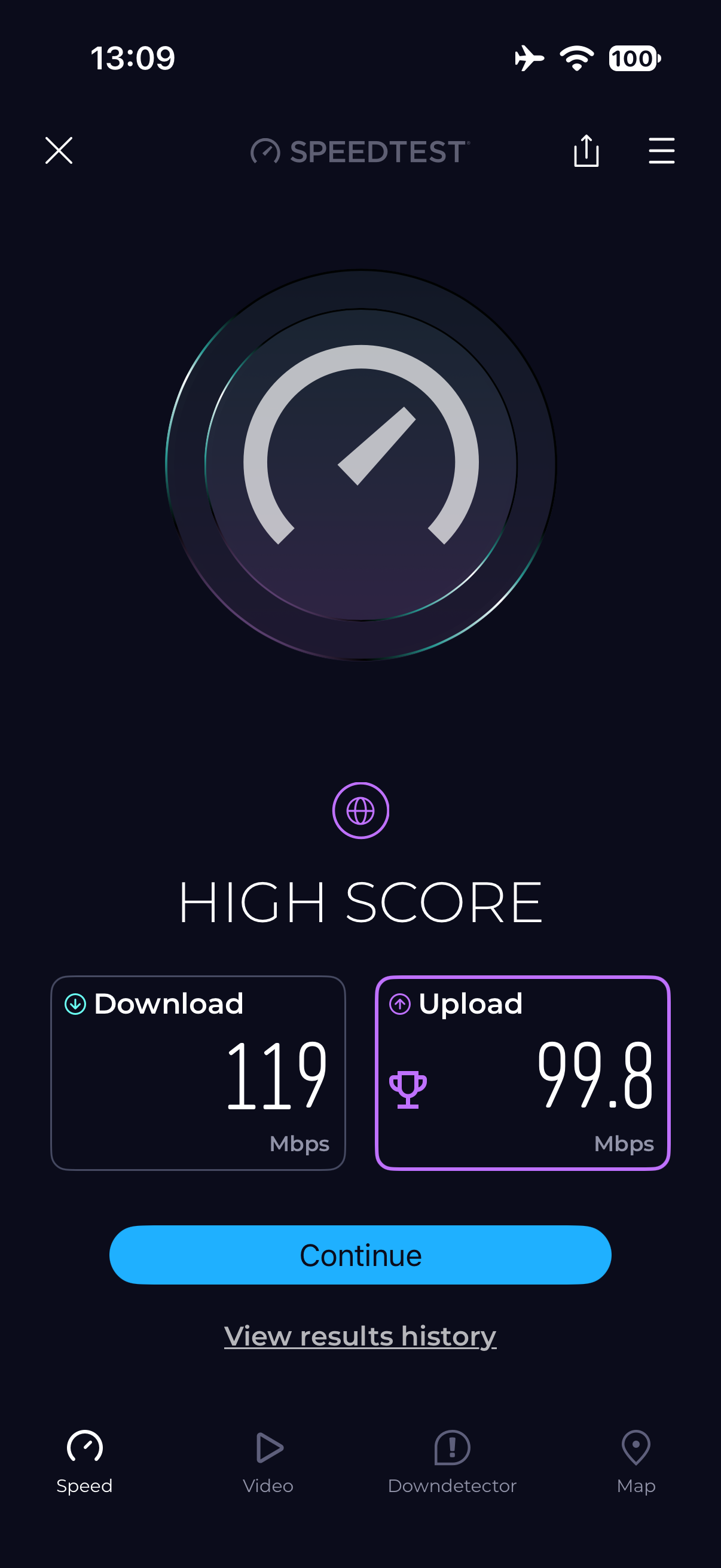
I have MT3000 with client WireGuard profile as primary tunnel connecting to home WireGuard server. Network quality and Speedtest in UI report full 100MBPS throughput for the connection I am on.
however client devices connecting to the MT3000 receive speed of only 15mbps
the home server has upload speed of 1000bmps.
if I connect phone to same client vpn endpoint to my home network I receive approx 200bmps throughput so the home server is not the bottleneck and the current WiFi repeater speed is not the bottleneck. The issue is isolated to the MT3000.
If I disable the VPN on primary tunnel, all the clients receive a full 100mbps on Speedtest. So the WiFi is only an issue when using WireGuard.
is this known issue? This tender router unusable for my purposes which is to extend my home network when traveling.
The router’s built-in Speedtest does not measure the full path used by a client device, so it can show 100 Mbps while forwarded Wi‑Fi traffic through the WireGuard tunnel is much slower. The quickest way to isolate this is to test one client connected by Ethernet, if available, while the tunnel is enabled:
If Ethernet is also limited to about 15 Mbps, try changing the WireGuard tunnel MTU from 1420 to 1380, then 1280 if necessary, and retest.
If Ethernet reaches near 100 Mbps but Wi‑Fi remains at 15 Mbps, test a direct 5 GHz connection to the MT3000 rather than the repeater/backhaul. This distinguishes tunnel forwarding from a wireless/repeater interaction.
Since 4.11.0 is beta, repeat the same test on the latest stable firmware if the problem remains. Please note the result for Ethernet versus Wi‑Fi, the MTU used, and whether the connection is direct or repeated.
I read your mt3000 has a speed of 100MB, is that expected speed here ?
If not then I think you need to search the problem on the top of the MT3000 on the wan side, something there is making it slow, also because it is a fixed rounded value could it be that you are 100M negotiated ?
Best is to overload the speed to 1gbps upstream replace any network switch it crosses if they use 100M ports.
Then it should work similar as the advertised speeds.
Second:
If your speed is what it represent on the router, then it is not so strange wireguard has slow performance there is overhead to be made, always with vpn connections the throughput become a little slower due to encryption and other tasks it can easily drop 30mbps under your routers speed.
Wifi gives another overhead, on top of the wireguard tunnel.
So combine all these overheads and you come close to the speed you are seeing, the real fix is to solve the issue upstream on your mt3000 router on the wan side.
I hope it helps
Ps wireguard performance is also alot slower here because the cpu freq is 800mhz 1.3ghz per core I believe (dual core), so this aswell doesn't help, it can work as a downer on a lower speed like 100mbps.
Edit
Also what the ai is telling here above, the speed test in gl ui is the wan connection, not the accounted wireguard overhead speed this is true.
Ok it’s not firmware. I just tried 4.9 stable and 4.9 OP25 And had same issue, ironically 4.11 beta gave best performance
I can’t believe the little guy can’t handle a standard WireGuard over WiFi tunnel!?
the connection upstream is expected to be 100mbps in current location yes so that’s score reported by the wan interface Speedtest. All good there.
if I use the 5g WiFi interface without a VPN tunnel I get approx 80mbps.
the second I turn on the WireGuard VPN tunnel yeh it drops to around 10-12mbps.
didn’t realise the Beryl AX was this limited when I bought it pretty sure it said it could handle WireGuard speeds up to 300mbps. It wasn’t clear this was limited to Ethernet connections.
guess will have to live with it, not much you can do with 10mbps though!
Thanks, genuinely a blind spot in my knowledge. Not much good then when travelling through hotels - primary use case for travel router? LoL. Rarely do you pick up 1gbps, I was pretty impressed with 100mbps when I got here!
No, this is all wrong. I can do better with a Mango. The Beryl AX is not the problem, as it can do way more than you are seeing, and I’m not seeing critical parts of the connections in your description.
Let’s say at home you have a 1gpbs symmetrical connection to a home router with a wireguard server (a peer configured as a listener). So the first question is what the capabilities of the wireguard server are (sounds like 200mbps, so that is a bottleneck.)
You are traveling with a Beryl AX with clients on its LAN. Now the question is, how is the Beryl connecting to the internet. Ethernet or wifi, and what is the upload/download of that connection to the internet. I don’t see that described, but that sounds like “a full 100 mpbs”, which actually is not a test result. This is where I agree with xize11: what is the speed of the Beryl to the internet.
So you have connected an ethernet cable from the Beryl WAN port to a hotel ethernet outlet? You still have to figure out what the hotel speed is. If you have a laptop connected via wifi to the Beryl, without the wireguard client active, what is the speedtest.net reading?
I am currently in a hotel - I have about 50Mbps download on wifi from the hotel wifi, I get about 50Mbps download with wireguard active as well. The theory that the wireguard max speed is determined by a theoretical 1Gbps throughput is false.
Exactly. The OP’s download speed is going to be limited by the slowest of (1) the upload speed of his home connection, (2) the download speed of his hotel connection, (3) the processing speed of his travel router, (4) the speed of his wifi connection to his travel router.
We are starting to see throughout Europe AirBnB speeds of 1gbps symmetrical as fiber is installed. Hotels are different.
The information you reference has already been provided.
home WireGuard server has 1gbps upload
Connecting to it over 5g cellular here gets at least 180mbps
WiFi connection to Beryl clients with no vpn tunnel gives 90-100mbps download
WiFi connection to Beryl clients with vpn tunnel configured gives 12mbps download
WAN interface Beryl speedsters gives 100mbps download
Configuring Beryl WireGuard tunnel to proton vpn yields same result of 12mbps. Home router and home connection is not the bottleneck. Hotel connection is not bottleneck as the hotel connection direct to client gives 100mbps and Beryl wan interface Speedtest shows 100mbps.
Somewhere in the processing of the wire guard interface on the Mt3000 I lose almost 90% of throughput.
I have tried 4.9 stable, 4.9 op25 beta and 4.11 beta
Those results rule out the 100 Mbps hotel link and your home WireGuard server as the main bottlenecks. WireGuard performance does not scale down in proportion to the WAN link speed, so a 100 Mbps WAN connection should not inherently reduce the MT3000 to 12 Mbps.
One distinguishing result is still needed: connect the same client to the Beryl AX LAN port by Ethernet, enable the same WireGuard tunnel, and repeat the speed test. If Ethernet is also around 12 Mbps, the issue is in the router’s WireGuard forwarding/configuration path; if Ethernet approaches 90–100 Mbps, it isolates the problem to Wi‑Fi-to-WireGuard forwarding. Given that the behavior persists with both your home server and Proton VPN across three firmware builds, 12 Mbps should not be treated as normal advertised-performance overhead.
This reply was generated by AI. Please verify its accuracy.
GL.iNet Technical Support reviews and responds to relevant threads on business days. Please allow time for a staff response.
I am traveling with smart phones and tablets that unfortunately don’t have Ethernet connectivity, as such WiFi is only connection available. Were the issue the WiFi wireguard forwarding what are potential steps to troubleshoot
You can continue without an Ethernet client. The most useful tests are:
In the WireGuard tunnel options, test MTU 1380, then 1280. This checks for fragmentation or path-MTU problems; if neither changes throughput, restore the original value.
Disable Network Acceleration, reboot, and retest. Also temporarily disable AdGuard Home, QoS, Tailscale, and any other optional traffic-processing features. A substantial improvement would identify an interaction in the forwarding path.
If the Beryl AX is using Wi‑Fi repeater mode, connect its upstream and downstream on different bands—for example, hotel Wi‑Fi on 2.4 GHz and your devices on 5 GHz. Alternatively, use a phone hotspot or USB tethering as the upstream for one comparison. This determines whether repeater-mode radio sharing is involved.
During a speed test, use an SSH client on a phone or tablet to run top -d 1 on the router. If one CPU reaches approximately 100% only with WireGuard enabled, processing is the limiting path; if CPU remains well below saturation, the result points more toward forwarding, MTU, or driver behavior.
Please report which of these changes the 12 Mbps result, particularly the MTU tests, Network Acceleration state, upstream connection type/band, and observed CPU usage. Do not post the complete router log publicly; if none of the tests changes the result, a redacted log or private diagnostic review by GL.iNet Technical Support would be the appropriate next step.
This reply was generated by AI. Please verify its accuracy.
GL.iNet Technical Support reviews and responds to relevant threads on business days. Please allow time for a staff response.
Could you test the WireGuard speed on your mobile device while the mobile device is connected to the Beryl AX Wi-Fi and WireGuard is running on the mobile device, not on the Beryl AX?
If the speed is also around 12 Mbps , rather than close to the hotel Wi-Fi’s full speed of 100 Mbps , the limitation may be coming from the hotel network.
Tried MtU settings and network acceleration on and off when I was doing the different firmware versions. Just tried again for completeness and no change. Honestly give up. Tried absolutely everything last couple days.
Also tried setting the upstream radio to 5g and clients all on 2.5ghz
The repeated results now isolate the slowdown to traffic passing through the Beryl AX’s WireGuard forwarding path; they do not establish whether the cause is CPU saturation or another forwarding/driver issue. Further MTU, radio-band, or Network Acceleration changes are unlikely to add useful information.
During one WireGuard speed test, run top -d 1 over SSH and note whether a single CPU core reaches approximately 100%. Then export the router log immediately afterward and send the CPU result and log privately to moderator @will.qiu for review—do not post the complete log publicly. You can click the moderator’s avatar and select Message; if that option is unavailable, ask them to initiate the private message.
This reply was generated by AI. Please verify its accuracy.
GL.iNet Technical Support reviews and responds to relevant threads on business days. Please allow time for a staff response.