Hi Will, thanks I've sent the details. I've removed my home network VPN config for privacy but left you a protonvpn tunnel which exhibits the same behaviour / throughput.
MTU has been set back to default of 1420 and network acceleration back on. Currently my clients are sharing the same 5g radio as splitting over the two radios made minimal difference either. Let me know how you get on.
We performed an initial check and found the following:
The path MTU is 1492. Considering the WireGuard MTU and the previous lower-MTU tests, MTU is unlikely to be the cause.
An OpenVPN UDP profile in the same geographic region can achieve much higher speeds on this connection—over 80 Mbps download—so this does not appear to be a general upstream UDP limitation.
During the speed tests, both CPU cores remained at only around 30% utilization, so CPU saturation is not the cause.
A direct iperf3 test to a server we control reaches over 80 Mbps, while the same test through the WireGuard tunnel reaches only around 13 Mbps.
We could not reproduce the issue locally using another MT3000 running v4.11.0 release, the same WireGuard profile, and a 5 GHz repeater connection. This suggests that the issue may depend on this device’s configuration or its current network environment, rather than being a general firmware issue.
Could you please help us with two further tests?
Connect the MT3000 to another network, such as your phone’s hotspot, and check whether the issue still occurs.
Export a configuration backup, factory-reset the MT3000, and configure only the Internet connection and WireGuard profile. Please test the speed before restoring the backup.
You can restore the backup afterward to recover your other settings. However, if the problem disappears after the factory reset, restoring the old backup may reintroduce the configuration responsible for it.
Totally bizarre and unexpected results. I will not do reset config as I already did that 3 times when trying different firmware’s (I did not use keep settings).
However I connected Beryl repeater mode to my 5g cellular hotspot. I immediately got 57mbps through WireGuard tunnel.
After disconnecting and going back into hotel WiFi I am now getting same speed, approx 57mbps instead of 10mbps. What could be possible reason for this?
Are you able to review logs and do more tests, I have left the same login and good cloud lease
We have accessed the router remotely and reviewed the logs, but unfortunately, we did not find any information that could help identify the cause.
Since the issue is no longer occurring, we may not be able to investigate it further at this time. If it happens again, please let us know. We’ll be happy to continue investigating.
Note, for timestamps, I just reconnected repeater to my cellular hotspot the back to hotel WiFi and wireguard tunnel throughput has returned to approx 50mbps again
This is a little unexpected, as the connection was working normally when we ran speed tests during our earlier remote log review.
If the issue occurs again, please let us know and, if practical, leave the router and network environment unchanged. This will give our R&D team the best opportunity to examine the issue while it is active.
Our R&D availability will be limited during the national holiday over the coming week, so a deeper investigation may need to wait until October 8. We appreciate your patience and will continue checking this with you as soon as the team is available.
Will the issue has returned again overnight I'm back to 7mbps. I leave in a couple hours any chance you can take another look before I turn off the router and depart
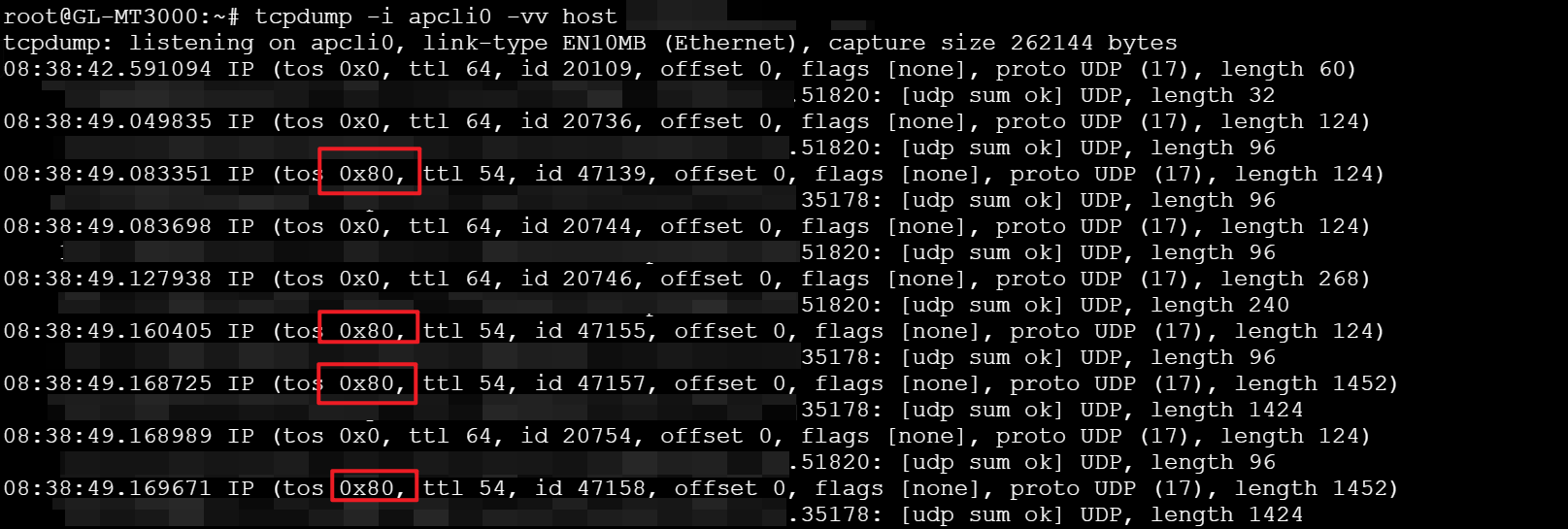
After analyzing the packet captures, we found that the downstream WireGuard traffic coming from the upstream Wi-Fi network is marked with DSCP 0x80 / CS4.
Therefore, we suspect that the hotel Wi-Fi may start identifying WireGuard traffic after some time and rate-limit it by applying a specific DSCP marking.
If possible, please switch Wi-Fi networks and then reconnect to the hotel Wi-Fi. Once the WireGuard speed is back to normal, please run the following command to check whether the WireGuard traffic is then marked with the normal DSCP 0x00 / CS0 value:
Hi I switched and switched back, throughout successfully returned. Managed to ssh in to router using termius, tcpdump starts listening but then never returns query on 2.4ghz
On 5ghz it returns the traffic, largely all 0x0 and some 0x2
Because the hotel uplink is currently using 5 GHz, seeing no matching packets on apcli0 (the 2.4 GHz interface) is expected. On apclix0, 0x02 means DSCP 0 / CS0 with the two low bits used for ECN; it is not the earlier CS4 marking. Thus, the current capture is largely normal and provides a useful comparison with the 0x80 / CS4 marking observed while throughput was limited.
Please keep the capture available for @will.qiu. If the slowdown returns before departure, capturing the same traffic without first switching networks would provide the direct before/after comparison.
This reply was generated by AI. Please verify its accuracy.
GL.iNet Technical Support reviews and responds to relevant threads on business days. Please allow time for a staff response.
Thank you for the update. Based on this, we can basically confirm that the issue is related to the hotel Wi-Fi — after some time, it appears to identify WireGuard traffic and apply rate limiting to it.