Just noticed stable (or not stable  ) firmware has been released today. Has anyone installed this? if so, can you provide some feedback? I dont really want to install it just yet as I had issues with 4.8.2 so I had to revert back to 4.7.7 which was a massive headache.
3 Likes
I second that. There is nothing in the release notes about ipv6 changes which may or may not have fixed our slow web page loading issues amongst other things. I only had a basic setup, no VPN or Adguard, Auto DNS which was default. Only config was router and wifi passord setup, with ipv6 & ipv4 enabled.
1 Like
Hello,
Please help to test the v4.8.3 firmware to see if the MT6000 works fine, the issue about slow loading if the hardware acceleration is enabled.
This v4.8.3 firmware has rolled back the wired and wireless drivers to the previous version. In the v4.8.2 issue thread, many users said that they tested v4.8.3 beta and found no problems.
If you have any questions, please feel free to let us know, and please prepare for desktop remote access with us to check.
6 Likes
Hello @bruce for me 4.8.3 works good with network acceleration set in hardware mode (with 4.8.2 I have the “slow page loading” issue).
Thanks a lot!
2 Likes
Is it OK to keep settings when upgrading from 4.7.7?
4.8.2 caused issues for me outlined in this thread.
The router I purchased on Amazon AU is HW locked to the US and I live in Australia. Is this an issue? I can change Router WIFI region in Luci to Australia, but the Router is still HW locked to the US. I believe this can cause issues with BARK?
AdGuard Home with DOT. Any news on that?
It works like a charm !
As the 4.8.2 was so buggy, I have decided to follow up on the SNAPSHOT AND BETA ones for the 4.8.3, so I already have tried the 4.8.3 in early stages and have worked fine since final august.
Once released officially, I just replaced the snapshot one for the released one and no issues at all. Move on with confidence buddy!
4 Likes
Hopefully its fixed - just upgraded to 4.8.3 but still early days.
2 Likes
I would say go for it, I saved settings and upgraded from 4.7.7 and it has been stable for over 10 hours if that helps.
2 Likes
Tested 4.8.3 and everything is working. My problem with AdGuard and DOT specifically has been fixed.
3 Likes
I’m running the 4.8.2-op24 firmware (because i want to use Banip and Adblock) and i’m not getting this update “alert” on my Flint 2. This means that i can’t do a local 4.8.3 upgrade because of the op24 update i did? Do i need to wait for a 4.8.3-op24 firmware or something like that? Sorry for the noob question…
Hello,
The v4.8.2-op24 firmware (open source) and stable v4.8.3 firmware (closed source) are different source codes (and different branches), so users who are using op24 open source firmware will not receive updates to the closed source firmware.
If your router are running normally on v4.8.2-op24, continue to current firmware and no changes are needed; if you want to upgrade to stable v4.8.3, please download it from the firmware center, and upgrade manually in the GL GUI.
I have just upgraded to the 4.8.3 firmware without keeping settings, I have just finished inputting my settings. I will keep an eye out and provide hopefully good feedback over the next few days.
1 Like
Hello, thank you the info 
1 Like
Been using the internet a lot today and no problems so far, its looking good. I have sent my router logs (kernal and system) to Gemini for ‘it’ to check them out and its reporting a normal connection with no errors.
Good work @bruce
2 Likes
I upgraded to 4.8.3 yesterday and re-enabled network hardware acceleration. So far so good.
2 Likes
Upgraded from 4.8.2 beta2 to 4.8.3 stable since day of release. Also kept setting. Perfectly running and stable.
2 Likes
Thats good to know 4.8.2 left me stranded with Wireguard and Openvpn both just refusing connections till i reflashed 4.8.2 and recreated configs. Wireguard performance has been also extremely slow/buggy since.
I’ll update to 4.8.3 and test functionality as well. Hopefully it fixes all the issues with 4.8.2
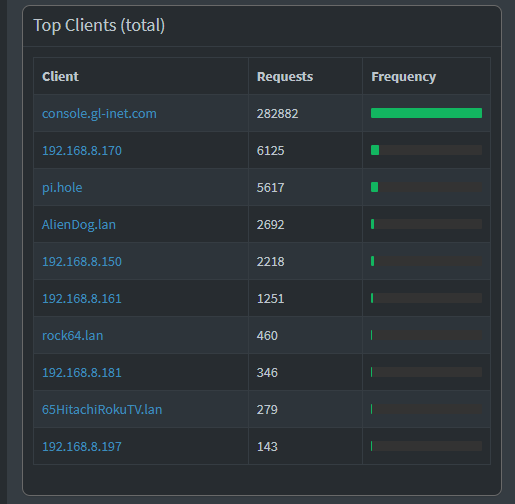
I run pi-hole and today (about 30hrs after FW upgrade from 4.8.2 to 4.8.3) the pihole server was overrun with DNS requests. Anyone else? or?
EDIT : It looks like it is trying to hit AWS …. spectrum.s3.amazonaws.com
Do you mean VPN server or VPN client?
I'm assuming it's the VPN server being slow, but this issue shouldn't be related to v4.8.2 or v4.8.3 firmware.
Is the VPN speed of previous firmware version normal? You can roll back to the previous firmware version and check again, also as a comparison test.