Device has been shared and details share to @Javon_ma via pm for Technical Support via GoodCloud.
1 Like
i'm having this problem now too, but in a weird way - i can send but not receive. this is a huge problem, as i need to be able to get 2FA codes to this number...the weird thing is that it was working until today. i moved the router to a new location, but signal seems fine here. speeds still 200-300+ mbps on 5G SA.
did you ever get this working? i'm seeing the exact same symptoms...this worked from the time i first installed the sim until about a week ago, now i can send SMS but can't receive anything. nothing comes through. trying to lock to LTE bands only or 5G NSA don't work either, still can't receive any SMS.
They collected the module logs and have sent them to the manufacturer now. No update yet.. Once they update me I will let you know here..
1 Like
it seems this may be related to either band locking or removing power from the router to move it to another location.
i normally have the router up at home acting as backup internet for our fios connection, but occasionally take it on trips with me...today after SMS had been working again for a while i moved it to the car for a bit and disabled band masking (as i want it to be able to use all bands while we're on the road), then moved it back to the house...now SMS isn't coming through again. this is the same pattern as the last time this happened, when i was testing the signal at another location in the house. the question is why does it happen when removing power but then all of a sudden start working again after plugged in for an extended period of time?
i've sent the router to tech support, i guess we'll see if they can find anything. it's frustrating and annoying to have this continue to happen, to say the least.
after many research and test by me and GL staff they also accept that SMS working until firmware version 4.4.9. SMS not working with all firmware after 4.4.9.
so, this is problem with GL firmware.
2 Likes
I have 5G NSA, I can receive SMS, but I can not send them. Has this issue been resolved already?
I am using the latest firmware with module firmware version: RM520NGLAAR03A03M4G
btw, I can send SMS while I am connected to 3G
The SIM works in the phone normally, it can send SMS in 5G NSA
The SIM works in ZTE F50 normally while connected to 5G NSA.
Why do I need to send SMS if some of you ask?
I just want to automate a few things in my home, and I want to know when they disconnect from the network by getting an SMS.
I own a newly bought GL-EX3000
I hate the latest online firmware that the admin UI allows:
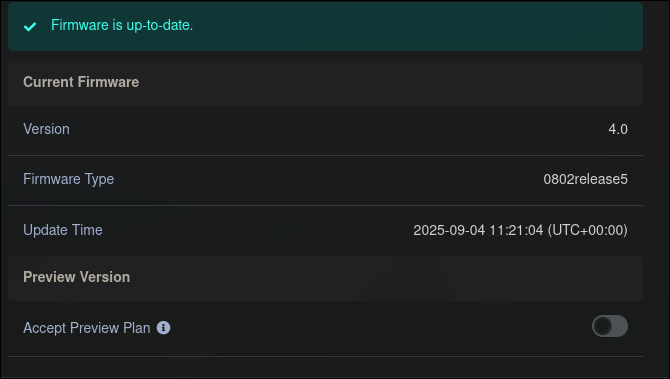
Version: 4.0
Firmware Type: 0704release5
I have upgraded the module firmware to the latest RM520NGLAAR03A04M4G
Downloaded from the following git repo:
Some info about the cell I am connected to:
gl_modem AT 'AT+QENG="servingcell"
+QENG: "servingcell","NOCONN"
+QENG: "LTE","FDD",425,03,BD802,353,1800,3,5,5,1CAD,-93,-20,-52,6,6,-20,-
+QENG: "NR5G-NSA",425,03,353,-97,4,-11,647424,78,12,1

OK
gl_modem AT 'AT+QCAINFO'
+QCAINFO: "PCC",1800,100,"LTE BAND 3",1,353,-96,-20,-51,-10
+QCAINFO: "SCC",9260,50,"LTE BAND 28",1,353,-81,-20,-50,-10,0,-,-
+QCAINFO: "SCC",647424,12,"NR5G BAND 78",353

OK
Here are my tries from the posts above:
service |  grep SMS

/etc/init.d/sms_manager            enabled         running
/etc/init.d/smstools3              enabled         running

service sms_manager restart && service smstools3 restart
Creating minimum spool directories
I will be hiding the number with "x"es
AT+CGSMS=2

OK
AT+CMGS="+xxxxxxxxxxxx"

+CMS ERROR: 304
I get ERROR 304 immediately, it doesn't wait for input
AT+CMGF=1

OK
AT+CMGS="+xxxxxxxxxxxx"

+CMS ERROR: 304
Same behaviour, I get ERROR 304 immediately, it doesn't wait for input
AT+QCFG="IMS"

+QCFG: "ims",1,0
1 Like
I have to reboot the router from the options in the top right of the routers settings page anytime i want to receive sms. it will work for a little bit again then stop at which point i have to reboot it again. really annoying because i receive alot of 2fa to this number.
Service - visible
Firmware
1 Like
Same here with my x3000 on 0704release5 and RM520NGLAAR03A03M4G (Visible, {LTE FDD, band 66}). Since rebooting fixes it it (for a while) it would be neat if we could identify whichever service/process/condition is failing and restart that instead of the whole device.
service sms_manager restart && service smstools3 restart definitely doesn’t do it.
If SMS stayed stable for 24hrs before failing I’d just reboot the router every morning at 4am or whatever.
{edited to add connection data above}
I am also tired with this SMS problem.. After paying a lot of money  (40%) as import duty, finally got this SMS problem..
Hello,
@craptor @fratermus Could you share device to GL.iNet support via Goodcloud? We'd like to have a remote check?
DM with password and other info has been sent. Thanks!
Edited to add this for onlookers: I finally narrowed down the time of failure a bit. I reboot the router this morning and started sending SMS to it every two hours:
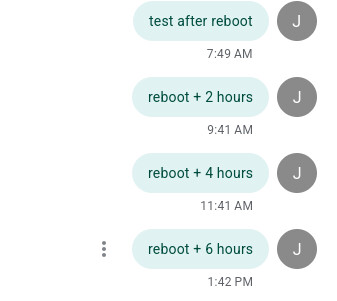
- 0740 - rebooted, received SMS
- 0940 - no SMS received
- 1140 - no SMS received
- 1340 - no SMS received
So the SMS module appears to have fallen over sometime within 2 hours of the reboot.
For completeness: same behavior on new firmware 4.8.3. Figured it was worth a try. 
Yes i also tested latest firmware 4.8.3.. but, sadly same problem SMS not working.. @Cathy
1 Like
@mdpatel and onlookers: could be a coincidence, but within a couple minutes of running the new auto_check_SMS_Visible.sh script from support my Visible connection crashed and will not reconnect. If it comes back online I will edit this post to reflect that, but until then I wouldn’t run the script.
Update: sim works fine in my phone, still won't connect in the router. I restarted the router and also pulled power for a few minutes; no change. I believe the script borked something.
Update: connection returned after several minutes from the power off reboot. Will run script again
Update: it's definitely the script. I timed it and 20 seconds after starting the script the connection drops and does not reconnect.
Hi @mdpatel, the reason of the SMS problem may vary. Regarding your SMS problem, please try the following AT commands to modify the modem config
AT+QMBNCFG="AutoSel",0
AT+QMBNCFG="Deactivate"
AT+QMBNCFG="Select", "ROW_Commercial"
Then reboot the router and see if issue persists.
- Run all AT command
- reboot router and sms working
- But, After 20-30 minutes sms stoped working
@Cathy Are you know we had already discussed much in personal message about this sms problem and also send qlog many times.
why GL.inet team still failed to figure out problem? and same problem continue in new firmware too.
Yes, I remember the problem. Your SMS problem is due to IMS registration failure, differing from other SMS issues. It is related to the modem firmware and not affected by GL firmware updates. The IMS-related code is closed source, it's difficult to determine the cause yet. Therefore, I suggested to try the AT Command method.
If the AT command method doesn't work, we still recommend upgrading modem to R03 and obtain some information for analysis.