Looks like there is a time limit on edits, so will have to update in a new comment.
When GL.iNet staff logged in via Goodcloud they were able to run the Visible test script successfully. At any rate, while running the script the SMS function has stayed stable for 48 hours so far. So there seems to be hope for folks like me and @mdpatel.
–
It’s not clear why the script worked for them and not me. The script was unchanged (same md5sum). The only difference I can see is they appear to have run it explicitly from the shell interpreter (sh auto_check_SMS_Visible.sh) instead of relying on the #!/bin/sh shebang line in the script. Since the script is not in $PATH I invoked it as ./auto_check_SMS_Visible.sh. I can’t think of a way it could make a difference but who knows. There only seems to be one sh on the system and it’s a link to busybox.
Hi sir, confirmed that new gl firmware has not modified the SMS function code. Previous logs indicated that your SMS issues were caused by IMS authentication failures. However, the root cause was not identified, as the modem firmware remains on the relatively old R01 branch.
To further investigate the issue, we recommend updating your device's modem firmware to the latest version, which may provide more detailed information for diagnosis. Would you mind to update it to try?
Borther, i had already told you that in our discussion why i am using R01 branch firmware. the main reason is unstable internet when use R03 firmware. R01 firmware is provide 100% stable internet, no single disconnect. my current firmware is latest from R01 branch.
“I still don’t understand why SMS stopped working after the GL.iNet firmware update, even when using the same module firmware.”
@Cathy I just again tested R03 Firmware (RM520NGLAAR03A04M4G_A0.301.A0.301).
But, i got unstable internet.
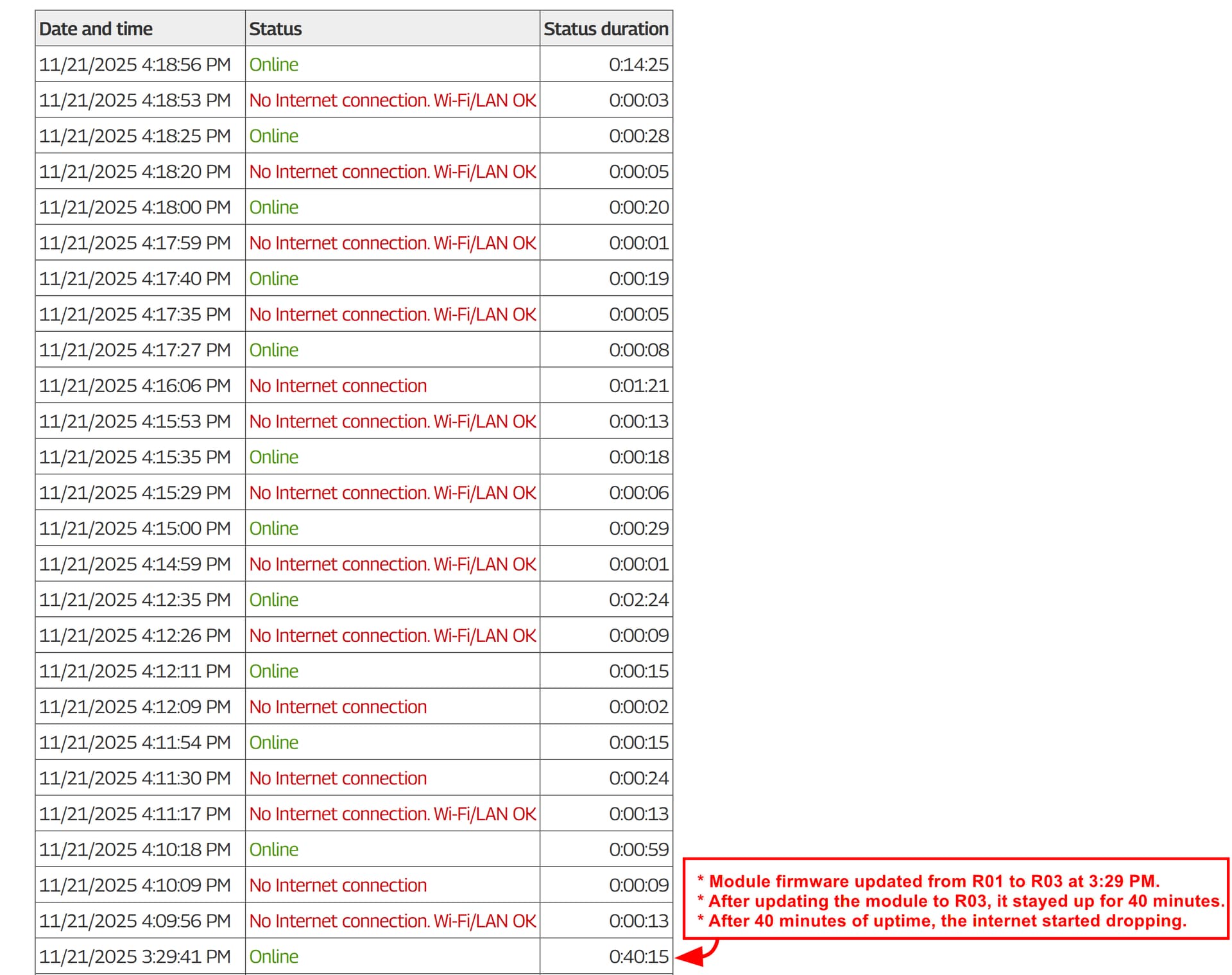
Module firmware updated from R01 to R03 at 3:29 PM.
After updating the module to R03, it stayed up for 40 minutes.
After 40 minutes of uptime, the internet started dropping. and Also internet speed fluctuate, some time very very slow internet speed and high ping time..
* Same problem faced by other user too with R03, and also discussed with you in this forum.
The script appears to be tailored for my US-only carrier (Visible). I don’t think it’s mine to give; perhaps the GL staff can roll one for your carrier.
Hi @mdpatel Besides updating firmware, re-configuring the APN and rebooting the modem, we didn't make any other changes. The SMS problem with @fratermus has not occurred recently, I suspect the previous issue was due to the operator side such as the network policy. I don't think the SMS script help with that.
Although your SMS issue appears similar, the underlying causes may differ. Would you mind to share device with us again to check the settings?
Then it’s an amazing coincidence. With the script running the SMS was stable for over a week. I just rebooted to stop the script and SMS failed within 2 hours just like before. IOW, the only time SMS worked right was when GL statf started the script.
Is it possible that the script’s periodic status checks (IMS, IP, etc) are enough to keep SMS working, whether the underlying problem is at the router or the carrier?
Edit: I rebooted again and tested the theory I mentioned in a previous post that the script broke my connection when I invoked it directly and kept connection when GL apparently ran it with an explicit call to sh. I called it with sh and the connection was fine. SMS worked after reboot (as usual) and I’m setting a timer for 2 hours to check again.
Edit after three hours: the script itself died with a Killed message and SMS did not work. I restarted the script (no router reboot) and SMS working again. Will try again in 2 more hours.
Edit: after another 2 hours SMS continues to work with the script running. I have no idea why this is.
It didn't occur until the next reboot, at which time the problem returned.
I think I understand why the testing script (auto_check_SMS_Visible.sh) kept/keeps SMS alive on my router: it toggles the modem ON/OFF when it first runs. Reformatted for legibility:
# off
gl_modem -B $BUS AT AT+CFUN=0
sleep 1
# back on
gl_modem -B $BUS AT AT+CFUN=1
For whatever reason on my X3000 a modem reset keeps Visible SMS running (or restores SMS after it has died). Having those AT commands in the test script accidentally made the problem disappear; a Heisenbug.
For testing I'm dorking around with a smaller script called from /etc/rc.local.
More info in this blog entry since there is a time limit on edits here.
If you use that script, related qlog files will be stored in the same folder when the SMS problem occurs again. Could you share these qlogs with us for checking?
I no longer use auto_check_SMS_Visible.sh so no QLOG data is available. I don't thiink the QLOG would show anything anyhow because auto_check_SMS_Visible.sh was preventing the problem as described in this comment.
The only thing I've found so far that works consistently & automatically is to toggle the modem with CFUN when QIMSCFG="ims_status" detects IMS failure. To that end I'm running a watchdog script from /etc/rc.local as described in this blog post.
CFUN knocks the whole connection offline so I'd like to find a more elegant solution. I tried to toggle PDP context 1 (IMS on Verizon-based networks) on/off with CGACT. I was hoping that it force IMS to start working again but it errors when I try to deactivate it.
I found something important related to the SMS issue with the newer GL-X3000 firmware.
1. The main problem:
After the router boots, SMS works for a short time and then stops after a few hours because IMS is not registered properly. The IMS APN has no IP.
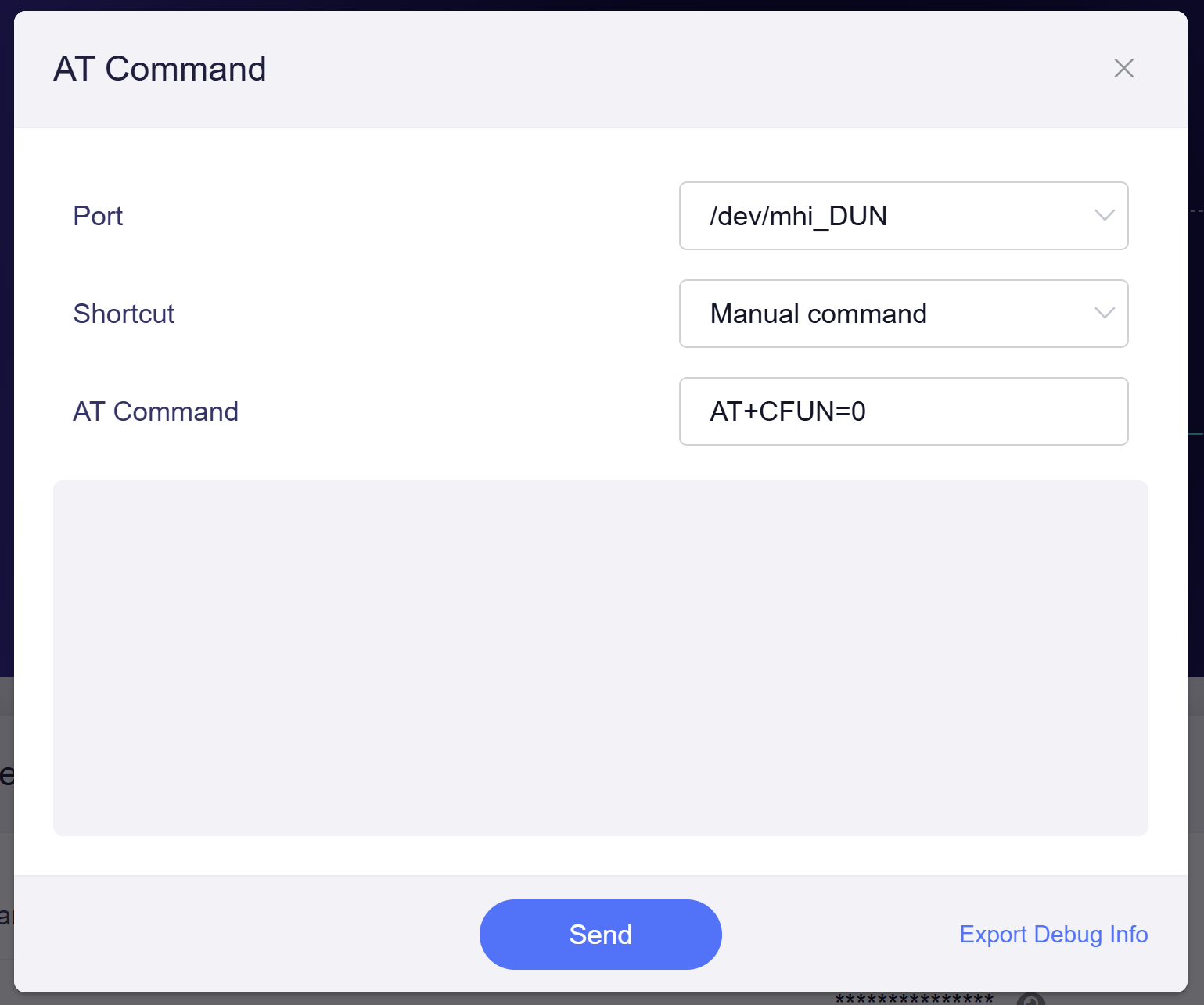
But if I manually run (on GL GUI) :
AT+CFUN=0
AT+CFUN=1
after the router finishes booting or any time, then IMS registers correctly and SMS works perfectly for many hours (24+ hours). and still continue sms working…
So the issue is with the modem initialization that happens during boot.
2. Difference I noticed between firmware versions:
Starting from firmware 4.4.11, 4.4.12, 4.4.13, the internet connection comes up very quickly after reboot.
But in 4.4.9 and older firmware, the internet starts slowly after reboot.
This makes me think the new firmware starts the modem/QMI connection too fast, before the modem and IMS are fully ready. Because of this early attach, IMS fails and later SMS stops working.
When I run CFUN manually after boot, everything works correctly — this proves initialization timing is the issue.
So May Be the problem is likely: “Modem attaches to network too early in new firmware → IMS not ready → SMS stops working.”