It would be nice if under "Specified connection type", we could address Tailscale-connected clients as well. As of now, by default, it seems that none of the policies specified in the new VPN dashboard apply to remote Tailscale clients. Their traffic, if routed through the GL router as a TS exit node, always goes directly to the internet from the router.
1 Like
Could you please share screenshot for the your VPN dashboard?
This is a situation where:
- VPN server = SERVERNAME
- Certain specific devices access EVERYTHING - Tunnel1
- All other devices access only a subset of the Internet (domains 1.....N excluded).- Tunnel2
The picture is quite clear in my mind.
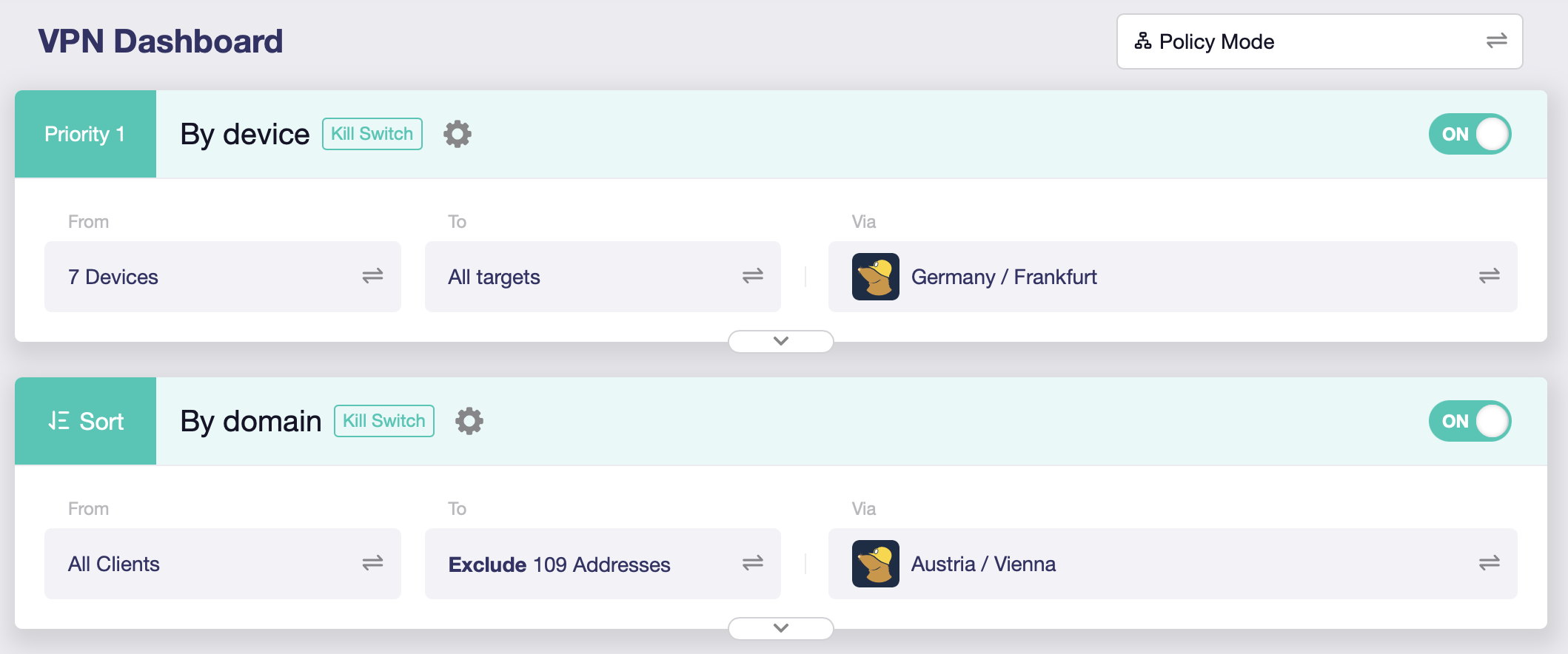
This setup works because the servers are different. If I set both tunnels to the same server the devices targeted in tunnel 1 lose their connection. It is 100% reproducible. Try for yourself.
Yes, my initial explanation was sufficient for someone to reproduce the bug. Maybe now that I provided an additional screenshot it will be done.
Can you comment on the performance impact of running multiple VPN clients in parallel?
I noted a problem when devices in the Guest Network need to communicate with a device in another network segment, e.g. LAN and how the traffic by default gets routed to the VPN.
The script below works around this, perhaps this is by design I am not sure; but it does not seem logical to me that when traffic traverses different zones it would be routed to the VPN by default.
Here’s a simple breakdown of what was happening:
-
VPN Connects: The rtp2.sh script runs and creates a very powerful routing rule in the TUNNEL10_ROUTE_POLICY chain. This rule essentially says: "Any traffic that gets here should be marked and sent through the VPN tunnel."
-
Local Traffic is Hijacked: In my case; I am running Proxmox on a host in my LAN subnet 192.168.8.0 and in turn Home Assistant is running in an Overlay SDN network on 192.168.11.0; some IOT devices reside in the Guest network and need to be accessed but the only way to do this is through the Proxmox host on 192.168.8.0 (LAN) then into 192.168.9.0 (GUEST), but it was failing on the return path due to the rtp2.sh script.
-
Sent to the Wrong Place: Instead of being routed locally from the LAN to GUEST network, the router marked the packet and sent it out the VPN tunnel.
-
Packet is Dropped: The VPN provider received a packet destined for a private IP address that only exists on the local network. It has no idea where to send it, so it simply drops the packet.
The result was 100% packet loss because local traffic was taking an unnecessary trip to the internet and getting lost.
Hotfix
Hotplug script fixes this by inserting rules at the very top of the TUNNEL10_ROUTE_POLICY chain that say:
"Before anything else, check the destination. If the packet is going to a local IP address (like 192.168.x.x), then RETURN it to the normal routing process. Do not send it to the VPN."
This creates an exception that allows local traffic to be handled correctly by the router, while all other internet-bound traffic continues to go through the VPN as intended.
#!/bin/ash

# This function adds rules to the VPN policy chain to exclude private IP ranges,
# ensuring local traffic is not routed through the VPN.
patch_vpn_policy() {
    logger -t ha-custom "VPN interface is up. Waiting for TUNNEL10_ROUTE_POLICY to be created..."

    # Wait for up to 20 seconds for the main routing script to create the chain.
    # This avoids a race condition during firewall reloads or VPN reconnections.
    i=0
    while [ $i -lt 20 ]; do
        # Check if the chain exists in the mangle table.
        if iptables -t mangle -L TUNNEL10_ROUTE_POLICY >/dev/null 2>&1; then
            logger -t ha-custom "TUNNEL10_ROUTE_POLICY found. Applying LAN bypass rules."

            # The chain exists, insert our rules.
            # Use -C to check if the rule exists before inserting to avoid duplicates.
            iptables -t mangle -C TUNNEL10_ROUTE_POLICY -d 192.168.0.0/16 -j RETURN >/dev/null 2>&1 || iptables -t mangle -I TUNNEL10_ROUTE_POLICY 1 -d 192.168.0.0/16 -j RETURN
            iptables -t mangle -C TUNNEL10_ROUTE_POLICY -d 172.16.0.0/12 -j RETURN >/dev/null 2>&1 || iptables -t mangle -I TUNNEL10_ROUTE_POLICY 2 -d 172.16.0.0/12 -j RETURN
            iptables -t mangle -C TUNNEL10_ROUTE_POLICY -d 10.0.0.0/8 -j RETURN >/dev/null 2>&1 || iptables -t mangle -I TUNNEL10_ROUTE_POLICY 3 -d 10.0.0.0/8 -j RETURN

            logger -t ha-custom "Successfully patched TUNNEL10_ROUTE_POLICY."
            return 0
        fi

        # Increment counter and wait for 1 second before checking again.
        i=$((i+1))
        sleep 1
    done

    logger -t ha-custom "ERROR: Timed out waiting for TUNNEL10_ROUTE_POLICY chain. Patch failed."
    return 1
}

# The hotplug script is triggered for all interface events.
case "$INTERFACE" in
    "wgclient1")
        if [ "$ACTION" = "ifup" ]; then
            # The VPN just connected. Run the patch function in the background.
            patch_vpn_policy &
        fi
        ;;
    "guest")
        if [ "$ACTION" = "ifup" ]; then
            # Optimize guest network route priority.
            ip route change 192.168.9.0/24 dev br-guest proto kernel scope link src 192.168.9.1 metric 0
        fi
        ;;
esac
I do not know if this will be of use to someone, I save the file in "/etc/hotplug.d/iface/"
1 Like
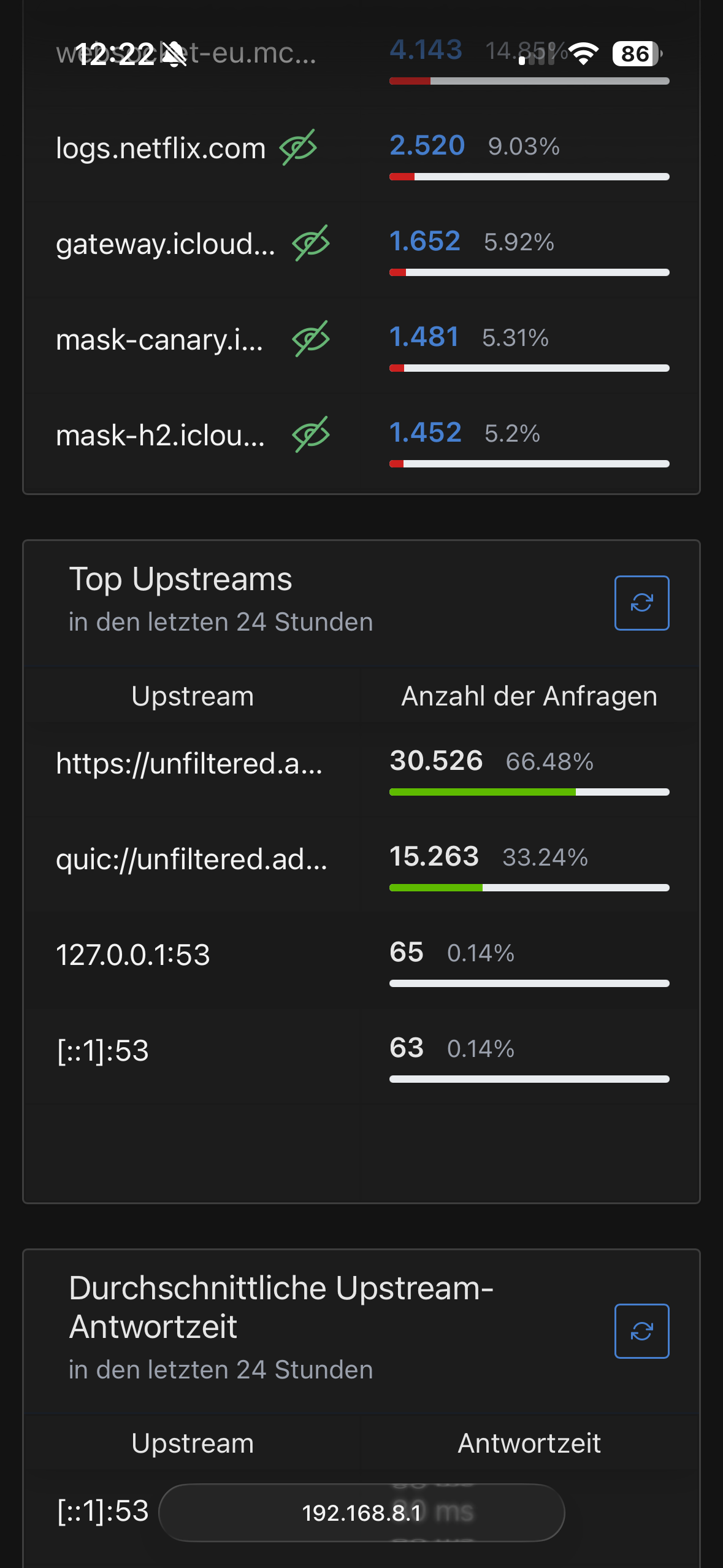
I think AG is reopening port 53. It happened right at the beginning with the beta. Now, with the latest snapshot, it's back. It has nothing to do with AG rebooting, as there have been 50 requests via port 53 in the last 24 hours.
Unable to connect a Raspberry Pi 3 to the wireless connection with latest 4.8.1 beta snapshot. Previous versions worked. It's only a Raspberry Pi 3 that is unable to connect but it is critical to my solar setup so I reverted to a previous version.
Log:Mon Aug 18 21:29:19 2025 kern.warn kernel: [ 569.443085]
Mon Aug 18 21:30:07 2025 kern.warn kernel: [ 617.068719] 7981@C08L2,ap_peer_disassoc_action() 3645: ASSOC - 1 receive DIS-ASSOC request
Mon Aug 18 21:30:07 2025 kern.warn kernel: [ 617.077035] 7981@C01L2,wifi_sys_disconn_act() 1002: wdev_idx=0
Mon Aug 18 21:30:07 2025 kern.notice kernel: [ 617.083246] 7981@C08L3,hw_ctrl_flow_v2_disconnt_act() 172: wdev_idx=0
Mon Aug 18 21:30:07 2025 kern.warn kernel: [ 617.090464] 7981@C13L2,MacTableDeleteEntry() 1938: Del Sta:b8:27:eb:63:06:30
Mon Aug 18 21:30:39 2025 kern.debug kernel: [ 648.789722] entrytb_aid_aquire(): found non-occupied aid:4, allocated from:4
Mon Aug 18 21:30:39 2025 kern.warn kernel: [ 648.796786] 7981@C13L2,MacTableInsertEntry() 1577: New Sta:b8:27:eb:63:06:30
Mon Aug 18 21:30:39 2025 kern.notice kernel: [ 648.807744] 7981@C08L3,ap_cmm_peer_assoc_req_action() 1714: Recv Assoc from STA - b8:27:eb:63:06:30
Mon Aug 18 21:30:39 2025 kern.notice kernel: [ 648.817066] 7981@C08L3,ap_cmm_peer_assoc_req_action() 2241: ASSOC Send ASSOC response (Status=0)...
Mon Aug 18 21:30:39 2025 kern.notice kernel: [ 648.826161] 7981@C01L3,wifi_sys_conn_act() 1115: wdev idx = 0
Mon Aug 18 21:30:39 2025 kern.notice kernel: [ 648.832193] 7981@C08L3,hw_ctrl_flow_v2_connt_act() 215: wdev_idx=0
Mon Aug 18 21:30:39 2025 kern.notice kernel: [ 648.959326] 7981@C15L3,WPABuildPairMsg1() 5310: <=== send Msg1 of 4-way
Mon Aug 18 21:30:39 2025 kern.notice kernel: [ 648.990444] 7981@C15L3,PeerPairMsg2Action() 6303: ===>Receive msg 2
Mon Aug 18 21:30:39 2025 kern.notice kernel: [ 648.997233] 7981@C15L3,WPABuildPairMsg3() 5595: <=== send Msg3 of 4-way
Mon Aug 18 21:30:39 2025 kern.notice kernel: [ 649.007748] 7981@C15L3,PeerPairMsg4Action() 6734: ===>Receive msg 4
Mon Aug 18 21:30:39 2025 kern.warn kernel: [ 649.019328] 7981@C15L2,PeerPairMsg4Action() 7098: AP SETKEYS DONE(ra0) - AKMMap=WPA2PSK, PairwiseCipher=AES, GroupCipher=AES, wcid=1 from b8:27:eb:63:06:30
Mon Aug 18 21:30:39 2025 kern.warn kernel: [ 649.019328]
Mon Aug 18 21:32:38 2025 kern.warn kernel: [ 768.030123] 7981@C08L2,ap_peer_disassoc_action() 3645: ASSOC - 1 receive DIS-ASSOC request
Mon Aug 18 21:32:38 2025 kern.warn kernel: [ 768.038462] 7981@C01L2,wifi_sys_disconn_act() 1002: wdev_idx=0
Mon Aug 18 21:32:38 2025 kern.notice kernel: [ 768.044702] 7981@C08L3,hw_ctrl_flow_v2_disconnt_act() 172: wdev_idx=0
Mon Aug 18 21:32:38 2025 kern.warn kernel: [ 768.051958] 7981@C13L2,MacTableDeleteEntry() 1938: Del Sta:b8:27:eb:63:06:30
Thank you very much for your further clarification!
I think this is not a bug, but the current firmware does not support "multiple tunnels to same one server".
Please let me know about the scenario of this requirement, the reason why do you request this.
same, about in Q3 2025.
Unfortunately, no, the GL firmware is maintained (update features) based on the current op version of each model.
There are certain performance requirements in policy mode. This is the reason why some older models may not be upgraded to 4.8 to support multi-tunnel.
The sum of multiple tunnel speed can be close to the advertised VPN speed. BTW, advertised VPN speed is measured in "global mode".
1 Like
It seems that WiFi was disconnected by the Raspberry Pi.
-
Please try to delete the recorded/saved WiFi information on the RPi and reconnect.
-
Are your other wireless devices connected to MT3000 normally?
(you didn't mention model, I just saw the kernel log is MT7981, probably MT3000, X3000, XE3000) -
Try downgrading the MT3000 to the previous firmware version. Can the RPi be connected?
Different models have different op versions, please refer to:
And maintain their current op version to update the GL firmware function.
1 Like
Hi,
Thank you very much for your feedback!
We attach great importance to your feedback and R&D will be resolved in the codes.
I think this issue will be improved in the next firmware version.
Hi, if it is a missing feature and not a bug, then you should implement an error message rather than silently blocking all devices on the first of two tunnels to the same server. The reason a same-server multiple tunnel setup is of interest is to maintain the same VPN-IP while combining different types of policies (in this case, inclusions and exclusions by device and by domain). Some finance-related websites don't like VPNs in general so I need a domain-based VPN exclusion for them. Others accept VPNs but don't like concurrent connections from IPs which are far apart geographically as that makes it look like an account is being used by different people. For this case a same-IP-VPN setup is best.
1 Like
In regards to the issue that I am having with my RPi not connecting to lastest beta snapshop release for the GL-X3000:
- The RPi is headless so I don't have an easy way to connect it to a monitor for networking configuration. It is being used with Victron's VenusOS.
- All other wireless devices connect to the GL-X3000 without issue as far as I can tell. It's just the RPi not connecting.
- As soon as I downgraded to the Beta version dated 8-15-25, the RPi connected right away. I then upgraded back to 8-18-25 and lost all connection again. Downgraded back to 8-15-25 and connection is established immediatly again. Something with authentication has changed between these versions it would appear.
I am more than happy to try to remove the wifi connection on the RPi and try to re-establish a new connection. It just seems that between the log files and the behavior of the RPi, it is more likely to be something in the firmware. I'll definitly give it another try when time allows.
EDIT: I was able to remove wifi connection on the RPi and re-establish a new wifi connection after upgrading to the latest beta/snapshot realease. It seems that it is working just fine even after a couple of reboots. I appreciate your suggestion and help with this.
1 Like
I just noticed that the vpn policy isn't working in the op24 vpn dashboard in my BerylAX, but the Global Mode is working. Maybe the devs can use the Policy-based routing package to integrate it on VPN Dashboard's policy routing to make it work
1 Like
MT3000 (beryl AX) already receive 4.8.1 stable.
What about to share some love to other router too? Flint 2 is stuck to 4.7.7 and a lot of betas (4.8.0) or op24 RC/beta.... a 4.8.0 stable with the classic stable openwrt 21 will be a good start for now.... flint 1 has 4.8.2 now (beta).
1 Like
I observed a very concrete issue with 4.8.0-op24 (beta2) on Flint2:
- The self-signed certificate created at boot seems to be using the LAN IP of the guest network. I don't think this is expected behavior, as this means users on the main network cannot add the certificate to trusted ones, since there is a host mismatch between main LAN IP and certificate IP.
Steps to reproduce:
- Activate Guest Network
- Set IP to e.g. range 192.168.3.1
- Reboot Flint2
- Certificate can be viewed e.g. via firefox when connecting to router via HTTPS
Or is this intended behavior for some reason?