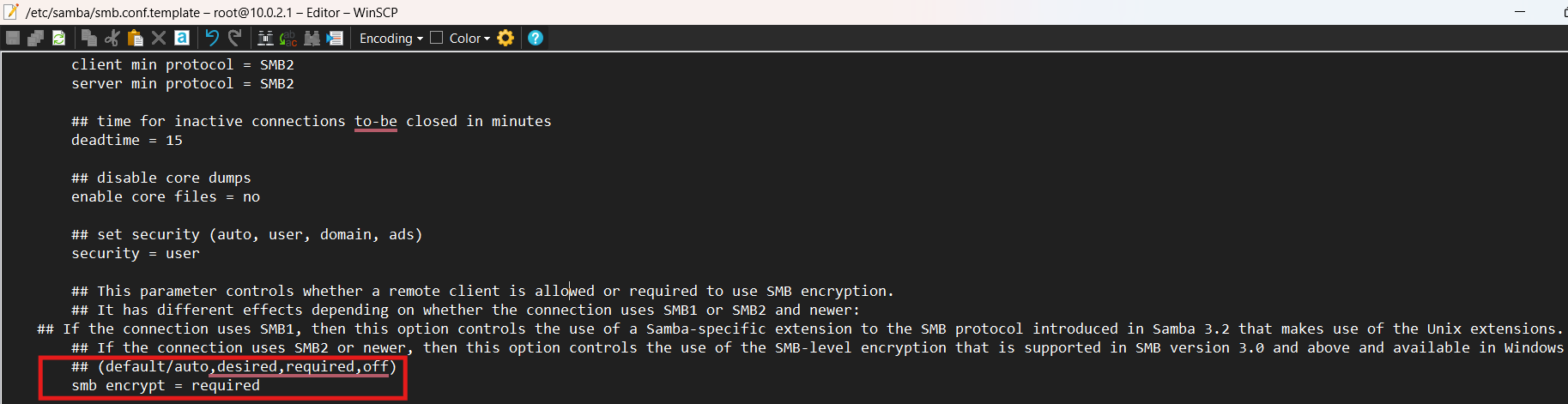
Can you guys fix your Samba4 config in /var/etc/smb.conf and edit the "smb encrypt = required" to "smb encrypt = auto" so it can work to Samsung's file expolorer and other apps? some apps like X-plore can't connect on a Samba4 server
I see that the Flint 2 firmware version 4.8.1 is now a release candidate. Here goes…
Update:
I installed the 4.8.1 release candidate firmware on my Flint 2 and it disabled my current client VPN setup obviously because of the new multi-VPN client features. Since I was in Customized Routing Rules before, I changed the VPN Client Policy Mode settings from the default Global Mode to Policy Mode, selected the client VPN I was using as the new Policy and re-added my static destination IP routes to the Tunnel Policy. VPN is up and running again.
I have just noticed the same symptoms that I suspected was an issue with SMB config. The SMB share is accesible via a windows 11 client, but not via the samsung Files SMB client on a galaxy s24. Anonymous access works on the s24, but doesn't when setup using credentials. I was going to hunt around in the smb.conf, but strongly suspect this is the same issue.
Btw, if you need to make this permanently so it can survive in restart, you need to edit /etc/samba/smb.conf.template4 and edit that line that I mentioned in my first post. Restarting the samba4 service(/etc/init.d/samba4 restart) doesn't work, you need to restart your router after editing the smb.conf.template4. Why not edit the /var/etc/smb.conf you ask? it doesn't work for some reasons...
EDIT: Nevermind, found out something has changed and you can't have restricted subnet's in the AllowedIPs of your config. Must use 0.0.0.0/0, ::/0 and then use the VPN dashboard to restrict what subnets go where.
Some weirdness with 4.8.1 beta on Flint 2, with Wireguard tunnel enabled in policy mode. Adguard home doesn't get connection to the internet. "Test upstreams" button and trying to update lists doesn't work.
But somehow it can still resolve DNS.
If I turn off Wireguard client connection Adguard home test upstreams button and updating lists work again.
Anyone else seeing this?
Logs show, doesn't matter what upstream I put it fails.
Wed Aug 27 14:08:36 2025 user.notice AdGuardHome[30251]: 2025/08/27 14:08:36.084081 ERROR response received addr=tls://1.1.1.1:853 proto=tcp status="reading response from tls://1.1.1.1:853: read tcp 192.168.1.254:49662->1.1.1.1:853: i/o timeout"
Wed Aug 27 14:13:57 2025 user.notice AdGuardHome[30251]: 2025/08/27 14:13:57.724527 [error] dnsproxy: exchange failed upstream=tls://1.1.1.1:853 question=";raw.githubusercontent.com.\tIN\t A" duration=10.000767754s err="getting conn to tls://1.1.1.1:853: connecting to 1.1.1.1: dial tcp 1.1.1.1:853: i/o timeout"
Wed Aug 27 14:13:57 2025 user.notice AdGuardHome[30251]: 2025/08/27 14:13:57.724509 [error] dnsproxy: exchange failed upstream=tls://1.1.1.1:853 question=";raw.githubusercontent.com.\tIN\t AAAA" duration=10.00077969s err="getting conn to tls://1.1.1.1:853: connecting to 1.1.1.1: dial tcp 1.1.1.1:853: i/o timeout"
Wed Aug 27 14:14:07 2025 user.notice AdGuardHome[30251]: 2025/08/27 14:14:07.726206 [error] dnsproxy: exchange failed upstream=tls://1.0.0.1:853 question=";raw.githubusercontent.com.\tIN\t A" duration=10.001492581s err="dialing tls://1.0.0.1:853: connecting to 1.0.0.1: dial tcp 1.0.0.1:853: i/o timeout"
Wed Aug 27 14:14:07 2025 user.notice AdGuardHome[30251]: 2025/08/27 14:14:07.726206 [error] dnsproxy: exchange failed upstream=tls://1.0.0.1:853 question=";raw.githubusercontent.com.\tIN\t AAAA" duration=10.001399173s err="dialing tls://1.0.0.1:853: connecting to 1.0.0.1: dial tcp 1.0.0.1:853: i/o timeout"
Wed Aug 27 14:14:07 2025 user.notice AdGuardHome[30251]: 2025/08/27 14:14:07.726693 [error] filtering: updating filter from url "https://raw.githubusercontent.com/hagezi/dns-blocklists/main/adblock/tif.medium.txt": reading from url: Get "https://raw.githubusercontent.com/hagezi/dns-blocklists/main/adblock/tif.medium.txt": resolving "raw.githubusercontent.com": all upstreams failed to exchange request: getting conn to tls://1.1.1.1:853: connecting to 1.1.1.1: dial tcp 1.1.1.1:853: i/o timeout dialing tls://1.0.0.1:853: connecting to 1.0.0.1: dial tcp 1.0.0.1:853: i/o timeout all upstreams failed to exchange request: getting conn to tls://1.1.1.1:853: connecting to 1.1.1.1: dial tcp 1.1.1.1:853: i/o timeout dialing tls://1.0.0.1:853: connecting to 1.0.0.1: dial tcp 1.0.0.1:853: i/o timeout
Wed Aug 27 14:14:17 2025 user.notice AdGuardHome[30251]: 2025/08/27 14:14:17.728578 [error] dnsproxy: exchange failed upstream=tls://1.0.0.1:853 question=";small.oisd.nl.\tIN\t A" duration=10.001154965s err="getting conn to tls://1.0.0.1:853: connecting to 1.0.0.1: dial tcp 1.0.0.1:853: i/o timeout"
Wed Aug 27 14:14:17 2025 user.notice AdGuardHome[30251]: 2025/08/27 14:14:17.728578 [error] dnsproxy: exchange failed upstream=tls://1.1.1.1:853 question=";small.oisd.nl.\tIN\t AAAA" duration=10.001173524s err="getting conn to tls://1.1.1.1:853: connecting to 1.1.1.1: dial tcp 1.1.1.1:853: i/o timeout"
Wed Aug 27 14:14:27 2025 user.notice AdGuardHome[30251]: 2025/08/27 14:14:27.730023 [error] dnsproxy: exchange failed upstream=tls://1.1.1.1:853 question=";small.oisd.nl.\tIN\t A" duration=10.001250812s err="getting conn to tls://1.1.1.1:853: connecting to 1.1.1.1: dial tcp 1.1.1.1:853: i/o timeout"
Wed Aug 27 14:14:27 2025 user.notice AdGuardHome[30251]: 2025/08/27 14:14:27.730023 [error] dnsproxy: exchange failed upstream=tls://1.0.0.1:853 question=";small.oisd.nl.\tIN\t AAAA" duration=10.001169032s err="getting conn to tls://1.0.0.1:853: connecting to 1.0.0.1: dial tcp 1.0.0.1:853: i/o timeout"
Wed Aug 27 14:14:27 2025 user.notice AdGuardHome[30251]: 2025/08/27 14:14:27.730507 [error] filtering: updating filter from url "https://small.oisd.nl": reading from url: Get "https://small.oisd.nl": resolving "small.oisd.nl": all upstreams failed to exchange request: getting conn to tls://1.0.0.1:853: connecting to 1.0.0.1: dial tcp 1.0.0.1:853: i/o timeout getting conn to tls://1.1.1.1:853: connecting to 1.1.1.1: dial tcp 1.1.1.1:853: i/o timeout all upstreams failed to exchange request: getting conn to tls://1.1.1.1:853: connecting to 1.1.1.1: dial tcp 1.1.1.1:853: i/o timeout getting conn to tls://1.0.0.1:853: connecting to 1.0.0.1: dial tcp 1.0.0.1:853: i/o timeout
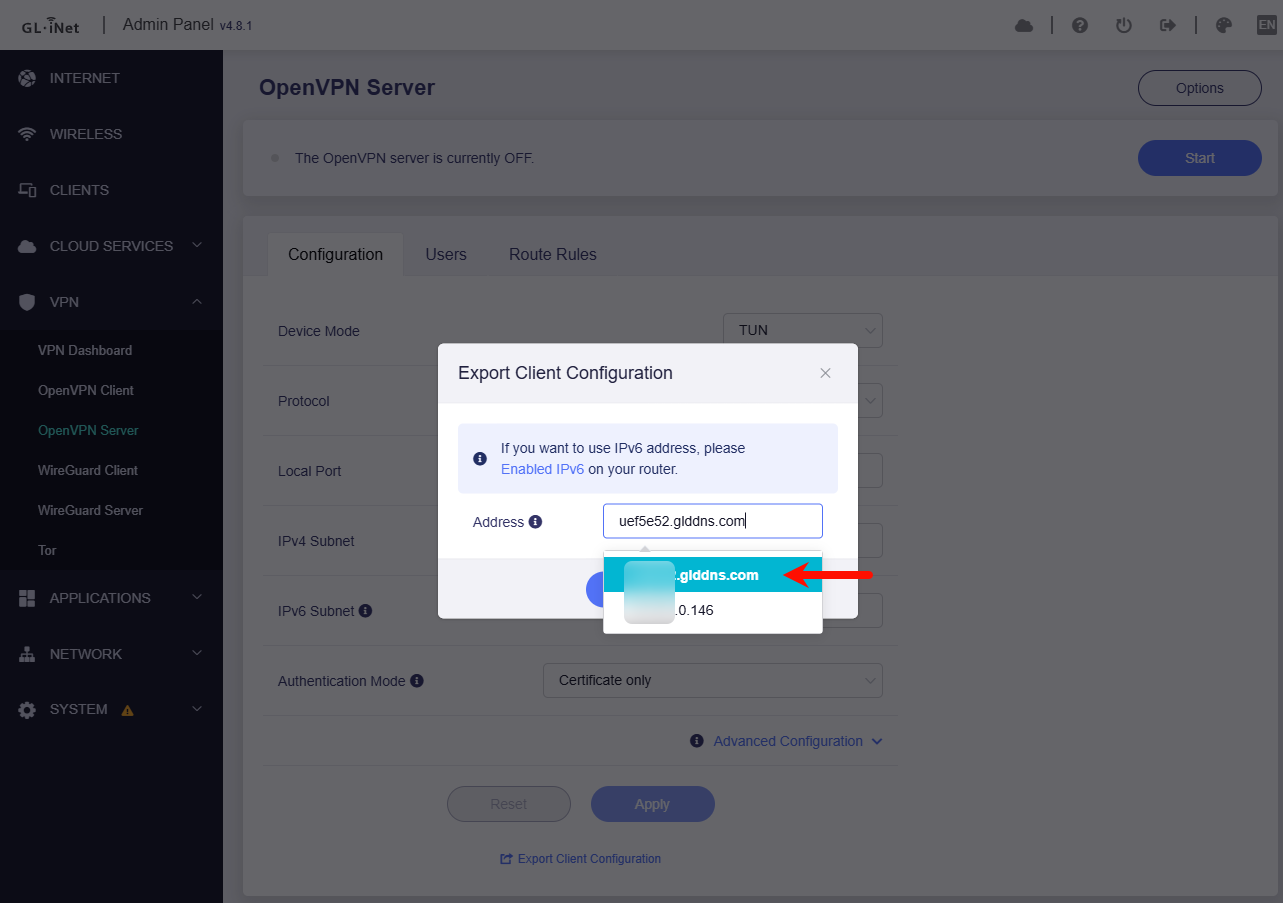
Optimized the export of client configuration files for the VPN Server, allowing users to manually enter the server address in the configuration file.
@bruce I upgraded to the 4.8.1 release candidate on my Flint 2 and noticed that the OpenVPN Server export client configuration shows the IP address without any checkbox selection to use the DDNS hostname instead. Since I do not get a static internet address from my ISP, could the DDNS checkbox option for the OpenVPN client configuration export be added back to the 4.8.x version GUI like it was on previous versions please? I know I can just copy and paste the DDNS hostname into the box, but the checkbox was much more convenient and super easy to use.
Op24 Runs much better as the Beta 4.8.1 on my flint 2 and iPhone 14 with the Beta I Need always reload websites or Apps have buffering Trouble but with the op24 no Problem