OpenVPN - how to control access to network resources based on username

I have a Flint AX1800 running OpenVPN server in the username/password only mode.

How can I control access to network resources inside the Flint LAN based on the username of the VPN user?

I think the version of OpenVPN Access Server I have running on an Ubuntu box can do this with group memberships, but I’m not seeing anything like that on this implementation.

I have set up the CCD directory and files to create tunnel endpoint address reservations so I can create a return routing rule to access LAN resources inside a remote Slate (think site-to-site).

Maybe I need to use a firewall traffic rule to block critical resources.

I think I’d rather have no access for anybody by default and then allow only considered user endpoint address to have access.

Anybody doing this?

John

Since the Flint AX1800 uses a standard OpenWrt-based OpenVPN implementation rather than the enterprise "Access Server" web UI, you won't find native group-based permission toggles. Your strategy of using Client Config Directives (CCD) to assign static internal tunnel IPs (e.g., 10.8.0.10 for User A, 10.8.0.20 for User B) is exactly the right foundation. To achieve a "deny-by-default" posture, you should create Traffic Rules under Network -> Firewall. Set a global rule to drop traffic from the VPN zone to the LAN zone, then create specific "Allow" rules where the Source IP matches the fixed tunnel address of the authorized user and the Destination IP/Port matches your sensitive resource.

I tried this and am not having any luck.

I have turned off masquerading on the ovpnserver zone in the firewall so there is routing all the way across the tunnel.

I do not have any subnet IP address overlaps.

The CCD DHCP reservation for the tunnel endpoint on the client is working.

I have set up routing from the Flint to the Slate LAN with a routing rule directing traffic to the reserved tunnel endpoint and that works.

I am using Policy routing instead of Global on the Slate.

I built a route on the Slate for all Slate LAN traffic heading for the Flint LAN should go to the VPN tunnel. This works.

This creates a split-tunnel situation where traffic headed for the Internet goes out the WAN of the Slate and not into the VPN tunnel. This works.

On the Slate Luci Firewall I removed the Guest zone as being allowed to forward to the ovpnclient zone. So Guest traffic must go out the WAN to the Internet and not back into the VPN tunnel. This works.

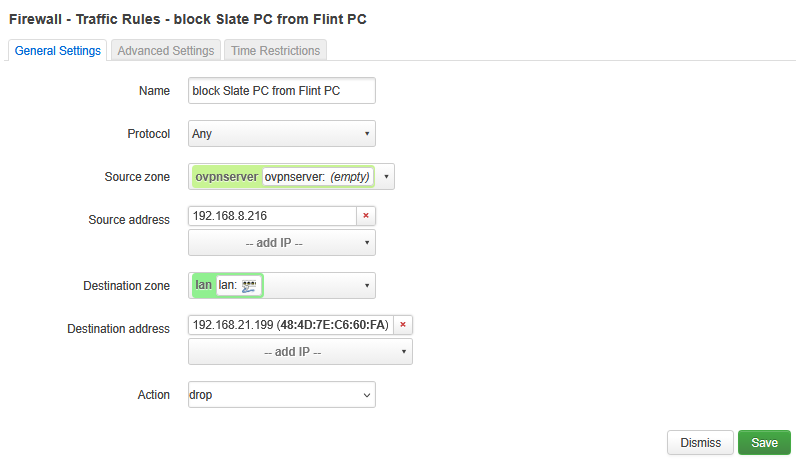
Now… As a first test so I could understand the Luci firewall traffic rule configuration, I was attempting to block traffic from 1 specific computer on the Slate LAN from reaching 1 specific computer on the Flint LAN.

I want other Slate LAN computers to still be able to reach the Flint LAN.

I want the specific computer on the Slate LAN to reach other computers on the Flint LAN.

The test is to block traffic originating from the Slate LAN PC 192.168.8.216 from reaching the Flint LAN PC at 192.168.21.199

On the Flint Luci Firewall settings I created a traffic rule.

But this does not stop pings from 192.168.8.216 to 192.168.21.199

I even moved the rule to the first position of the rules list.

I also stopped the VPN server on the Flint and the VPN client on the Slate. And restarted them.

Still no luck.

I’m missing something.

John
Hi

You can try installing tcpdump on the router to capture packets and see what’s happening.

opkg update && opkg install tcpdump
tcpdump -i any icmp and ip host 192.168.8.216

If you’ve already covered all the configurations, you should also disable the VPN client’s IP Masquerading feature on the Slate. Otherwise, the source IP of devices on the Slate LAN will be NATed to the VPN IP.

Since you didn’t specify the firmware version, this option should generally be found in the Admin Panel under VPN → VPN Dashboard.