Brilliant thank you like the compression that will come in handy on my GL-AXT1800 Slate AX 
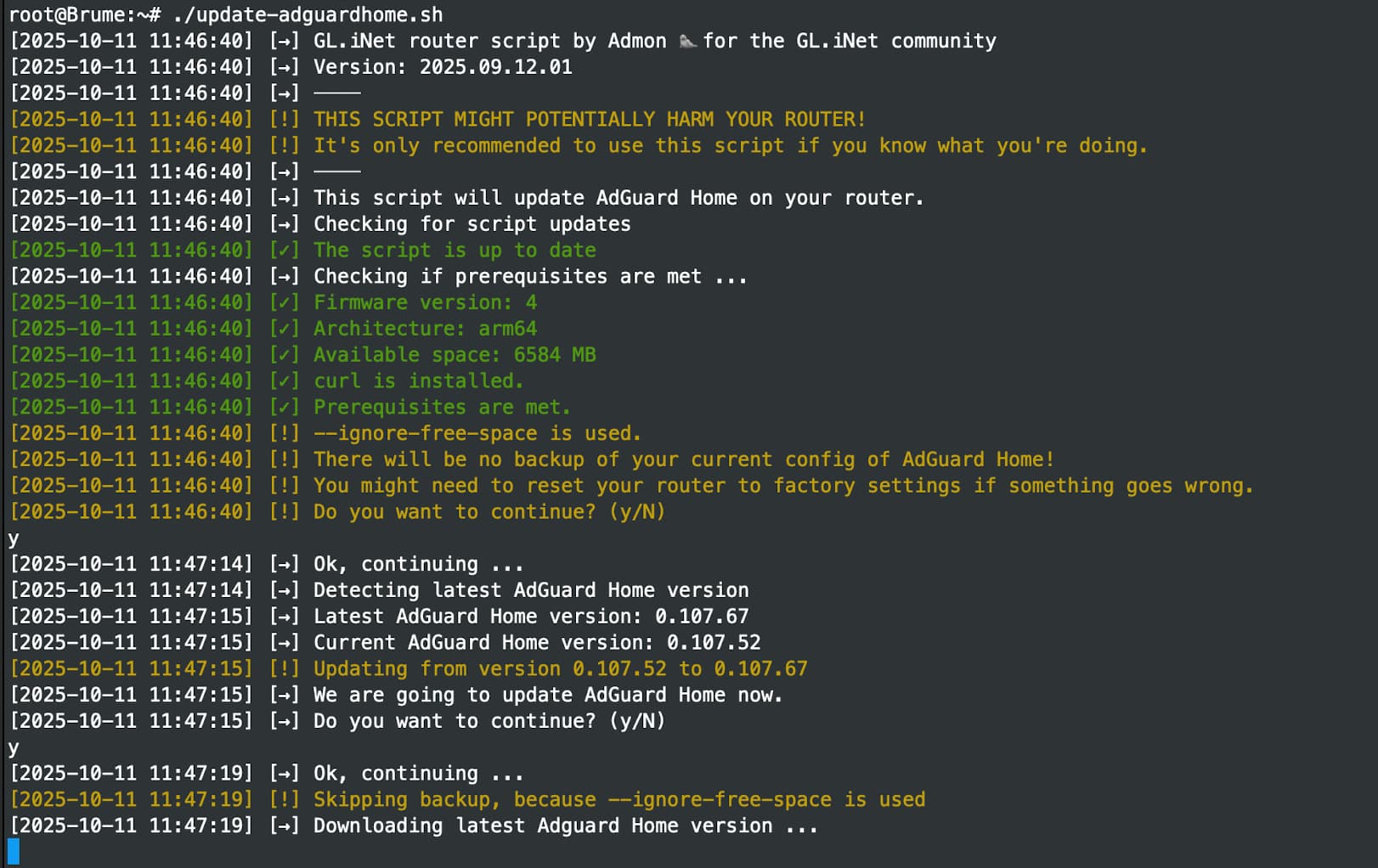
@admon hey there, I’m trying to use this script, but it just sits on Downloading latest Adguard Home version ... with and without space check (Brume 2 has 8gb )
I can see the downloaded copy in /tmp/AdGuardHomeNew
Any thoughts?
root@Brume:~# ls -la /tmp
drwxrwxrwt 33 root root 1080 Oct 11 11:49 .
drwxr-xr-x 1 root root 3488 May 18 18:37 ..
drwx------ 2 root root 220 Oct 8 13:02 .uci
-rw-r--r-- 1 root root 6147876 Oct 11 11:47 AdGuardHomeNew
Please disable VPN if currently used
I tried with and without vpn - it never moves on from downloading… at least for me 
Did you find a solution for your issue? I can't reproduce it on my end.
Just a quick one if the script is made permanent does the upgrade option appear in AdGuard Home, I still have to run the script to update AdGuard.
Thanks
Yup, that's by design.
Ok that’s fine now I know, thank you
My script will use a tiny version of AGH to save space. If you are using the normal version, the update within the web interface will work. But I would not really recommend it, tbh.
So do you update to the latest version of AdGuard home with this script
wget -O update-adguardhome.sh https://raw.githubusercontent.com/Admonstrator/glinet-adguard-updater/main/update-adguardhome.sh && sh update-adguardhome.
Is that correct.
Thanks
Yup, that's correct as written in die repo.
@admon just updated mine using your script via putty, worked great. thanks very much.
1 Like
Thanks @admon for this AGH update script. I think I’m going to have fun with this Slate7 and all the settings I can potentially bork, so you may be hearing more from me.
I was afraid of it. 
Happy New Year guys 
I updated new frimware with keep setting everything. Later few days I can see update new version Adguard Home on top header. Updated Adguard home whith very smoth.
So, I would like thanks to @admon made good script long time ago
p.s I used once script long time ago then upgraded 2 or 3 new frimwares Flint 2.
1 Like
Hi did you make the script permanent, as i was wondering what the advantages was making it permanent, i usually make it temporary, still a great script though.
1 Like
When you tick keep setting before start new firmware then yes permanent config in root file. So any time to update Adguard home.
So is the update in AdGuard home or is it done in the background or do you still have to run the scrip still.
@admon i ran this script again on 4.8.x firmware and the DNS routing is still “broken”.
On the new 4.8.x firmware we can now use adguard home and our DNS traffic will policy route over WAN or VPN tunnel depending on what devices we choose to policy route, this can be seen if we visit ipleak.net for example and see our location of the DNS. However, when we update adguard home the adguard home upstream will always use the VPN tunnel which means that even clients that are not going via VPN will have their DNS traffic going via the VPN tunnel.
On the older firmware 4.7.x the logic was to send all dns request via VPN tunnel but this has since been amended in the later builds and now we can fully send the correct traffic via the correct interface but as soon as the adguard script is run then we are back to having all dns traffic going via VPN.
My guess is that glinet have moddified their adguard home files / code with some hardcoded policy routing which is then getting overwritten with the newer aguard home files.
To replicate what i mean. Flash a 4.8.x firmware. Set policy based routing and choose a client to use the vpn (setup a VPN client to a different country to easily see the country is different)
Now with a client thats NOT going via VPN visit ipleak.net you will see its IP and DNS country flags both match. Now on your VPN routed client do the same but you will obviously see the country flags of the VPN for both the IP and DNS
Now run the upgrade script. Do the same checks again, on a client thats NOT using the VPN and you will see the DNS results now show the VPN country.
This might not seem like a big deal but it could mean we encouter issues with some sites detecting that the DNS is coming from another region and prevent certain streaming apps / it could add latency if our VPN tunnel is set to be using a server thats miles away and then our DNS has to route via it.
1 Like
Just go Adguard home page and you will see too header notifications about updates from official Adguard. Or just click check updates footer page in Adguard home.