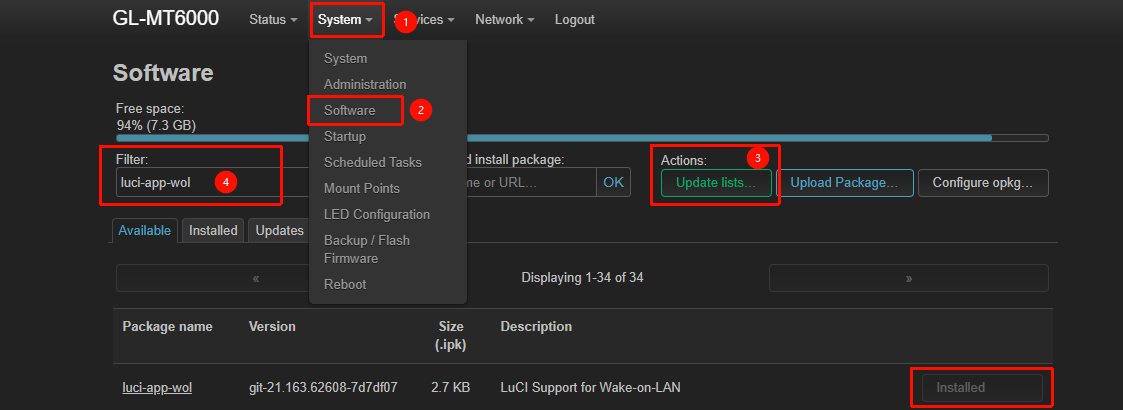
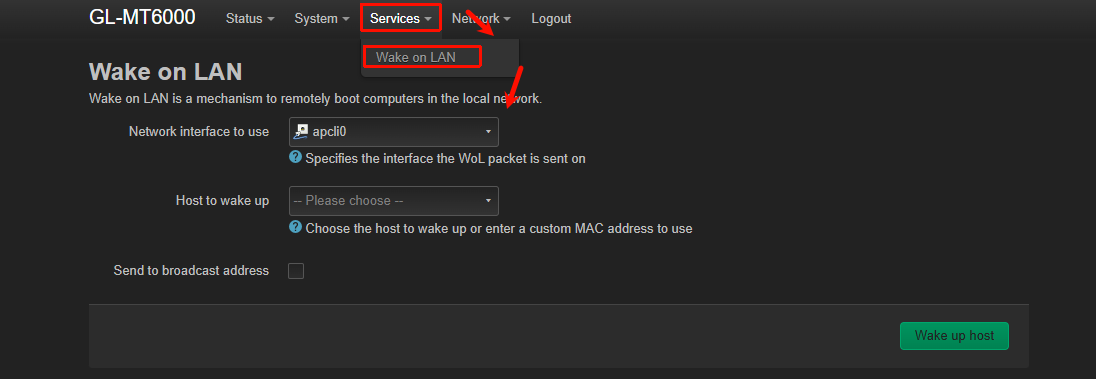
I have recently move from an ASUS router to a GL-iNet MT6000. One of the ASUS features I used was its Wake on LAN support. I recently saw I could install several OpenWRT WoL apps but these are command line functions - not nearly as convenient as a function that is part of a GUI. Then I saw
[Script] Wake on LAN (WOL) Simple Interface Installation
This seems to be exactly what I want, but I’m too new to GL-iNet and OpenWRT (and Linux, for that matter) to understand what I’m seeing. That’s especially true because I can see little similarity between the script present and the script referenced in PWOL: Public Wake-On-Lan Interface Example. I know the purpose of this forum is not educate neophytes on OpenWRT modification, but I’m hoping someone will provide me with some very basic guidance.
Is the code show in that post the install script? If so, do I just stick it somewhere in the router and use SSH to invoke it? If so, where do user scripts go in a GL-iNet router?
When installed, how is this function invoked? Does it get added to a menu somewhere on the router? (GL menu? LuCI menu?) The original referenced article implies it’s in the router’s HTML admin GUI, but that was an OpenWRT article, not a GL-iNet article.
What is the format of www/pwol/dev_list.txt? Is it just a list of host names (as I saw mentioned somewhere) or does it contain additional info such as MAC address?
Sorry if these are bonehead questions. I really want this function, but I know I don’t have the background to implement this without a lot of assistance.