WAN DHCP Timeout

I have an MT6000 with Starlink. I bypass the Starlink router and use the MT6000 with a Starlink assigned IP. It’s DHCP with a lease of 300s. When I max out the WAN bandwidth the MT6000 will send a DHCP renew request but never receive or process the response and at then the MT6000 eventually releases the IP and bounces the interface and it gets the same lease again and things work. The issues is that once the interface/fw bounces all state is gone and my downloads that have maxed the interface need to be reset. I removed wan monitoring/tracking and added the broadcast flag for the wan interface in hopes of triggering it to not release the lease.

Tue Jan  6 12:12:29 2026 daemon.notice netifd: wan (23594): udhcpc: sending renew to 0.0.0.0
Tue Jan  6 12:12:39 2026 daemon.notice netifd: wan (23594): udhcpc: sending renew to 0.0.0.0
Tue Jan  6 12:12:43 2026 daemon.notice netifd: wan (23594): udhcpc: sending renew to 0.0.0.0
Tue Jan  6 12:12:45 2026 daemon.notice netifd: wan (23594): udhcpc: sending renew to 0.0.0.0
Tue Jan  6 12:12:46 2026 daemon.notice netifd: wan (23594): udhcpc: sending renew to 0.0.0.0
Tue Jan  6 12:12:46 2026 daemon.notice netifd: wan (23594): udhcpc: lease lost, entering init state
Tue Jan  6 12:12:46 2026 daemon.notice netifd: Interface 'wan' has lost the connection
Tue Jan  6 12:12:46 2026 daemon.info avahi-daemon[6345]: Withdrawing address record for x.x.x.x on eth1.
Tue Jan  6 12:12:46 2026 daemon.info avahi-daemon[6345]: Leaving mDNS multicast group on interface eth1.IPv4 with address x.x.x.x.
Tue Jan  6 12:12:46 2026 daemon.info avahi-daemon[6345]: Interface eth1.IPv4 no longer relevant for mDNS.
Tue Jan  6 12:12:46 2026 user.notice kmwan: config json str={ "op": 6, "data": { } }
Tue Jan  6 12:12:46 2026 user.notice kmwan: config json str={ "op": 3, "data": { "cells": [ "wan" ] } }
Tue Jan  6 12:12:46 2026 user.notice firewall: Reloading firewall due to ifdown of wan ()
Tue Jan  6 12:12:49 2026 daemon.notice netifd: wan (23594): udhcpc: sending select for x.x.x.x
Tue Jan  6 12:12:49 2026 daemon.notice netifd: wan (23594): udhcpc: lease of x.x.x.x obtained, lease time 300
Tue Jan  6 12:12:49 2026 daemon.info avahi-daemon[6345]: Joining mDNS multicast group on interface eth1.IPv4 with address x.x.x.x
Tue Jan  6 12:12:49 2026 daemon.info avahi-daemon[6345]: New relevant interface eth1.IPv4 for mDNS.
Tue Jan  6 12:12:49 2026 daemon.info avahi-daemon[6345]: Registering new address record for x.x.x.x on eth1.IPv4.
Tue Jan  6 12:12:49 2026 daemon.notice netifd: Interface 'wan' is now up
Tue Jan  6 12:12:49 2026 user.notice kmwan: config json str={ "op": 6, "data": { } }
Tue Jan  6 12:12:49 2026 user.notice firewall: Reloading firewall due to ifup of wan (eth1)

Hi

The WAN interface should have the BROADCAST flag enabled by default.

root@GL-MT6000:~# ip link show eth1
3: eth1: <BROADCAST,MULTICAST,UP,LOWER_UP> mtu 1500 qdisc fq_codel state UP mode DEFAULT group default qlen 1000

Perhaps SSH into the router and capture packets to check whether Starlink is responding to DHCP renew requests.

opkg update && opkg install tcpdump
tcpdump -i any port 67 or port 68

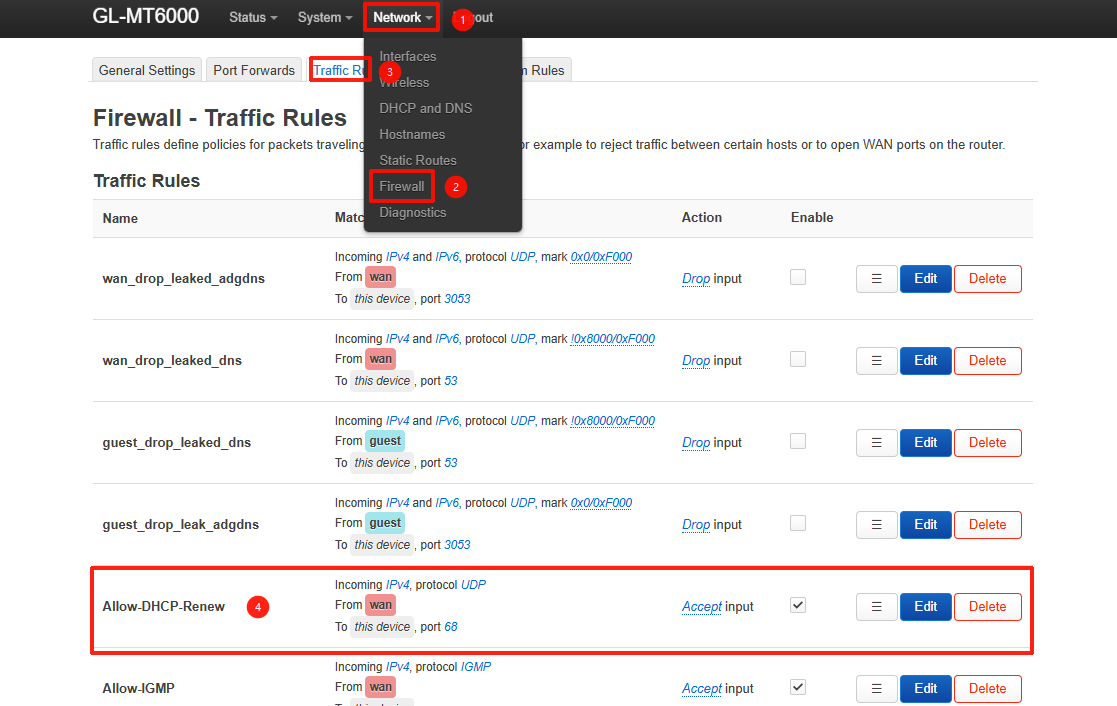
Note to check the rule for “Allow DHCP Renew” in Luci - Network - Firewall remains present and has not been mistakenly disabled or deleted.

I see broadcast enabled and the firewall DHCP Renew still exists in Luci.

I did a packet capture and see the request coming in but it appears that the router doesn’t use it?

Here tcpdump if it helps. The WAN interface dropped during the 9:13 minute. Again this only happens under load ~400-450Mb/s as far as I can tell.

09:12:34.422729 IP 100.12.34.56.68 > 255.255.255.255.67: BOOTP/DHCP, Request from 94:83:ab:cd:ef:11 (oui Unknown), length 300
09:12:34.423413 IP 100.64.0.1.67 > 100.12.34.56.68: BOOTP/DHCP, Reply, length 282
09:12:52.110758 IP 100.12.34.56.68 > 255.255.255.255.67: BOOTP/DHCP, Request from 94:83:ab:cd:ef:11 (oui Unknown), length 300
09:12:52.111956 IP 100.64.0.1.67 > 100.12.34.56.68: BOOTP/DHCP, Reply, length 282
09:13:02.106717 IP 100.12.34.56.68 > 255.255.255.255.67: BOOTP/DHCP, Request from 94:83:ab:cd:ef:11 (oui Unknown), length 300
09:13:02.108657 IP 100.64.0.1.67 > 100.12.34.56.68: BOOTP/DHCP, Reply, length 282
09:13:07.126721 IP 100.12.34.56.68 > 255.255.255.255.67: BOOTP/DHCP, Request from 94:83:ab:cd:ef:11 (oui Unknown), length 300
09:13:07.127924 IP 100.64.0.1.67 > 100.12.34.56.68: BOOTP/DHCP, Reply, length 282
09:13:09.142729 IP 100.12.34.56.68 > 255.255.255.255.67: BOOTP/DHCP, Request from 94:83:ab:cd:ef:11 (oui Unknown), length 300
09:13:09.144197 IP 100.64.0.1.67 > 100.12.34.56.68: BOOTP/DHCP, Reply, length 282
09:13:10.134727 IP 100.12.34.56.68 > 255.255.255.255.67: BOOTP/DHCP, Request from 94:83:ab:cd:ef:11 (oui Unknown), length 300
09:13:10.135372 IP 100.64.0.1.67 > 100.12.34.56.68: BOOTP/DHCP, Reply, length 282
09:13:10.338810 IP 0.0.0.0.68 > 255.255.255.255.67: BOOTP/DHCP, Request from 94:83:ab:cd:ef:11 (oui Unknown), length 300
09:13:10.340274 IP 100.64.0.1.67 > 255.255.255.255.68: BOOTP/DHCP, Reply, length 282
09:13:13.082708 IP 0.0.0.0.68 > 255.255.255.255.67: BOOTP/DHCP, Request from 94:83:ab:cd:ef:11 (oui Unknown), length 300
09:13:13.084315 IP 100.64.0.1.67 > 255.255.255.255.68: BOOTP/DHCP, Reply, length 282
09:13:13.126703 IP 0.0.0.0.68 > 255.255.255.255.67: BOOTP/DHCP, Request from 94:83:ab:cd:ef:11 (oui Unknown), length 300
09:13:13.128232 IP 100.64.0.1.67 > 255.255.255.255.68: BOOTP/DHCP, Reply, length 282
09:15:43.367149 IP 100.12.34.56.68 > 100.64.0.1.67: BOOTP/DHCP, Request from 94:83:ab:cd:ef:11 (oui Unknown), length 300
09:15:43.368020 IP 100.64.0.1.67 > 100.12.34.56.68: BOOTP/DHCP, Reply, length 282

That seems a bit unusual. It is unclear whether Starlink is returning a DHCP NAK, or if the MT6000 is encountering an issue while processing the DHCP renew request.

To help us investigate further, please follow these steps:

  1. Capture the network packets: Run the following command to capture packets and write them to /www/dhcp.pcap. After waiting for 5 minutes, press the ctrl +c to stop it and then log into the Admin Panel, download the file via http://192.168.8.1/dhcp.pcap to send to us.
    (Please replace 192.168.8.1 with your LAN address.)
tcpdump -i any -w /www/dhcp.pcap
  1. Export device logs: Once the issue occurs, please export the device logs and send them to us via private message (PM).

How to export logs:

How to send private messages:

Thank you for providing the packet capture.

Could you please also provide the device system logs? This will allow us to cross-reference the packet data with the udhcpc (the DHCP client daemon) logs to see exactly how the service is reacting.

In the meantime, please try to disable Network Acceleration on Admin Panel -> Network -> Network Acceleration and see if it helps resolve the issue:
