To better troubleshoot anomalies, it's sometimes necessary to capture packets on router interfaces for analysis.
However, without remote access, engineers can't directly capture packets remotely.
You can follow these steps and send the captured packets to engineers for analysis.
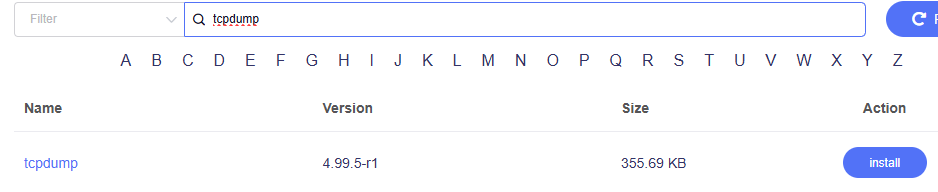
Step 1: Search for tcpdump in the router's GUI>>Plug-ins, and install it.(The router network must be normal)
Step 2: Access the router's SSH interface.
Please refer to the guide:SSH log in to the Router - GL.iNet Router Docs 4
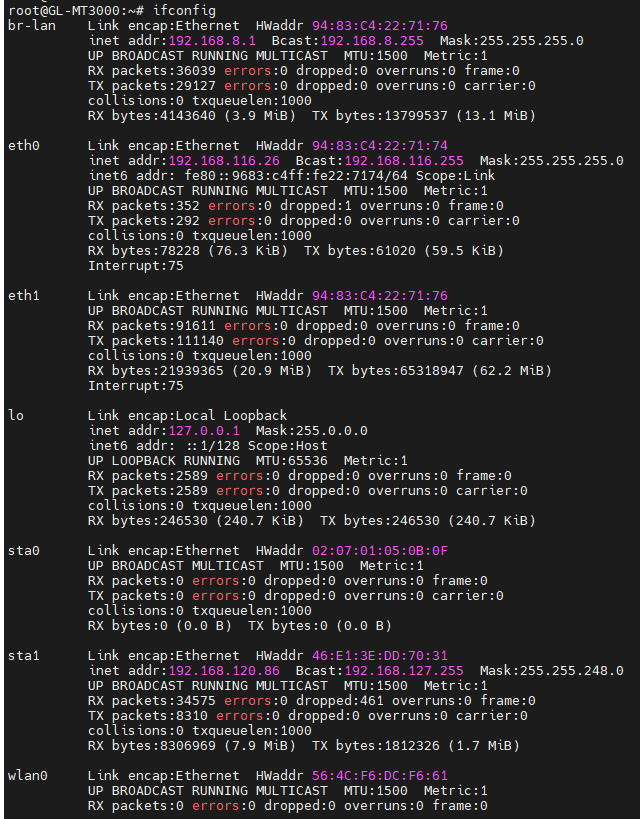
Step 3: Run the ifconfig command to confirm the interface you want to capture packets on.(Different router models may have different interface names.)
Take the MT3000 as an example.
The repeater is connected to the 5G WiFi, interface sta1.
The repeater is connected to the 2.4G WiFi, interface sta0.
The Ethernet is connected to the WAN, interface eth0.
Step 4: If my WAN connection is having issues, I need to capture WAN packets.
Execute the command in SSH: tcpdump -i eth0 -w /www/eth0.pcap
(This command captures packets from the eth0 interface and saves the captured data file as eth0.pcap in the router's www directory.)

After the command is executed, unplug the network cable of the router's wan port and then plug it in to capture the data of the wan connection process.
Step 5: Wait about 1 minute and then stop capturing packets.
Press Ctrl+C on the keyboard to stop capturing packets in SSH.

Step 6: The packet capture is now complete.
You can open a browser and enter 192.168.8.1/eth0.pcap to download the captured file.
(192.168.8.1 is my router LAN IP. You need to modify it according to your router LAN IP)
If the interface you want to capture packets on is a 5G repeater, follow the same procedure, except that you need to execute the command in step 4:
tcpdump -i sta1 -w /www/sta1.pcap
However, please note that if the repeater is disconnected, packet capture will automatically be interrupted. Therefore, if you need to capture packets from the repeater, you can also capture packets directly from any interface.
tcpdump -i any -w /www/any.pcap
Finally, you can send the captured data and the router's system log to the engineer for inspection.