WISP client (repeater) mode silently fails after firmware instability recovery — two independent root causes, no UI error shown

Device: GL.iNet GL-BE3600 (Slate 7)
SoC: Qualcomm IPQ5332/AP-MI04.1-C2
Firmware: Admin Panel v4.10.0
Kernel: Linux 5.4.213 #0 SMP PREEMPT Fri Sep 11 12:40:19 2026
Base: OpenWrt 23.05-SNAPSHOT r0-3601c2a49

Timeline:

  1. Router ran stably in WISP client (repeater) mode.
  2. After a firmware update the device became unstable (general malfunction, no further detail captured). Reboot and a hard power cycle did not restore normal operation.
  3. Only a full factory reset restored basic function. LAN IP changed as a side effect of the reset (192.168.7.1 -> 192.168.11.1), noted here only as context, not itself a bug.
  4. After the reset, WISP client mode stopped working entirely: no scan results, no connection attempt, no error shown in the Admin Panel — reproduced against two different target APs (the previously-used office AP and a freshly selected phone hotspot).

Root cause 1 — STA interface left disabled after reset:
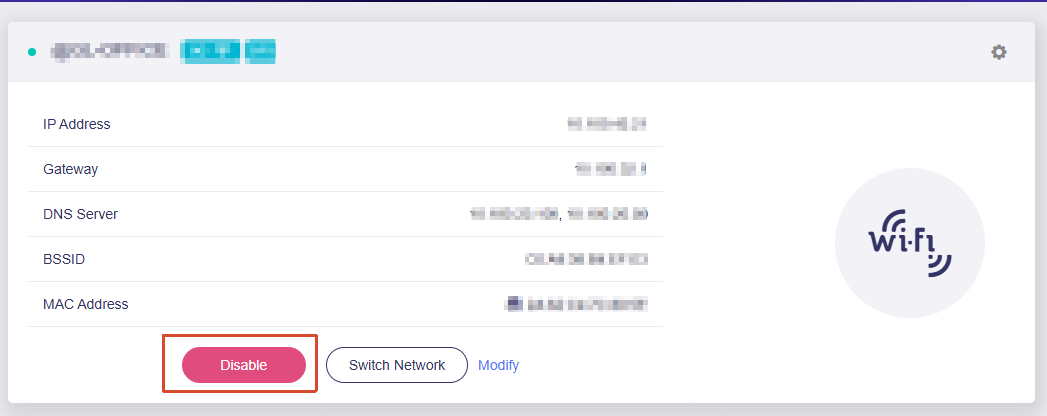
uci show wireless showed the client interface fully configured (target SSID, BSSID, PSK) but with disabled='1':

wireless.sta=wifi-iface
wireless.sta.mode='sta'
wireless.sta.device='wifi1'
wireless.sta.network='wwan'
wireless.sta.ssid='<redacted>'
wireless.sta.disabled='1'

ubus call network.wireless status did not list this interface among active ones at all — the Admin Panel repeater UI gave no indication that the underlying interface was switched off.

Fix: uci set wireless.sta.disabled='0'; uci commit wireless; wifi reload. Radio association then succeeded immediately (iwinfo sta1 info: RSSI -33dBm, 688 MBit/s link rate, full link quality) — confirms the wifi hardware/driver was fine the whole time; the interface was just never brought up.

Root cause 2 — wwan logical interface missing device binding:
Despite a successful L2 association, traffic still did not pass. ifstatus wwan returned:

{"up": false, "available": false, "errors": [{"subsystem": "interface", "code": "NO_DEVICE"}]}

uci show network.wwan had proto/metric/mtu set but no device field at all, so netifd had nothing to bind the DHCP client to.

Fix: uci set network.wwan.device='sta1'; uci commit network; ifup wwan. DHCP completed immediately after.

Secondary observation (possibly related): wireless.sta.sae='1' is set in config, but the live negotiated encryption reported by iwinfo sta1 info was WPA2 PSK (CCMP), not SAE. The SAE flag does not appear to be enforced or reflected in the actual association. Did not block connectivity once the interface was enabled, but looks like a config/UI inconsistency worth checking.

Expected: after a factory reset, either WISP client mode is fully functional again after reconfiguration through the Admin Panel, or the UI surfaces a clear error when the underlying STA interface is disabled or the wwan network has no device bound — instead of silently doing nothing.

Actual: both failures were completely silent from the Admin Panel's perspective; diagnosis required SSH + uci/ubus/iwinfo/logread.

This looks related to a long-standing, recurring class of issue reported across multiple GL.iNet models and firmware versions:

Checked the v4.10.1 changelog before updating — no mention of a fix for repeater/STA/wwan handling, so filing this against v4.10.0 behavior which likely still applies.
Update: root cause found in gl-repeater (firmware v4.10.1). Upgrading from
v4.10.0 to v4.10.1 did not fix it, and it reproduces on a plain reboot with the
saved upstream AP in range (RSSI -33 dBm).

Root cause

repeater.@main[0].disabled='1' is persisted in /etc/config/repeater. On boot
gl-repeater reads it and goes straight to the DISABLED state without scanning:

gl-repeater: (gl-repeater.lua: 17) load repeater config...
gl-repeater: (repeater.lua:2160) switch in 0 seconds...
gl-repeater: (repeater.lua:2067) disabled

From the bytecode of /usr/sbin/gl-repeater and
/usr/local/lib/lua/5.4/gl/repeater.lua (disassembled with luac -l):

  • gl-repeater.lua:24 loads cfg.disabled = (main.disabled == "1").
  • repeater.lua:2065-2067 __run: if cfg.disabled then state = DISABLED; log("disabled"); return end. That runs before auto, smart_reconnect
    or the boot-reconnect logic, so auto='1' / smart_reconnect='1' never
    get a chance.
  • repeater.lua:2015-2033 disable(): writes repeater.@main[0].disabled=1
    to UCI and commits ("disabled by user").
  • gl-repeater.lua:396-409: the ubus methods repeater disconnect and
    repeater disconnect_wait both call disable().
  • Reconnecting from the Admin Panel calls enable(), which writes
    disabled=0. That is why the manual reconnect works.

So one "disconnect" (from the UI or any internal caller of ubus call repeater disconnect) permanently disables the repeater across reboots. The
Admin Panel does not show this as an off switch, so it looks like "the
router can't find any networks".

Correction to my first post

wireless.sta.disabled='1' and wwan reporting NO_DEVICE are symptoms
of this state, not separate bugs. gl-repeater adds sta1 to
network.interface.wwan only when it connects:

gl-repeater: (repeater-nl80211.lua:243) add device sta1 to network.interface.wwan

Manually setting wireless.sta.disabled='0' + wifi reload brings the
link up, but leaves repeater main.disabled at 1, so it breaks again on the
next reboot. That matches what I saw.

Suggested fix

Either keep "disconnect" as a runtime action (don't persist disabled=1),
or show the persisted disabled state in the Admin Panel. A user-visible
"Repeater disabled" toggle would have made this a one-click fix.

Workaround

uci set repeater.@main[0].disabled='0'
uci commit repeater
ubus call repeater reload

(or reconnect once from the Admin Panel).

I couldn't find what set disabled=1 in my case. There was no "disabled by
user" line left in logread after the reboot, and I didn't press Disconnect
knowingly. If there is an internal caller of repeater disconnect during
reset/upgrade/mesh setup, that would be the trigger.

Also noticed: /etc/config/repeater now holds 3 identical config network
entries for the same SSID with different random macaddrs, accumulated
across reset and reconnects.

Hi,

This seems a little unusual, as the Admin Panel already includes the relevant button and description. Are you using the Repeater feature through another interface, such as LuCI or SSH?

If so, and you do not plan to use the Repeater feature in the Admin Panel, you can disable the repeater service to prevent it from interfering:

/etc/init.d/repeater stop
/etc/init.d/repeater disable


Hi Will, thanks for looking into this.

No. The repeater (connection to the upstream AP) is set up and used only
through the Admin Panel, and I want to keep using it there, so disabling
the repeater service is not an option for me.

  • LuCI: I only installed/enabled it when the Admin Panel prompted for it.
    I never opened it and never configured anything there.
  • SSH: no settings were changed over SSH before the problem appeared.
    I only used SSH afterwards, to diagnose it.

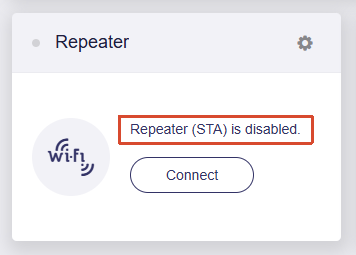
You're right that the Admin Panel shows "Repeater (STA) is disabled" with
a Connect button. I was wrong in my earlier post to say it doesn't. The
problem is that the router ends up in that state by itself after a power
cycle, without anyone pressing Disconnect.

This started with v4.10.0. On the previous firmware the router
reconnected to the upstream AP after every power-on.

Timeline:

  1. Upgraded to v4.10.0. The router was connected to the upstream AP as a
    repeater that day.
  2. Next day, after power-on, it did not reconnect. Several reboots did
    not help.
  3. Factory reset, then reconnected to the upstream AP in the Admin Panel.
    It worked again, for 2-3 reboots.
  4. Next day, after power-on, it did not reconnect again.
  5. Upgraded to v4.10.1. Same behavior.

There are two failure states:

  • Milder: Connect in the Admin Panel brings the connection back.
    In this state repeater.@main[0].disabled is '1' on flash, so on boot
    gl-repeater goes straight to DISABLED ("(repeater.lua:2067) disabled")
    and never scans.
  • Worse (what I hit first on v4.10.0): Connect does not help. The scan
    shows no networks at all, not even a phone hotspot next to the router.
    In this state wireless.sta.disabled was '1' and the sta1 device did not
    exist. Only a factory reset, or manually setting
    wireless.sta.disabled='0' + wifi reload, brought it back.

Since it breaks after a few power cycles rather than on the first one,
something seems to call repeater disconnect / disconnect_wait (which
writes disabled=1) conditionally, for example on shutdown, after a failed
connect, or from the inactivity check. Is there such a path in v4.10.x?

I've set up persistent syslog (gl-repeater at debug level) and a
per-minute snapshot of the repeater/STA state on the router. I'll collect
as much information as possible over the next power cycles and come back
here with the logs from the moment it breaks.

Update: I caught the failure live after power-cycling the router four times, unplugging it for a couple of minutes between each cycle. The failure occurred on the 3rd of the 4 cold boots, and I was able to observe the broken state while it was happening.

In the broken state, gl-repeater keeps looping:

scanning... → sta1 scan failed after multiple attempts → sta0 scan failed after multiple attempts → scan failed on all radios

It continues doing this for as long as the router stays on (40+ minutes in my case). repeater.@main[0].disabled stays 0 the entire time, so this is not related to the disabled flag.

The radio driver itself appears to be fine. At the same time, a manual iwinfo sta1 scan and iw dev sta1 scan both find the upstream AP immediately (-35 dBm, channel 36).

AP vdev state in the broken state (cfg80211tool <if> g_is_vdev_up):

wlan0   vdev_up=1   (2.4G AP)
wlan02  vdev_up=1   (2.4G MLO link)
wlan1   vdev_up=0   (5G AP)
wlan12  vdev_up=0   (5G MLO link)

get_cac_state is 0 on both radios, and 5 GHz is on channel 36 (non-DFS).

Interestingly, iwinfo reports wlan1 as HT20 even though wireless.wifi1.htmode is configured as HT160.

From the bytecode of /usr/local/lib/lua/5.4/gl/repeater-vendor.lua (module ./files/lib/repeater-nl80211.lua):

  • scan() (line 1178), in the qcawificfg80211 branch, calls is_iface_setup() for every enabled AP wifi-iface on the scanning radio. If is_iface_setup() returns false, scan() simply returns nil without logging anything (lines 1196-1197). This explains why gl-repeater only logs scan failed after multiple attempts without any actual error message.
  • is_iface_setup() (lines 1089-1124), but only when /lib/firmware/IPQ5332 exists, checks cfg80211tool <if> g_is_vdev_up and requires it to return "1". If the iface has mld set, it also checks every enabled AP iface on all radios and returns false if any of them has an empty SSID, get_acs_state=1, or g_is_vdev_up=0.

So with the 5 GHz AP vdevs down, the 5 GHz scan is refused. Because the 2.4 GHz MLO link (wlan02) triggers the all-radios check, the 2.4 GHz scan is refused as well. The Admin Panel then shows no networks at all.

What does and doesn't recover it:

  • /etc/init.d/repeater restart: no, same loop.
  • wifi reload (wireless.sta.disabled='1'): no, wlan1/wlan12 come back with vdev_up=0.
  • wireless.sta.disabled='0' + wifi reload: yes. The 5 GHz vdevs come up within ~20 seconds, and gl-repeater connects on its own within ~40 seconds.

What's still unknown is why the 5 GHz AP vdevs sometimes remain down after a cold boot. I'm now logging the vdev state every minute and will post the results from the next failing boot.

Questions:

  1. Is scan() really supposed to refuse scanning while the AP vdev on that radio is down? In repeater mode, this looks like it can create a deadlock when the AP on that radio is waiting for the upstream channel.
  2. Should the MLO all-radios check in is_iface_setup() really block scanning on the other band?

Temporary workaround until this is fixed in firmware, in case anyone else
hits it on GL-BE3600 (v4.10.x).

A cron watchdog detects the stuck state (wwan down, repeater not connected,
5G AP vdev down for 3 consecutive minutes) and applies the only recovery that
worked for me: wireless.sta.disabled=0 + wifi reload. It saves the
repeater log and vdev state to a file before acting, so the evidence is kept.
It does nothing in the first 3 minutes after boot, skips the case where the
repeater was switched off in the Admin Panel, and acts at most 3 times per
boot, 10 minutes apart. After a bad cold boot the repeater comes back on its
own in about 4-5 minutes.

Assumes the 5G AP interface is wlan1 (check with iwinfo).

Save as /root/repeater-wd.sh:

#!/bin/sh
# Recovers the stuck state: 5G AP vdev stays down (g_is_vdev_up=0)
# and gl-repeater's scan() silently fails forever.
D=/root/repeater-wd.d
S=/tmp/repeater-wd
mkdir -p $D $S
log(){ logger -t repeater-wd "$*"; echo "$(date '+%F %T') $*" >> $D/history.log; }

UP=$(cut -d. -f1 /proc/uptime)
[ "$UP" -lt 180 ] && exit 0
# repeater switched off by the user: leave it alone
[ "$(uci -q get repeater.@main[0].disabled)" = "1" ] && { rm -f $S/bad; exit 0; }
[ "$(uci -q show repeater | grep -c "=network")" -gt 0 ] || exit 0

WWAN=$(ifstatus wwan 2>/dev/null | jsonfilter -e "@.up")
STATE=$(ubus call repeater status 2>/dev/null | jsonfilter -e "@.state_s")
V1=$(cfg80211tool wlan1 g_is_vdev_up 2>/dev/null | sed "s/.*://")

if [ "$WWAN" = "true" ] || [ "$STATE" = "connected" ] || [ "$V1" != "0" ]; then
  rm -f $S/bad; exit 0
fi

# condition must hold for 3 consecutive minutes
N=$(( $(cat $S/bad 2>/dev/null || echo 0) + 1 )); echo $N > $S/bad
[ "$N" -lt 3 ] && exit 0

# at most 3 recoveries per boot, 10 min apart
A=$(cat $S/actions 2>/dev/null || echo 0)
[ "$A" -ge 3 ] && exit 0
LAST=$(cat $S/last_action 2>/dev/null || echo 0)
[ "$LAST" -ne 0 ] && [ $((UP - LAST)) -lt 600 ] && exit 0

# keep evidence before touching anything
E=$D/wd-$(date +%s).txt
{ echo "state=$STATE wwan=$WWAN"
  for i in $(iwinfo | awk '/^wlan/{print $1}'); do
    echo "$i vdev_up=$(cfg80211tool $i g_is_vdev_up 2>/dev/null | sed "s/.*://")"
  done
  logread | grep -E "gl-repeater|Scan is in progress" | tail -40; } > $E 2>&1
ls -t $D/wd-*.txt 2>/dev/null | tail -n +21 | xargs rm -f 2>/dev/null

log "stuck: state=$STATE wwan=$WWAN wlan1 vdev_up=0 for ${N}m, recovering"
echo $((A + 1)) > $S/actions; echo $UP > $S/last_action; rm -f $S/bad
uci set wireless.sta.disabled="0"; uci commit wireless
wifi reload

Install:

chmod +x /root/repeater-wd.sh
echo "* * * * * /root/repeater-wd.sh" >> /etc/crontabs/root
/etc/init.d/cron restart
# keep it across upgrades with "Keep Settings"
echo "/root/repeater-wd.sh" >> /etc/sysupgrade.conf
echo "/root/repeater-wd.d/" >> /etc/sysupgrade.conf

Check whether it has fired: cat /root/repeater-wd.d/history.log.
Remove: delete the line from /etc/crontabs/root and restart cron.

I'll keep it running and post the evidence files from the next failing boot.

Thank you for sharing the watchdog workaround and documenting how to install, monitor, and remove it.

This reply was generated by AI. Please verify its accuracy.

GL.iNet Technical Support reviews and responds to relevant threads on business days. Please allow time for a staff response.