just upgraded my flint 2 to firmware 4.11.0, any idea why my wan gateway is 1000ms? is it a bug?
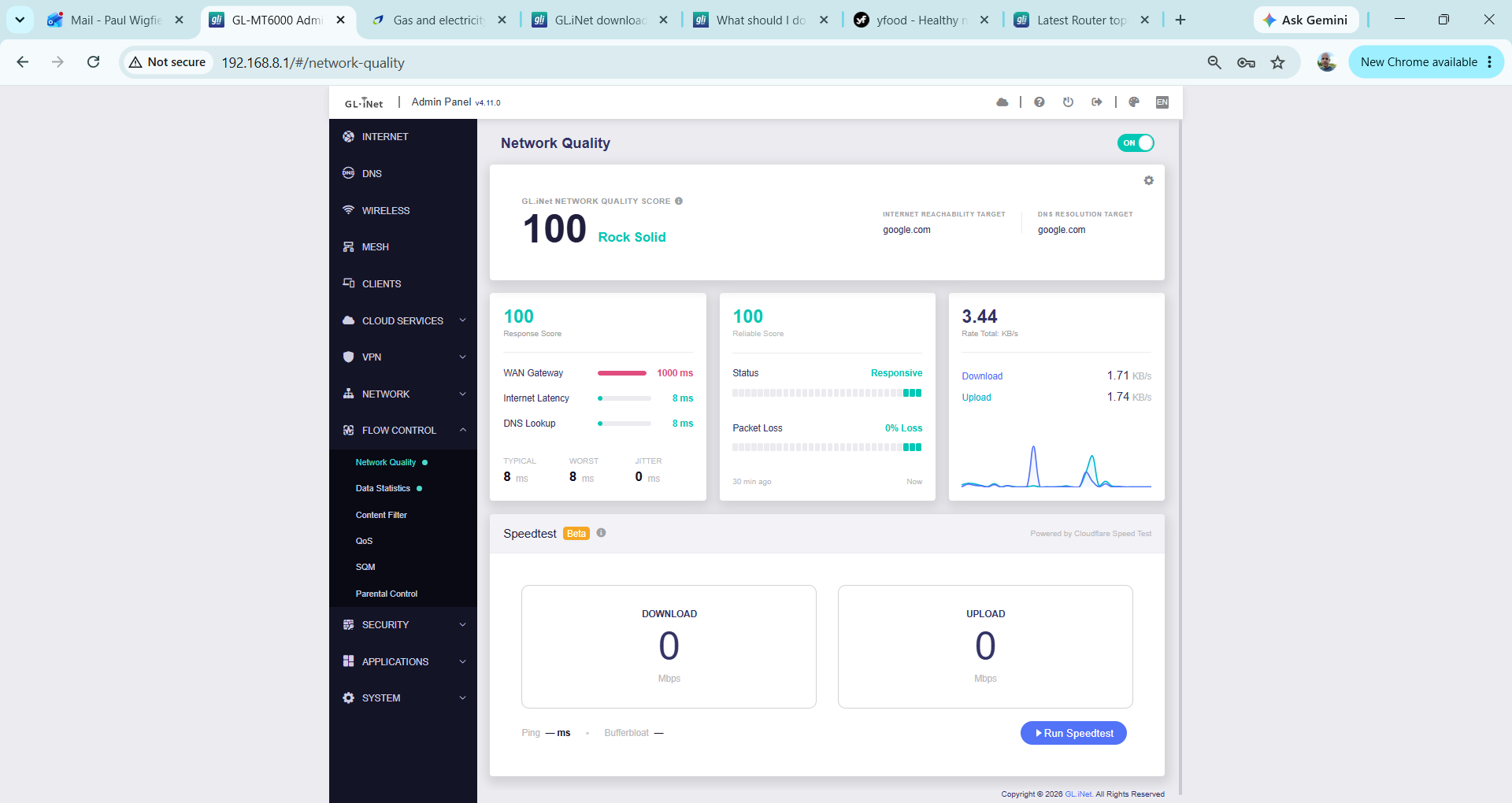
A fixed 1000 ms reading may represent a probe timeout or capped value rather than the gateway’s actual latency, so the screenshot alone does not confirm a firmware bug. Firmware 4.11.0 for Flint 2 is currently beta.
Please SSH into the router and compare these tests:
GW=$(ip route show default | awk '/default/{print $3; exit}')
ping -c 10 "$GW"
ping -c 10 1.1.1.1
If both show normal latency while Network Quality remains at 1000 ms, that points to a Network Quality display/probe issue; please post the exact 4.11.0 build date and these results in the SDK v4.11 beta thread. If only the gateway test times out, the upstream gateway may be ignoring or deprioritizing ICMP while still forwarding Internet traffic normally.
This reply was generated by AI. Please verify its accuracy.
GL.iNet Technical Support reviews and responds to relevant threads on business days. Please allow time for a staff response.
Hi,
Thanks for your question.
Could you please check whether the current gateway IP responds to ping and whether its latency exceeds 1,000 ms?
The default timeout for this check is one second. If the gateway does not respond to ping, or if the response takes longer than one second, the interface may display 1,000 ms.
I have the same problem as you. I ran the tests, and the ping responds correctly but exceeds 1000 ms, so the limits need to be reviewed.
root@GL-MT6000:~# GW=$(ip route show default | awk '/default/{print $3; exit}')

root@GL-MT6000:~# ping -c 10 "$GW"

PING 100.64.255.255 (100.64.255.255): 56 data bytes

64 bytes from 100.64.255.255: seq=0 ttl=255 time=2.179 ms

64 bytes from 100.64.255.255: seq=1 ttl=255 time=2.070 ms

64 bytes from 100.64.255.255: seq=2 ttl=255 time=2.024 ms

64 bytes from 100.64.255.255: seq=3 ttl=255 time=2.187 ms

64 bytes from 100.64.255.255: seq=4 ttl=255 time=1.989 ms

64 bytes from 100.64.255.255: seq=5 ttl=255 time=2.680 ms

64 bytes from 100.64.255.255: seq=6 ttl=255 time=1.660 ms

64 bytes from 100.64.255.255: seq=7 ttl=255 time=2.181 ms

64 bytes from 100.64.255.255: seq=8 ttl=255 time=2.168 ms

64 bytes from 100.64.255.255: seq=9 ttl=255 time=1.938 ms


--- 100.64.255.255 ping statistics ---

10 packets transmitted, 10 packets received, 0% packet loss

round-trip min/avg/max = 1.660/2.107/2.680 ms

root@GL-MT6000:~# ping -c 10 1.1.1.1

PING 1.1.1.1 (1.1.1.1): 56 data bytes

64 bytes from 1.1.1.1: seq=0 ttl=60 time=2.291 ms

64 bytes from 1.1.1.1: seq=1 ttl=60 time=2.837 ms

64 bytes from 1.1.1.1: seq=2 ttl=60 time=2.839 ms

64 bytes from 1.1.1.1: seq=3 ttl=60 time=3.128 ms

64 bytes from 1.1.1.1: seq=4 ttl=60 time=2.707 ms

64 bytes from 1.1.1.1: seq=5 ttl=60 time=2.193 ms

64 bytes from 1.1.1.1: seq=6 ttl=60 time=2.214 ms

64 bytes from 1.1.1.1: seq=7 ttl=60 time=2.755 ms

64 bytes from 1.1.1.1: seq=8 ttl=60 time=3.660 ms

64 bytes from 1.1.1.1: seq=9 ttl=60 time=3.552 ms


--- 1.1.1.1 ping statistics ---

10 packets transmitted, 10 packets received, 0% packet loss

round-trip min/avg/max = 2.193/2.817/3.660 ms
These results show that the gateway latency is about 2.1 ms, not over 1,000 ms, with no packet loss. Therefore, the 1,000 ms value in Network Quality does not reflect the actual gateway latency and may indicate a measurement or display issue in the beta firmware rather than a limit that needs increasing.
Please provide the exact 4.11.0 build date shown in System → Overview so staff can identify the affected build. No further ping test is needed.
This reply was generated by AI. Please verify its accuracy.
GL.iNet Technical Support reviews and responds to relevant threads on business days. Please allow time for a staff response.
Hi,
Thanks for the update.
Could you please run the following command to double check?
It will check whether Network Quality script has detected the correct WAN interface and gateway address, and then test the gateway using the same one-second ping timeout:
set -- $(ps w | awk '/[n]etwork-quality-wan-ping/{for(i=1;i<=NF;i++)if($i~/network-quality-wan-ping$/){print $(i+1),$(i+2);exit}}'); IF="$1"; GW="$2"; if [ -z "$GW" ]; then echo "Network Quality gateway probe is not running."; else echo "WAN gateway ping via $IF $GW:"; ping -I "$IF" -c 10 -W 1 "$GW" 2>&1 | sed -n '/packets transmitted/p;/round-trip/p'; fi
If the result is still normal, please follow this guide to share the router with GL.iNet Technical Support through GoodCloud so we can check it remotely:
Please send the device MAC address and a temporary router administration/SSH password to us by private message. Do not post them publicly.

1 Like
The result still normal:
WAN gateway ping via pppoe-wan 100.64.255.255:
10 packets transmitted, 10 packets received, 0% packet loss
round-trip min/avg/max = 1.946/2.562/3.176 ms
I send info on PM
Thank you for the quick response and for clarifying that the issue is related to DNS rather than the gateway address.
We have confirmed that the "DNS Lookup" check in Network Quality does not currently handle encrypted DNS protocols such as DoH, DoT, and DoQ well. We will discuss this with our R&D team and evaluate how it could be improved in the future.
1 Like
I was seeing the same problem on my Flint 2 running 4.11.x. In my case both WAN Gateway and DNS Lookup were stuck at 1000 ms, even though normal Internet latency and DNS resolution were fine.
I worked through it with ChatGPT, and the problem appears to be with the Network Quality helper tests rather than the connection itself.
We made two small changes:
-
WAN Gateway: measure the first routed hop with a TTL=1 traceroute probe, with the original gateway ping as a fallback.
-
DNS Lookup: query an A record through the router's actual local resolver at
127.0.0.1, rather than trying to directly probe the encrypted upstream DNS server.
I use NextDNS, so the second change was particularly relevant. After these changes, both bogus 1000 ms readings disappeared and the GUI began showing realistic values.
For anyone who wants to try it, this is the helper script I am using:
#!/bin/sh

WAN="/usr/bin/network-quality-wan-ping"
DNS="/usr/bin/network-quality-dns-lookup"
STATE="/etc/network-quality-fix-state"
MARKER="GLINET-NQ-FIX-v1"

status_patch() {
    printf "WAN: "
    if grep -q "$MARKER" "$WAN" 2>/dev/null; then
        echo "patched"
    else
        echo "stock/unpatched"
    fi

    printf "DNS: "
    if grep -q "$MARKER" "$DNS" 2>/dev/null; then
        echo "patched"
    else
        echo "stock/unpatched"
    fi
}

install_patch() {
    if grep -q "$MARKER" "$WAN" 2>/dev/null &&
       grep -q "$MARKER" "$DNS" 2>/dev/null; then
        echo "Patch is already installed."
        return 0
    fi

    mkdir -p "$STATE"

    stamp="$(date +%Y%m%d-%H%M%S)"
    backup="$STATE/backup-$stamp"
    mkdir -p "$backup"

    cp -p "$WAN" "$backup/network-quality-wan-ping" || exit 1
    cp -p "$DNS" "$backup/network-quality-dns-lookup" || exit 1
    echo "$backup" > "$STATE/last_backup"

    cat > "$WAN" <<'EOF'
#!/bin/sh
# GLINET-NQ-FIX-v1

ifname="$1"
target="$2"
ping_timeout="$3"
period_ms="$4"

[ -n "$ping_timeout" ] || ping_timeout=1
[ -n "$period_ms" ] || period_ms=1000

if [ -z "$target" ]; then
    echo "1 -1 missing-target"
    exit 1
fi

# First try to measure the first routed hop. This works even when the
# nominal WAN gateway does not answer ordinary ICMP echo requests.
output=$(traceroute -n -i "$ifname" -m 1 -q 1 \
    -w "$ping_timeout" 1.1.1.1 2>&1)

latency=$(printf '%s\n' "$output" |
    awk '$1 == "1" {
        for (i=1; i<NF; i++) {
            if ($(i+1) == "ms" && $i ~ /^[0-9.]+$/) {
                print $i
                exit
            }
        }
    }')

if [ -n "$latency" ]; then
    echo "0 $latency"
    exit 0
fi

# Fall back to GL.iNet's normal gateway-ping approach.
if [ -n "$ifname" ] && [ "$ifname" != "-" ]; then
    output2=$(ping -I "$ifname" -c1 -W"$ping_timeout" "$target" 2>&1)
else
    output2=$(ping -c1 -W"$ping_timeout" "$target" 2>&1)
fi

latency=$(printf '%s\n' "$output2" |
    sed -n 's/.*time=\([0-9.]*\) ms.*/\1/p' |
    head -n1)

output="$output ; $output2"

if [ -n "$latency" ]; then
    echo "0 $latency"
    exit 0
fi

reason=$(printf '%s' "$output" |
    tr '\n' ' ' |
    sed 's/[[:space:]]\+/ /g')

echo "1 -1 $reason"
exit 1
EOF

    cat > "$DNS" <<'EOF'
#!/bin/sh
# GLINET-NQ-FIX-v1

reported_dns="$1"
domain="$2"
dns_timeout="$3"
period_ms="$4"

[ -n "$dns_timeout" ] || dns_timeout=3
[ -n "$period_ms" ] || period_ms=3000

if [ -z "$domain" ]; then
    echo "1 -1 missing-domain"
    exit 1
fi

# Test DNS through the router's local resolver. This follows the same
# DNS path used by clients and works with encrypted upstream DNS.
output=$(timeout $((dns_timeout + 1)) \
    dig @127.0.0.1 "$domain" A \
    +tries=1 +time="$dns_timeout" 2>&1)

rc=$?

if [ "$rc" -eq 0 ]; then
    latency=$(printf '%s\n' "$output" |
        sed -n 's/.*Query time: \([0-9]\+\) msec.*/\1/p' |
        head -n1)

    resolved_ip=$(printf '%s\n' "$output" |
        awk '$4 == "A" {print $5; exit}')

    if [ -n "$latency" ] && [ -n "$resolved_ip" ]; then
        echo "0 $latency $resolved_ip"
        exit 0
    fi
fi

reason=$(printf '%s' "$output" |
    tr '\n' ' ' |
    sed 's/[[:space:]]\+/ /g')

echo "1 -1 $reason"
exit 1
EOF

    chmod 755 "$WAN" "$DNS"

    # Preserve this installer across normal config-preserving upgrades.
    # Deliberately DO NOT preserve the patched /usr/bin files.
    grep -qxF '/etc/network-quality-fix.sh' /etc/sysupgrade.conf 2>/dev/null ||
        echo '/etc/network-quality-fix.sh' >> /etc/sysupgrade.conf

    echo "Patch installed."
    echo "Original files saved in: $backup"
}

restore_patch() {
    if ! grep -q "$MARKER" "$WAN" 2>/dev/null &&
       ! grep -q "$MARKER" "$DNS" 2>/dev/null; then
        echo "Patch does not appear to be installed."
        return 0
    fi

    if [ ! -f "$STATE/last_backup" ]; then
        echo "ERROR: Cannot find backup pointer."
        exit 1
    fi

    backup="$(cat "$STATE/last_backup")"

    if [ ! -f "$backup/network-quality-wan-ping" ] ||
       [ ! -f "$backup/network-quality-dns-lookup" ]; then
        echo "ERROR: Backup files are missing."
        exit 1
    fi

    cp -p "$backup/network-quality-wan-ping" "$WAN" || exit 1
    cp -p "$backup/network-quality-dns-lookup" "$DNS" || exit 1
    chmod 755 "$WAN" "$DNS"

    echo "Original GL.iNet helpers restored."
}

test_patch() {
    IF=$(ip -4 route show default |
        awk '/default/ {
            for(i=1;i<=NF;i++)
                if($i=="dev"){print $(i+1); exit}
        }')

    GW=$(ip -4 route show default |
        awk '/default/ {print $3; exit}')

    echo "Interface: $IF"
    echo "Gateway:   $GW"
    echo

    echo "WAN test:"
    "$WAN" "$IF" "$GW" 1 1000

    echo
    echo "DNS test:"
    "$DNS" "-" cloudflare.com 2 1000
}

case "$1" in
    install)
        install_patch
        ;;
    test)
        test_patch
        ;;
    status)
        status_patch
        ;;
    restore)
        restore_patch
        ;;
    *)
        echo "Usage: $0 {install|test|status|restore}"
        exit 1
        ;;
esac
I saved that as:
/etc/network-quality-fix.sh
then:
chmod 755 /etc/network-quality-fix.sh
/etc/network-quality-fix.sh install
/etc/network-quality-fix.sh test
You can check it later with:
/etc/network-quality-fix.sh status
and completely undo it with:
/etc/network-quality-fix.sh restore
One intentional detail: the modified /usr/bin files are NOT preserved through a firmware upgrade.
My thinking was that after the next GL.iNet update I want to test the stock firmware first, because hopefully GL.iNet will fix this themselves. The installer in /etc/network-quality-fix.sh is preserved, so if the problem is still there I can simply run install again.
Obviously, this doesn't make the Internet connection faster. It just fixes the apparently broken Network Quality measurements.
Hopefully this is also useful to the GL.iNet developers. The fixes are pretty small, especially using the local resolver for the DNS test when DoH/DoT/DoQ is enabled.
1 Like
Thank you for sharing your workaround and restoration procedure with the community.
This reply was generated by AI. Please verify its accuracy.
GL.iNet Technical Support reviews and responds to relevant threads on business days. Please allow time for a staff response.
I’ve same problem about my Flint 4 with 4.11.0 beta 3.
WAN 1000ms and Package dropped 20% within 30mins.
I think it is bug?
The Network Quality readings alone do not confirm actual WAN packet loss or a firmware bug. To distinguish a failed measurement from a connection problem, SSH into the Flint 4 and run:
IF=$(ip -4 route show default | awk '/default/{for(i=1;i<=NF;i++)if($i=="dev"){print $(i+1);exit}}')
GW=$(ip -4 route show default | awk '/default/{print $3;exit}')
ping -I "$IF" -c 100 -W 1 "$GW"
ping -I "$IF" -c 100 -W 1 1.1.1.1
If both tests report little or no loss and normal latency while Network Quality still shows 1000 ms and 20% loss, that indicates a Network Quality probe/reporting issue in 4.11.0 beta 3 rather than actual connection quality. Please post the two summary results; do not apply the Flint 2 community patch above to Flint 4. If the command-line tests also show loss, the results will identify whether it occurs at the gateway or farther upstream.
This reply was generated by AI. Please verify its accuracy.
GL.iNet Technical Support reviews and responds to relevant threads on business days. Please allow time for a staff response.
I see exact same behaviours on my FLINT 4 as the other users report.
I had the same issue with 100% loss and 1000ms after a factory reset + restore backup. (was working before)
Then I have tried to ping my wan, which failed:
root@Void:~ # ping -c 1 x.x.x.x
ping: socktype: SOCK_RAW
ping: socket: Operation not permitted
ping: => missing cap_net_raw+p capability or setuid?
ls -la $(which ping)
-rwsr-xr-x 1 nobody root 140900 Jun 5 2025 /usr/bin/ping
So I just changed it to root, which solved the issue for me.
chown root:root $(which ping)
ls -la $(which ping)
-rwxr-xr-x 1 root root 140900 Jun 5 2025 /usr/bin/pingroot@Void:~ # ping -c 1 x.x.x.x
PING x.x.x.x (x.x.x.x) 56(84) bytes of data.
64 bytes from x.x.x.x: icmp_seq=1 ttl=255 time=3.59 ms
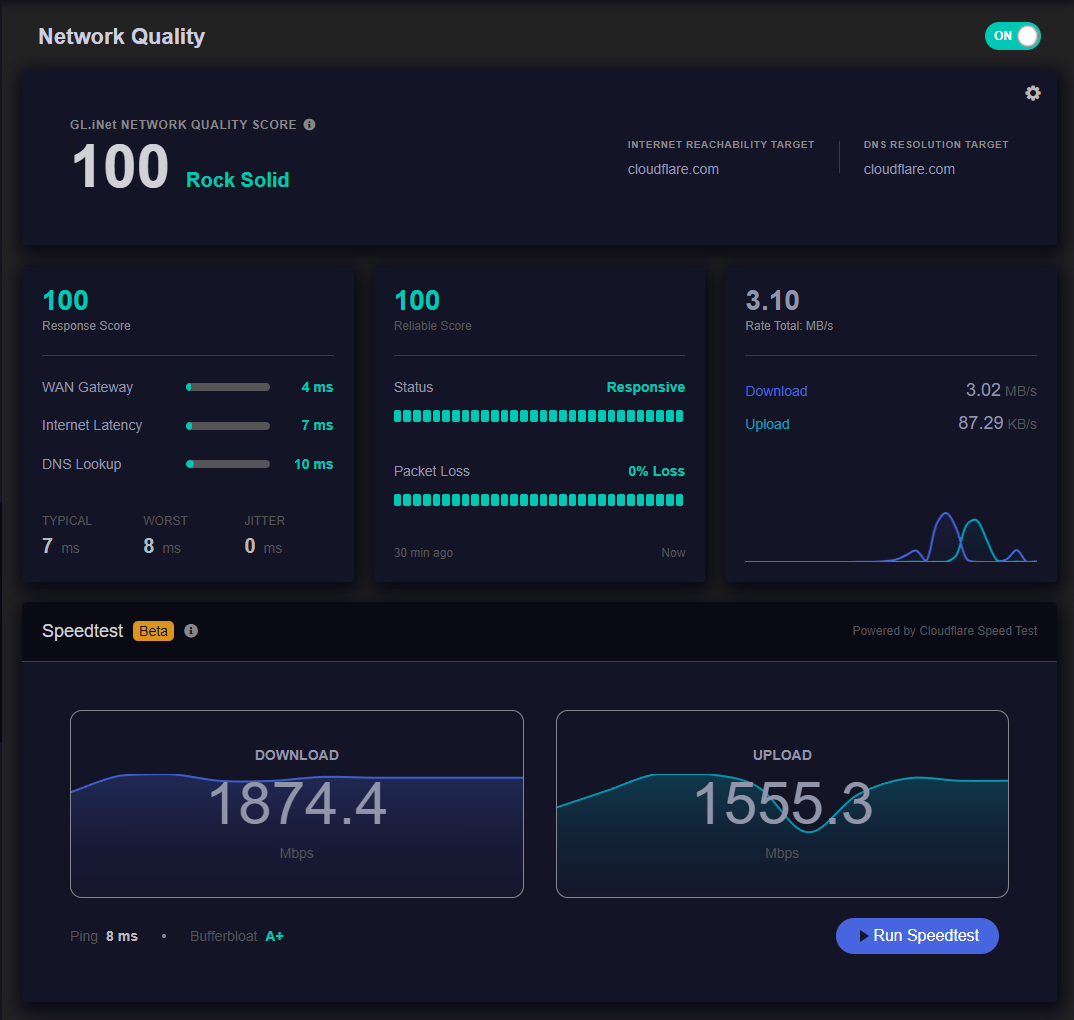
Looks good now.
Hi @Void,
Thank you for sharing your findings.
The stock firmware uses BusyBox ping rather than iputils-ping. Based on the output, it appears that the issue occurred when iputils-ping was installed with incorrect user ID or file ownership settings.
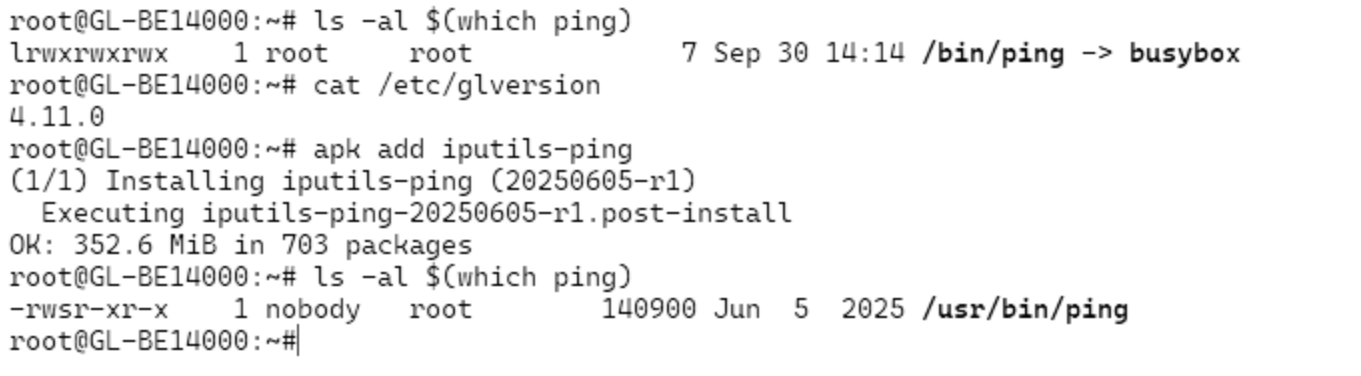
We will ask our R&D team to investigate the package build and installation settings.
1 Like