Yes, that is what @rain meant to my understanding.
@meerkat i haven't seen a video specific to the x3000, could you please post a link? Try as i might today, I can't get the "LED flashing in a regular sequence". Very frustrating, as I got that far on my first attempt some weeks ago... Thank you.
@rain People say that their MT2500 has bricked just after the U-Boot upgrade.
Is there any known or suspected cause?
Is this issue specific to certain hardware version or condition?
Or should we just follow the instructions and cross fingers?
I just want to know in advance what the possibilities are.
- Not Upgrade: Might be BRICKED during each bootup, by low chance
- Upgrade: Might be BRICKED just after the upgrade, by low chance
Is this right?
And this only applies when not upgraded, right?
1 Like
The solution contains two pasts, "upgrade the U-Boot" and "upgrade the firmware".
U-Boot is the bootloader works when you power up the device.
The firmware listed in the first post is just our official firmware, make sure your version is, or higher than v4.7.0 is OK.
And you shall upgrade the U-Boot at your convenience.
Actually NO.
We have performed many trials in our lab and this solutions work fine.
Our agents has reached these guys to offer the replacement and get back the defactive devices.
Since upgrading U-Boot is not a easy operator and may totally brick the device, espcially when you power down during the upgrade. If anyone come across this case, we have to get these devices back and flash the U-Boot with some specific tools by manual in our factory.
For your MT2500, please upgrade the U-Boot and firmware listed in the first post at your early convenience. Make sure NOT to power down the device during the upgrade.
For other brick possibilities and chances, I think it is low but the upgrade is need.
@rain All right. But currently the download link of MT2500 U-Boot shows only 62 times of click, and probably only some of them actually flashed it. Then isn't it pretty high percentage?
That's why I concerned. 
So how long does it take to flash U-Boot on average? It seems that they waited long enough too.
I asked a lot, but I want to be prepared since my MT2500s are physically far away that I must drive highways.
I did noticed something particular when I compare the size of the u-boot images.
but I don't know if it is a issue it's usually normal the sizes differ.
but because it maybe is one byte difference won't it be malformed?
sometimes github client can change the LF with something else I believe CRLF, I hope it did not happened on this image.

^ I see I double copied the image for x3000 (but I know these 2 have identical size I just redownloaded them).
We understand your concerns. Sorry anyway for all these inconvenience taken.
While still the upgrade is recommended, since we don't want the device brick some time unexpected, which may annoy our customers much more.
Generally it takes about 5-10 minutes, and after the upgrade it shall restart by itself. You can just change your desktop/laptop's connection to dhcp and it would build the connection successfully.
Yes, it is different, for different models.
You can calculate the MD5 and make sure it equal to the vaule in its name.
Forgive me if already mentioned but we are all recommended to upgrade the UBOOT on the brume 2 if we haven't already done so?? Is there a way for new brume 2 users to know if they already have the recommended UBOOT update?
I guess I will need to update my UBOOT as I haven't done so, I also see you say to update to 4.7.0 firmware, I am using a custom firmware from v4.6 - can I still use that firmware without issues or are old firmware the cause too??
3 Likes
On my X3000 I had to connect to the LAN port (I think the video mentioned the WAN port) and then after holding the reset button and powering on the device I saw the power led come on steady and then after the internet led flashed 5 times I released the reset button and that worked for me.
There don't seem to be official Information about this (yet), but I've seen some kind of U-Boot Version String (U-Boot Version 2022 or somehing similar) on the "U-Boot Update Page". This should be the installed version. My device is sent in, as it failed on any firmware or uboot update. Now I am waiting for the replacement, expecting that it is already fixed, but would also like to now how to check that myself.
2 Likes
Lots of designations, numbers, and letters, so I'll just ask. Does this include the Beryl MT-3000AX? Asking for a friend! 
Now I have 2 broken mt2500!!!
The first one (bought in 2023) didn´t come up after a reboot, but I was able to boot into U-boot. Flashing any firmware version was not possible. It ends with the error ´Upgrade failed!´. Now I saw this thread with new U-boot image. The upgrade was successful, but after the reboot the router was dead! No LED, no ping, no boot into U-boot... nothing!
The second router (bought in 2024) was complete ok. Because of making trouble ´risk at reboot...´ in this thread I tried to flash the second router with the U-boot image. Same behaviour like the first one. Now I´ve two broken devices.
It would be nice of GL-Inet to change both parts, even though the first one hasn´t warrenty anymore. GL-Inet promotes flashing this U-boot image strongly. And this has distroyed both routers! It was no faulty hardware or my mistake.
By the way... @D.D: The last screen (waiting for reboot) showed the U-Boot version 2022.07-rc3
@GL-Inet: I think it´s a good time for removing this firmware out of this thread. Or inform all users exactly when to install this image and when not, please.
3 Likes
Hi @jha, I think @ doczenith1 has answered your question.
The GLinet video needs improvement, I would not say depress reset button and wait for the LED flash in a pattern, rather depress reset button and wait the LED has finished flash in a pattern, before releasing the button.
@rain. The video contains all but the thread relevant models. I guess its time to for a new video, it does not have to be fancy, even silenced one is fine, or better insert text at the right moment (If any background music, lower the volume way down instead of overpowering the voice or distraction). This small effort actually reduces glinet cost on handling returned bricked devices.
How Glinet handles this is very bad. No information how important this is. Why do we need to update uboot bootloader, why doesnt the fw update do this for us? The prodecure to update bootloader seems to be really annoying. Please include the bootloader update procedure in the next fw update if this is important or come up with an easier way to update it directly from the Web Gui without this nonsense procedure with ethernet port, changing ip, using reset button and so on.
Will this reset my entire config and files? I would assume so if you need to use the reset button?
2 Likes
Could you help with a U-Boot device tree for the mt2500 for use with Openwrt?
I'm watching all the bricked mt2500s in this thread and I don't trust the U-Boot that GL have provided.
2 Likes
This was the correct sequence for the XE3000 as well. Thanks for sharing!
To recap:
- Power down
- Remove power cord
- Connect network cable to LAN port (WAN may work, did not test)
- Press & hold reset button
- Reconnect power cord
- Wait for Internet light to flash five times
- Release reset button
Was successfully able to update uboot from 2022.07-rc3 (Feb 21 2023) to 2022.07-rc3 (Feb 25 2025).
Interesting that only the timestamp changed and not the RC versioning, but whatever....
After the upgrade was completed, I noticed the lights cycle on my XE3000, so I removed the manual DHCP assignment, browsed to the normal admin panel and confirmed the device was up. Went back into uboot mode to confirm the versioning change, and then rebooted once more to restore normal operation.
2 Likes
SO....
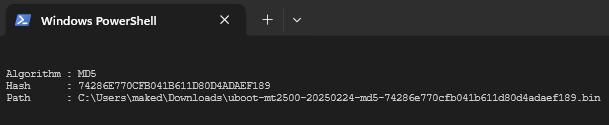
I did as the email told me, I downloaded uboot-mt2500-20250224-md5-74286e770cfb041b611d80d4adaef189.bin
did the precedure of remove all cables except lan, removed power, hold reset button, put back power, LED flashed then stopped, I released reset button.
I was able to go to http://192.168.1.1/uboot.html uploaded the bin file, pressed update, waited... and now my Brume 2 is DEAD. DEAD DEAD DEAD.
Didnt come back online anymore, waited for 10 minutes. No LEDs showing up. Removed power, pressed reset button put back power, no LEDs showing anymore. DEAD. Awesome.
I will write to the above support email and ask for a free replacement.
md5 hash was correct btw:
1 Like
Hi gl-inet team. I'm going to update my brume2. But the warranty has been expired . I will record the process , If ever the update will be fail, Will you replace my device?consider that problem is not on my end because I have video as proof.