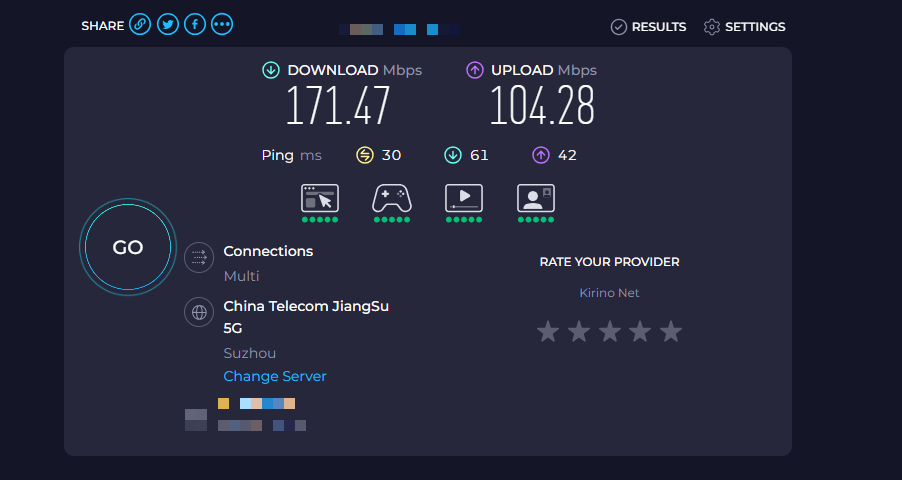
I did a factory reset on both routers, before the tests.
Hardware offloading is active by default
2 -
Tailscale status show the connection as direct, in both cases, there is no relay fallback;
A few Tailscale ping –size tests, shown replies from other local GL-Inet at 1ms or 2ms;
-
3 -
CPU load is low in both cases;
And as I wrote a local PC cable connection to the LAN port of both routers deliver my standard provider bandwith, about 930Mb downlink and 420Mb Uplink;
There is NO problem with Tailscale uploading from my phone on the Beryl AX
This difficulty ONLY happens with Tailscale uploading from my phone to the Slate 7
The hipothesis of a NIC driver quirk, makes sense if a cable test from LAN to WAN does not fail on the Slate 7 ?
A CPU saturation makes sense in this situation ?
The MTU is the factory default after a reset on both routers …
Could you please let us know your detailed network settings? Based on your description, I assume:
The Beryl AX and Slate 7 are both running as Tailscale Exit Nodes.
The Beryl AX and Slate 7 are connected via Ethernet to the same network.
You are using the same mobile phone connected to the same network (is this a cellular network?) for testing.
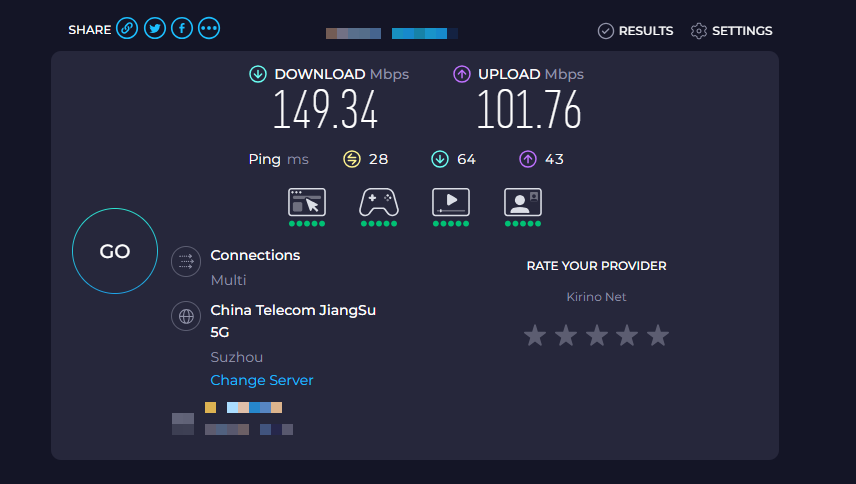
When the phone selects the Beryl AX as the Exit Node, the speed is 150 Mbps DL and 50 Mbps UL.
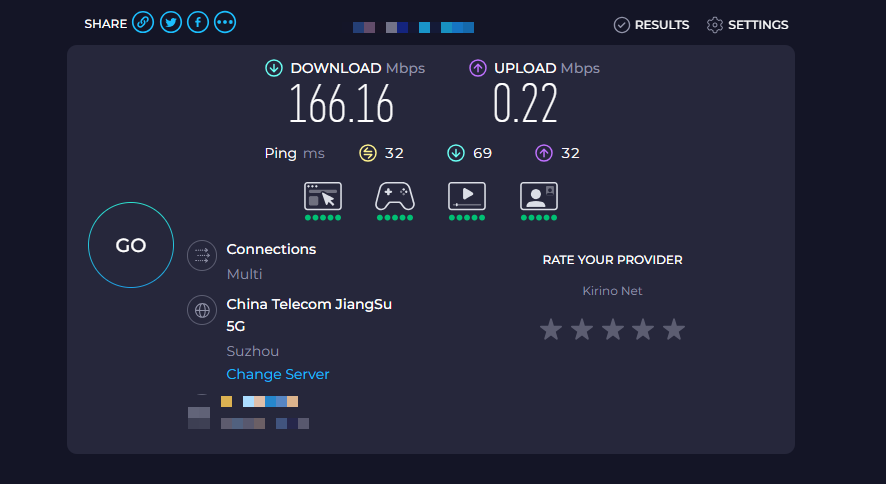
When the phone selects the Slate 7 as the Exit Node, the speed is 150 Mbps DL and 1 to 2 Mbps UL.
We would like to further confirm with you:
Is our understanding above accurate?
Are these test results consistently reproducible across multiple attempts?
Is the network the mobile phone is connected to stable? If it is a cellular network, did you disconnect from Tailscale and run a speed test again after testing the Exit Node speed to ensure the low UL speed is not due to cellular network fluctuation?
Thank you for your report. We have successfully reproduced the issue locally.
However, as using our devices as Tailsale Exit Node is not currently within the scope of official support, we are unable to offer much assistance in this regard.
We have logged this issue. If we introduce official Tailsale Exit Node support in the future, we will investigate this matter further.
May we know that in your use case, Beryl AX and Slate 7 are also operating as Tailsale Exit Nodes?
Or are they connecting to other Tailsale Exit Nodes?
both AX and slate 7 are connecting to other Tailsale exit node (which operate from linux)
case1:
My computer wifi → netgear router wifi (192.168.1.x) → LAN → AX dropin gateway (192.168.1.x) → tailsale exit node → linux (NO PROBLEM 100M+)
case2:
My computer wifi → netgear router wifi (192.168.1.x) → LAN → slate 7 dropin gateway (192.168.1.x) → tailsale exit node → linux (VERY SLOW less than 1M)
case3:
My computer wifi → slate 7 wifi (in 192.168.8.x) → tailsale exit node → linux (NO PROBLEM 100M+)
I didn N times factory reset, try different setting, still less than 1M on slate7. I did not expect new models can get worst than old one, I was thinking to upgrade but i want to refund now
I understand that you don’t support officially the Tailscale “Exit Node” option.
But as far as I know, you support, even directly at the GUI, the “Custom Exit Node” option.
If you configure a Slate 7 using the supported “Custom Exit Node” option, and connect it to a “Exit Node”, for example a Apple TV, the problem also exists and become reversed.
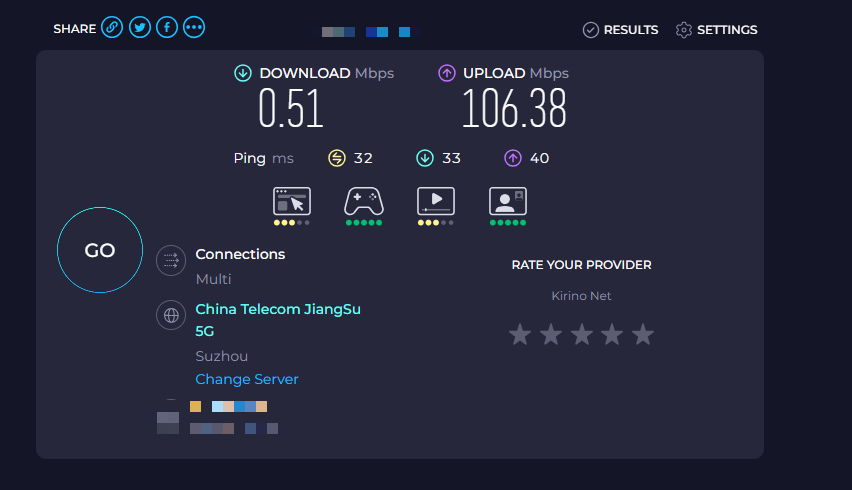
By reversed I mean that the downlink speed is miserable, about 1Mb/s and the upload speed is in my case around 50Mb/s.
As this is a supported option, I expect you to investigate this further.
I bought the Slate 7 specifically to be a traveling router using Tailscale and I’m just not able to do it.
Thank you for your feedback. We have successfully reproduced the issue locally.
We have asked the R&D team to investigate it and try to resolve the issue.
Our R&D team continues to investigate this issue.
This issue may involve multiple components, such as kernel-level network acceleration paths, and the way Tailscale’s WireGuard engine handles encryption and decryption for inbound and outbound traffic. These areas require deeper analysis, so additional time is needed.
We appreciate your continued cooperation and patience.
If we were talking of any other hardware from GL-Inet, for instance a Beryl AX, no problem, a user simply would download a earlier version of the firmware that works.
But in this case, a user like me, don’t have that option, because earlier software simply doesn’t exist.
Compared to a Beryl AX, I have bought a expensive hardware piece, that never worked since put on sale by GL-Inet. Its simply a paperweight.
This situation is not acceptable.
If you don’t have available the resources to solve this situation, at least have the decency to warn any candidate buyer on your site and at Amazon, that this hardware simply doesn’t work for Tailscale.
Also, can you talk to Amazon, so that I can send back my Slate 7 ?
Unless you can give me a reasonable time frame to solve this situation.
Thank you for your patience.
We’ve identified the likely cause and are validating it now, and we’re also planning a firmware update to fully resolve the issue.
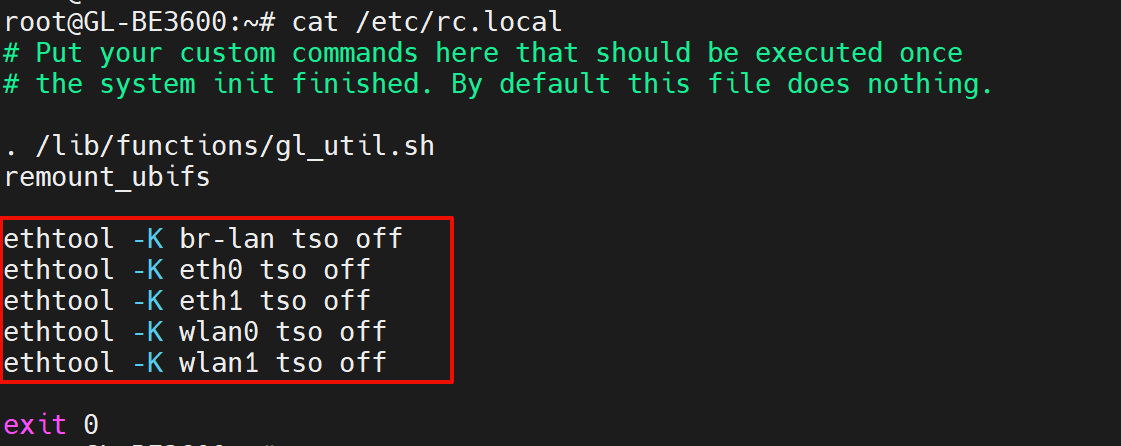
As a temporary workaround, please SSH into the router and run:
ethtool -K br-lan tso off
ethtool -K eth0 tso off
ethtool -K eth1 tso off
ethtool -K wlan0 tso off
ethtool -K wlan1 tso off
If the issue is resolved, you can make this persistent by adding the same commands to /etc/rc.localbeforeexit 0, then rebooting the router to confirm the setting is applied after startup.
Tailscale Version: v1.92.3 (Updated on all devices)
Hardware: * Routers: GL.iNet Slate 7 and Beryl AX
PC: Killer E3100G 2.5Gb Ethernet / AX1675x Wi-Fi 6E
Phone: iPhone 15 Pro Max
Topology: Router acting as a Wi-Fi repeater (connected to the main router). An oversea Linux machine is selected as the Tailscale Exit Node.
Testing Method: All tests conducted via Speedtest using the same remote server.
Performance Comparison Table
Device
Router
Connection Type
Download (Mbps)
Upload (Mbps)
PC
Slate 7
Ethernet (LAN)
2 (Abnormal)
23
PC
Slate 7
Wi-Fi
32 - 37
23
PC
Beryl AX
Ethernet / Wi-Fi
37
23
iPhone 15 PM
Beryl AX
Wi-Fi
45
35
iPhone 15 PM
Slate 7
Wi-Fi
45
25
Key Observations:
Slate 7 Wired Bottleneck: On the Slate 7, using a physical Ethernet cable causes the download speed to drop drastically to 2 Mbps. Simply switching to a Wi-Fi connection on the same router restores the speed to 32-37 Mbps.
Beryl AX Consistency: The Beryl AX does not suffer from this issue; it maintains consistent speeds regardless of the connection type (Wired vs. Wi-Fi).
Device Variance: The PC generally gets slower speeds compared to the iPhone 15 Pro Max across all tests.
Hardware Capability: The Beryl AX overall outperforms the Slate 7, especially in upload speeds.
Conclusion:
There appears to be a specific routing or driver issue with the Slate 7's LAN/WAN ports when Tailscale is active with a custom Exit Node. The fact that Wi-Fi performs normally while the physical LAN port throttles the connection to 2 Mbps suggests a potential conflict in how Tailscale handles traffic over the wired interface on this specific model.
In our internal tests, the throughput returned to normal after applying the change—both when the BE3600 was acting as an exit node and when it was connected to another exit node. Based on that, your outcome does seem inconsistent with what we’re seeing on our side.
Following a temporary fix applied to the routing configuration, the previous "download speed abnormality" (2 Mbps) on the Slate 7 has been successfully resolved. However, a consistent performance gap persists where Wi-Fi connections outperform Ethernet (Cable) connections across all tested devices.
Test Methodology
Topology: Router configured as a Wi-Fi repeater; Tailscale Exit Node enabled on a remote Linux machine.
Procedure: Three consecutive tests were performed for each scenario to calculate a reliable average.
Hardware: GL-BE3600 (Slate 7) and GL-MT3000 (Beryl AX).
Slate 7 Test Result
PC Connected to LAN by ethernet cable
Ping-MS
182
173
181
Average
PC Connected by WiFi
Ping-MS
183
183
183
Average
Iphone 15 Pro Max by WiFi
Ping-MS
185
185
186
Average
Beryl AX Test Result
PC Connected to LAN by ethernet cable
Ping-MS
189
188
188
Average
PC Connected by WiFi
Ping-MS
188
188
190
Average
Iphone 15 Pro Max by WiFi
Ping-MS
191
190
190
Average
Performance testing reveals a significant throughput discrepancy on the newly released Slate 7 (Wi-Fi 7) flagship router when using Tailscale. Despite its superior hardware specifications (Quad-core CPU, 2.5G ports), the Slate 7 exhibits lower-than-expected efficiency on wired connections compared to its wireless performance and the older Beryl AX model.
Flagship Underperformance: Although the Slate 7 features a powerful Qualcomm Quad-core SoC and 1GB of RAM, it struggled to outperform the Beryl AX in this Tailscale exit node scenario. Most notably, the iPhone 15 Pro Max achieved nearly double the upload speed on the Beryl AX (39.80 Mbps) compared to the Slate 7 (22.57 Mbps).
Ethernet vs. Wi-Fi Inconsistency: In all scenarios, Wi-Fi connections provided higher download throughput than physical Ethernet cables. On the Slate 7, switching to Wi-Fi yielded a 24% speed increase (34.74 → 43.06 Mbps).
Firmware Maturity: Given that the Slate 7 is a brand-new Wi-Fi 7 product, these results suggest that the current firmware (v4.8.1) may not yet be fully optimized for Tailscale/WireGuard hardware acceleration or the 2.5G Ethernet controller interface.
Conclusion
The Slate 7's hardware potential is currently bottlenecked by software/driver implementation when routing encrypted Tailscale traffic. The "Wired < Wireless" paradox on a high-end 2.5G router indicates a critical area for future GL.iNet firmware updates to address, particularly regarding LAN bridge efficiency and NPU (Network Processing Unit) utilization.