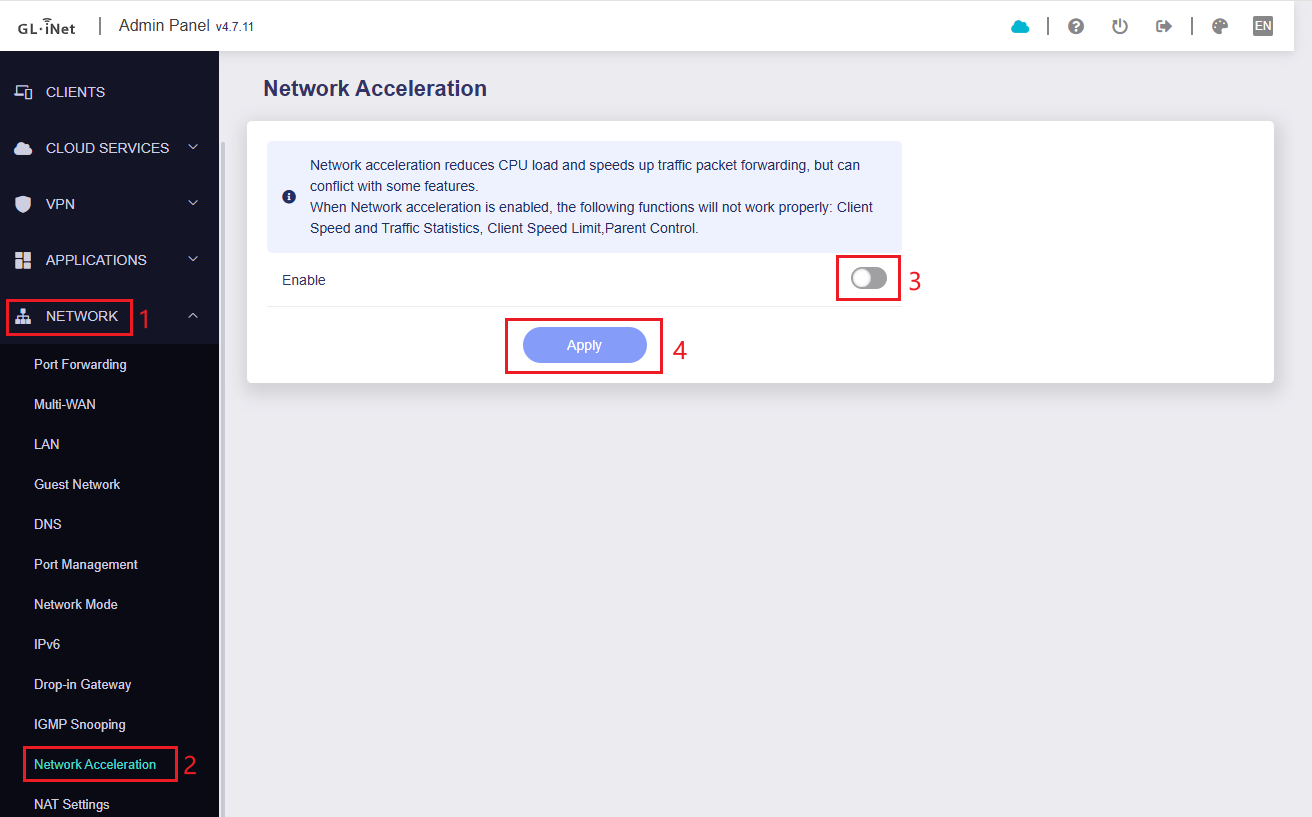
The external and internal ports for port forwarding to be configured the same, otherwise you will need to use different ports when accessing from a public or intranet network.
The intranet devices should use the DNS of BE9300, could not use the Encrypted DNS.
We are still working on it to see whether we can fix it, but no specific timeline can be shared.
Currently, please use one of the solutions mentioned before to bypass it.
Thanks for your understanding.
Our R&D team has been working hard on this issue for a long time, but there is no solution.
We have fed back to Qualcomm and await their further research.
We are also urging them to check, will update you asap if we have any news.
If this issue does affect your normal use, please contact us by email support@gl-inet.com, and let us communicate further.
Thank you for the update, I wish I kept the box for this router so I could send it back to you guys.
My Ring Doorbell won't connect to wifi anymore and the Hardware Acceleration has to be disabled, the Flint 3 shouldn't have been released with so many bugs, or perhaps you should have used a different brand chip, Qualcomm seem to be slipping...
I’ve tested this as well and can confirm your observations:
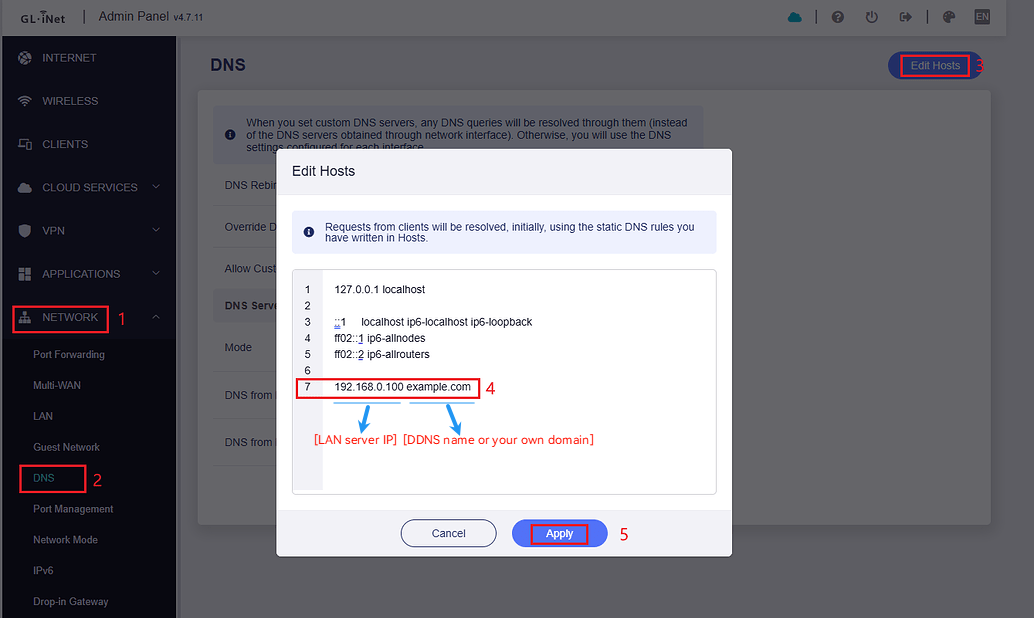
With hardware acceleration enabled, I can’t access my own domains from within the LAN when they point to my public IP address – for example via Cloudflare. The issue became especially clear after I disabled the Cloudflare proxy: local access failed immediately. Only after disabling hardware acceleration or adding a DNS rewrite to the internal IP was I able to fix the issue.
A special case on my end:
I'm using a Flint 3 as a VPN client (Mullvad) and simultaneously as a WireGuard server for my smartphone. However, if I route my Unraid server itself through the VPN tunnel, access to public services like Immich or Seafile fails – presumably due to missing NAT loopback in combination with the VPN routing logic. Once I exclude the server from the VPN via policy, everything works again as expected. The exact same setup worked without problems on the Flint 2.
Your doorbell scenario is obviously more specific – but overall, this behavior seems pretty consistently reproducible.
Our R&D team is actively collaborating with Qualcomm to address this issue.
We understand the importance of a timely resolution and are actively advocating for this matter to be prioritized.
It has been more than 2 months since I reported this. That is 8 weeks. That is 40 working days. That is 320 working hours. How much more time do they need to fix this? Will it ever be fixed?
We apologize for any inconvenience this may cause.
Please understand that this is a chip-level issue, which requires careful investigation by Qualcomm and our team to determine the root cause and whether a fix is feasible without affecting other functions. This process may take some time.
If the issue impacts your normal use, please contact us at support@gl-inet.com so we can follow up with you directly.
That’s realy sad. I bought the Flint 3 for home use after liking the Beryl AX, but NAT loopback is a must-have for my use case. I can’t even use the hosts workaround because there are multiple domains involved. Disabling hardware acceleration is obviously not a good solution (but in reality, I’m not sure how to properly test how much it really affects my performance). I hope this can be resolved; though, reading this, I'm starting to feel a bit skeptical.
Maybe we know more details why the Host solution isn't working for you?
If you have multiple domains pointing to the same internal server, creating multiple entries should make it work.
For example:
Well, simply turn it off and see if your internet speeds in for example speedtests are no longer giving you the maximum speeds.
Hardware Acceleration offloads certain routing tasks, like performing NAT, from the router’s CPU to dedicated hardware. The Flint 3’s CPU is not terrible though, so depending on your use that might actually just handle all your traffic fine.
So you need to now manually enter the port when you are inside your network and not use it when you are outside. As only 443 for example is exposed on the router and the reverse proxy tunnels it to the other port internally.
Really disappointed with the Flint 3. Even budget routers manage NAT loopback without issues, but this device fails at such a basic function. The lack of a fix makes me regret choosing GL.iNet, as it now disrupts my daily workflow and I can't recommend it to anyone.
We are still working hard on the NAT issue of Flint3.
If you require hardware acceleration to be enabled and port forwarding is available, please contact our CS team cs@gl-inet.com and replace it to Flint2/MT6000.