IoT issues on MT6000 Flint 2

Hi All

Despite trying plenty of vids, self-help, guides and the like, I’m no better off trying to resolve this.

I have an MT6000 Flint 2 (on stock Firmware V4.8.3 & OpenWrt 21.02-SNAPSHOT) with a LAN connection to TP-Link Archer BE400 (LAN to LAN) in AP Mode in another Room.

Flint 2:
Main Wi-Fi Network, 2.4 & 5GHz both SSIDs, called ‘DivLAN', with same password.
Guest Network Enabled for both 2.4 & 5GHz bands, with SSID of 'DivGuest', with same password.

Archer In (AP Mode):
PC is connected to LAN port on Archer and other ports are for other devices.
WiFi network SSIDs and passwords are replicated from Flint 2.

I want to create an IoT network on the Flint 2 for one or more Wi-Fi cameras. Apart from isolation and dialling home to ‘whoever’ paranoia, the cameras have to be entirely reset if there’s a change of SSID or Password, losing all settings which is a right PITA.

  • Camera will need to be controllable from devices on main ‘DivLAN’ WiFi
  • Camera Needs WAN access to provide remote access via it’s cloud server via my mobile phone when I’m out and about.
  • Camera should have no LAN Access.

Issues:

  1. Presently, Archer in AP mode just feeds everything back to Flint 2 via LAN connection for the Wi-Fi networks (DivLAN’ & ‘DivGuest’, so there’s obviously no segregation or isolation with devices just getting an IP from the DHCP Flint 2 - total waste of time. This is before even attempting to setup IoT.
  2. It seems impossible to create a simple IoT network on the Flint 2 via GL GUI - it needs Luci. I have tried for weeks to do this without success, creating the interface, DHCP, Firewall etc. I’ve exhausted AI with this to the point my blood pressure was going through the roof dealing with the likes of Chat GPT et al. I have several scripts and then scripts to correct scripts from GL Support without success. Often router is left inaccessible after rebooting, requiring reflashing again to stock. It fails each time or I have total loss of WiFI on router.
  3. As it now stands Support have suggested I should probably wait for V4.9x of the Firmware which is supposed to include native IoT support in the GL GUI!

As for the Archer AP, I am now deciding whether to purchase a second Flint 2 and use that in AP mode as it can replicate existing WiFi networks from the Main Flint 2 and maintains the Segregation (but will likely require setting up again via Luci). Given the initial problems with even attempting this on the main Flint 2 without success is not encouraging.

I've just about given up attempting this with AI help as all that does is screw things up and results in a firmware reflash being required! Also, it's pretty useless as it gives incorrect versions of syntax for later versions of OpenWRT which don't work.

So I don't know whether it's worth investing in another Flint 2 if it's just going to be too complicated to set up and to be honest. A PHD in rocket science should not be something that consumers are required to have in order to set up a basic IoT network and then replicate segregation on another AP.

Why is this basic functionality really so awkward to do?
I don’t think what I’m attempting to achieve is unreasonable, considering the very complicated projects that some people have undertaken. If anyone has any pointers, or has done this, perhaps they could chip in or better still send a script that I could amend as needed.

TIA

Hi

If you just want to create a new SSID for an IoT network on the MT6000, you can refer to the steps below—or wait for version 4.9, where IoT SSID support will be available directly in the GL UI.


However, if you need to use it together with other APs (including another MT6000) while maintaining the separation and characteristics of LAN, Guest, and IoT Wi-Fi networks, the overall setup becomes quite complex.

You’ll need to configure VLANs on the main router/AP for LAN, Guest, and IoT, along with firewall rules to keep devices of Guest and IoT isolated.

Below are some examples from other models/firmware versions with similar requirements that you can use as a reference.

Hi Will

I decided to get another Flint 2 to replace the Archer, but am going nowhere fast.

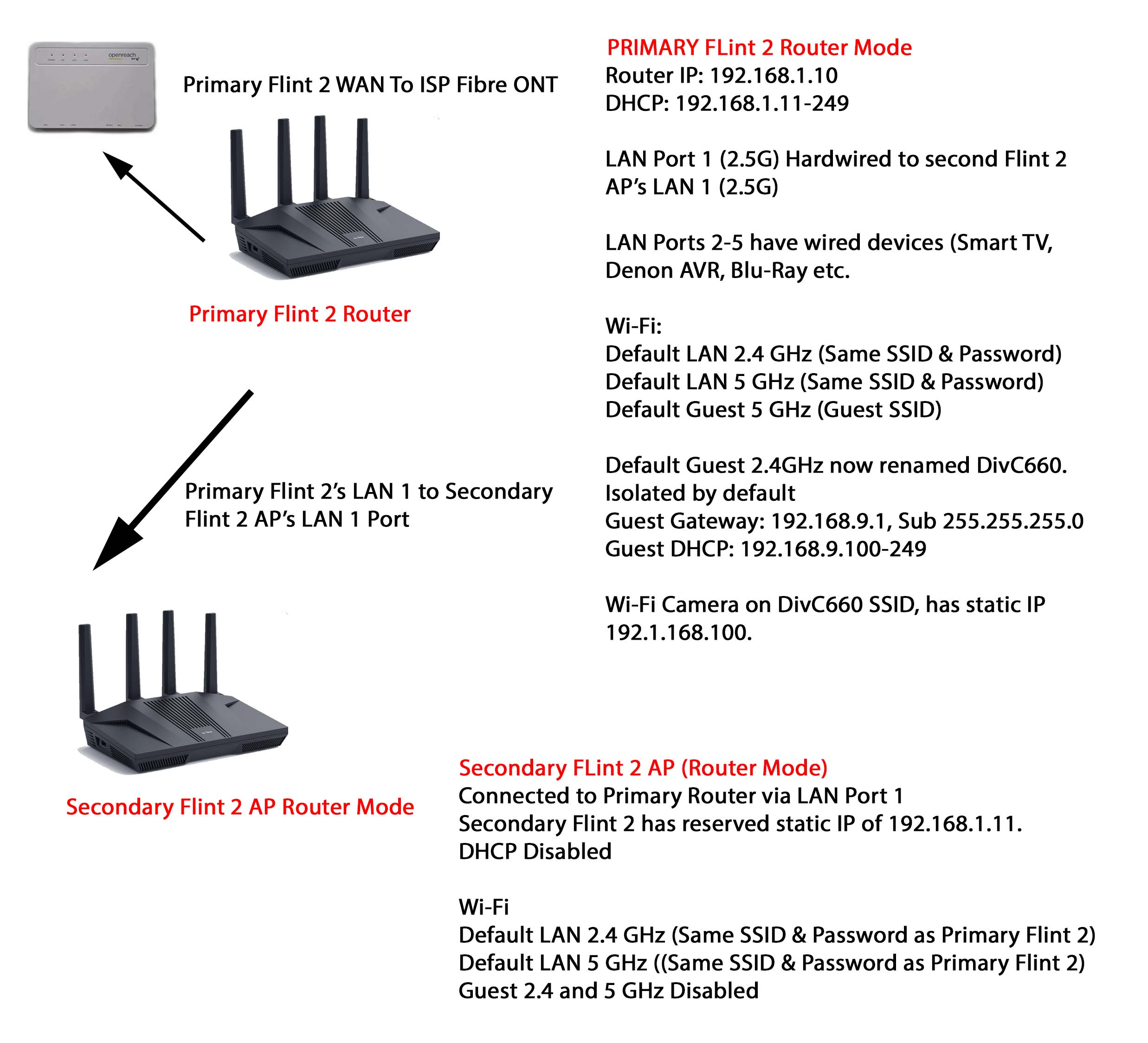
I totally gave up attempting to create another IoT on the Primary Flint 2. Instead, I just renamed the 2.4 GHz band Guest WiFi, created a subnet and got the camera moved over and created a traffic rule. But as far as the secondary Flint 2 goes, in AP mode it’s useless as it’s not carrying over anything. So it’s just a glorified second router in router mode at present for other wired devices and for providing WiFi for devices at the other end of the house. I have to rely on the signal from primary router being good enough for the camera as I’m stuck as it is.

Spent another 12 hours on this, trying to create devices, interfaces etc and every single time the CPU crashes leaving no access and a firmware reflash is needed to get back in. It would seem these models have some peculiarities that do not comply with much of the advice and examples out there and not being an expert, are far too complicated to follow as they all are for different projects which would make things worse.

My only solution it would seem is to wait for the later firmware 4.9x and see how that goes. But my point is it should be a basic feature to replicate segregation of whatever networks exist in the primary router when using a second flint 2 in AP mode. I’ve not been able to do this whichever way provided as everyone is using different versions of this and that. Not really good enough.

As mentioned earlier, even if you use another Flint 2 as an AP, the configuration for your scenario may still be quite complex.

When the time comes, you can draw out your network topology in detail and describe your requirements, then create a new thread—or email [email protected] if you have privacy concerns.
We can then provide more specific guidance.

A simplified version of this kind of setup is typically only available with enterprise-grade controller (AC) + AP solutions. We’re still working toward improving in this area.

Ok, so apologies if this is over-simplified.

Camera is currently isolated as it’s on the dedicated 2.4 Guest Wi-Fi (DivC660) of the Primary router, which is fine so long as there is a good signal.

I did buy a second Flint in the hope that this could be set up to extend the DivC660 Wi-Fi and maintain segregation, but of course this can’t happen as it is, because it’s my understanding that if I enable the Guest Wi-Fi on Secondary router and name SSIDs and passwords the same, it will just pass everything back via the LAN wired connection and end up getting a 192.168.1.x address from the main LAN.

So my point is why a second Flint 2 can’t just have the option to replicate the Primary networks and extend them, maintaining the same rules and segregation. It seems like it requires rocket science to do this. :slightly_smiling_face: