Masking a band leads to significantly reduced speed. So it is not a solution but only a temporary workaround. The unit needs a proper update to achieve the announced specs, obviously for many of us.
3 Likes
Dear Team @ GL iNet: Please take this very seriously! The Mudi 7 is not really usable at the moment here in Germany and probably in a lot of EU countries.
I like your products, having bought a Spitz AX, Beryl AX, Slate 7 and now a Mudi 7.
The Mudi 7 was supposed to replace my long lineup of good mobile routers. And I really do not like the expensive Netgear Nighthawk routers. But I am really close to re-activate my very capable ZTE MU5120 or to buy the newer ZTE U60 Pro. Seriously, cellular reception and bandwith are crucial for your product.
9 Likes
I'm based in Melbourne, Australia and had a similar issue. When I checked, my connection was on Band 3 (4G). I remembered this forum discussion, so I disabled band 3 and what do you know, went from 100 Mbps to 400 Mbps.
1 Like
I was able to do AT+QMBNCFG="Select","ROW_Commercial" and it worked. using the 0803release… the autoselect is still going through France-Commercial-Orange.
@rv42 Totally agree with you. Mudi 7 biggest weakness as of today is cellular reception and optimized carrier aggregation. All the rest is excellent.
I bought myself a ZTE U60 (again) for comparison reasons. It also has a X72 and it outperforms the Mudi 7 very often in speed due to better carrier aggregation. I really hope GL.iNet Team will be able to fix it. To be fair: It is still a pretty new product. Bugs are not unusual in the beginning.
But as you mentioned ZTE routers just as a remark:
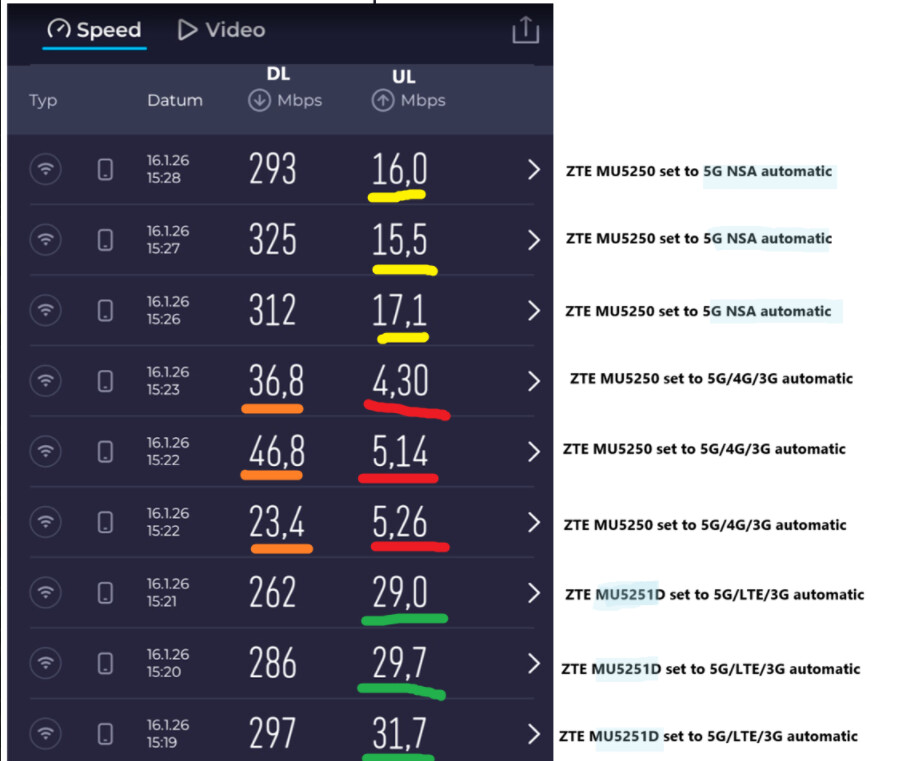
The ZTE U60 Pro (MU5250) had the same issues as the Mudi 7. I tried EU and China version on ZTE U60 Pro. It also forced it to remain in 5G SA band only no matter what download speeds and didn´t start CA with 4G.
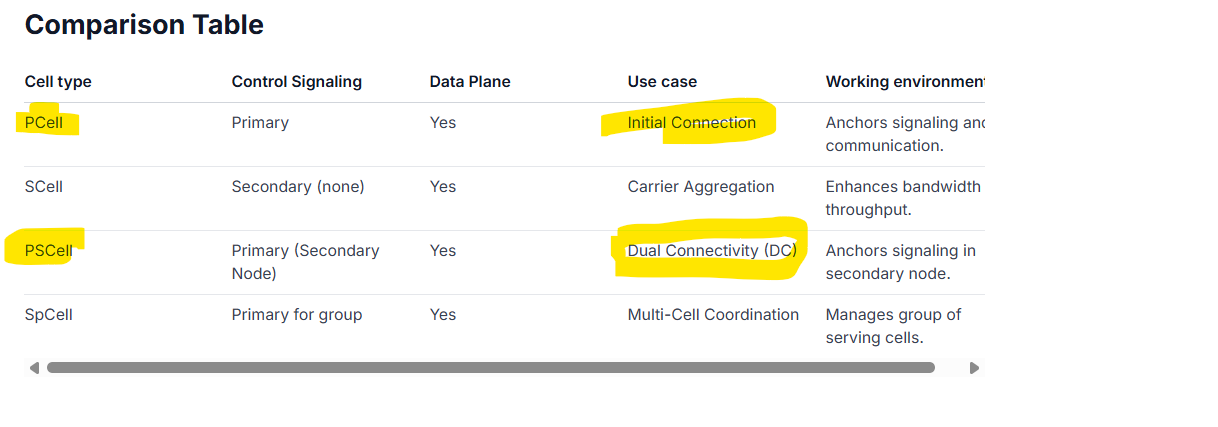
The ZTE U60 (MU5251D) is doing much better in automatic mode (even if it has X72 instead of X75)
Not sure though if it is because of a better MBN or if it is the router doing better on Dual DC with a Primary and a Primary Secondary Node. I couldn´t find out (ZTE is not willing or able to comment or disclose the MBN)
ZTE mobile routers on the other hand have a much worse battery and temperature managment. Mudi 7 is far, far better on these aspects. This is why I want to stick to Mudi 7 (apart from the much better versatility)
3 Likes
@Cathy Is there a timeline for a solution yet? Disabling B1 or 3 does help, but that can’t be a permanent solution. I had hoped the Mudi 7 would offer a bit more stability and speed compared to my previous router. I’ll therefore have to decide over the next few days whether to keep the Mudi 7 or return it, as it hasn’t met my expectations and isn’t usable for me without tweaks. I don't want to do without 5G either, as was suggested in another thread.
2 Likes
Still no solution??
Hungary Budapest
Telekom issue
The internet randomly disconnects, and it only reconnects after restarting the router.
Same issue in the UK. Mudi is actively trying to lock on to a different band and looking at my signal graph its spiking up and down on LTE.
Thats on EE network.
Obviously B3 band is a low range fast frequency while B20 is rural long range frequency but slower speed and this where MUDI lacks as its constantly hunting beetween bands. My old ZTE MU5120 doesn’t seem to suffer this issue as its my android so I believe future firmware updates will hopefully resolve this.
As for locking out Band 3 this results in much lower speeds as already mentioned above. I checked on my android on the Net Analyzer and it seems like B20 outputs much stronger signal and only outdoors I get B3, while Mudi obviously prefers to lock on lower bands to prioritise speed.
Also what helped me I played with different APN settings ( Lyca but using EE) when I turn off Authentication to NONE the problem seems to go away and then I even get 5G NS signal but speeds are poor as signal is bad so LTE works much better for my location.
Carrier aggregation is something that needs to be polished in Mudi 7 as its a super capable amazing device otherwise.
Thanks for the support and looking forward to a new firmware coming out
Hi @Taucher @Bguzelsoy @martinp
Here is a new firmware v4.8.4 for Mudi 7 that has optimized the cellular connection: GL.iNet download center
Please upgrade to this version to try.
3 Likes
Works for me!
Question: does this mean we don’t to block any band with the new firmware?
Thx for feedback
Yes. And you can keep using R17 with the new firmware.
Thanks. Initial test in the city central area looks good in Germany on Telekom. Removed the band masking, and the router is using band 3 and the speeds looking much better than before.
2 Likes
@Cathy Thank you very much. I can confirm that the new firmware works with Telekom without me having to block Band 3. At my current location, the download speed is fantastic; it’s just the upload that’s still a bit slow. I’ll be testing it in other locations as well, though.
1 Like
Hi, had the issue in germany. Resolved by blocking band 3. Now I’m in France. Provider “free”. Same problem. Blocked band 3 and 20. Still disconnecting. Besides this App now disconnects and tells admin password was changed… - is not!
Updated yesterday and reset router to factory.
Manual change of provider doesn’t work either (AT command error).
Hi,
tried it with the new firmware and is looking good.
Thanks Cathy
Firmware 4.8.4, wich a Telekom DE card in Hungary. (Telekom HU). Mudi does not connect to Telekom HU, while my older X3000 Spitz router is working absolute perfectly with the same setup.
1 Like
Which apn you are using? In roaming you should take this: Internet.v6.telekom
Edit: and you should enable „roaming“ in the Mudi.
Greetings
The current Firmware seems to improve the situation, but issues still remain:
Device is in Germany, 1st SIM is Telekom Germany, Second SIM is a keepgo Corvus E-SIM on an EOITCLUB ESIM-Card, therefore set up as a physical SIM. The keepgo SIM is able to connect to the Telekom, Vodafone and O2 networks in Germany.
Previoius Firmware 4.8.3: No connection with Telekom SIM without masking B3. Switching to UE cap. R15 resulted in stable connection even without masking B3.
SIM2: Even with masking B3 and B1 the connection to O2 netwrok frequently dropped (the interface is connected, but no internet). No real difference whether R15 or R17 or with or without band masking. Therefore, was unusable in that state.
Current Firmware 4.8.4 (Switched back to R17, no band masking).
SIM 2 is working flawlessly now.
SIM 1 (Telekom) does however show a strange behaviour: After powering on, device is trying a connection to the network, alternating messages from Connecting, to SIM not registered, finally after about 15 minutes, it succeeds in connecting and speeds are decent.
If I connect to the router while in this state, enable band masking on B3, the connection is established within seconds. Once connected, I can disable B3 band masking again and the connection remains stable, even using B3 in CA.
So, there is an improvement to see, however it is just annoying to either wait 15 minutes or doing the band masking workaround in order to be able to use the device quickly after powering it on.
I am willing to share the device via GoodCloud if needed.
UPDATE: I tried tweaking some settings, including the APN settings. Found out, when I switch to “Authentication None”, the device connects immediately.
Strange, because even on some official sites, PAP as authentication method and a username and password is provided and if putting the same SIM into an Android phone, PAP auth is set in the APN settings of that phone…
So, nevermind, I guess it is just not neccessary…
1 Like