@bruce, could you look into this issue with AdGuardHome? Is this a problem with OP25 or with AdGuardHome?
@EpsilonX, which AdGuardHome version are you running, if I may ask? The latest one?
Just a wild guess:
Could the issue be nginx related?
I read several posts here that the whole ui shutsdown but internet keeps working.
This led me to the suspicion nginx is having a leak?
Can somebody post the result from top?
Hi everyone,
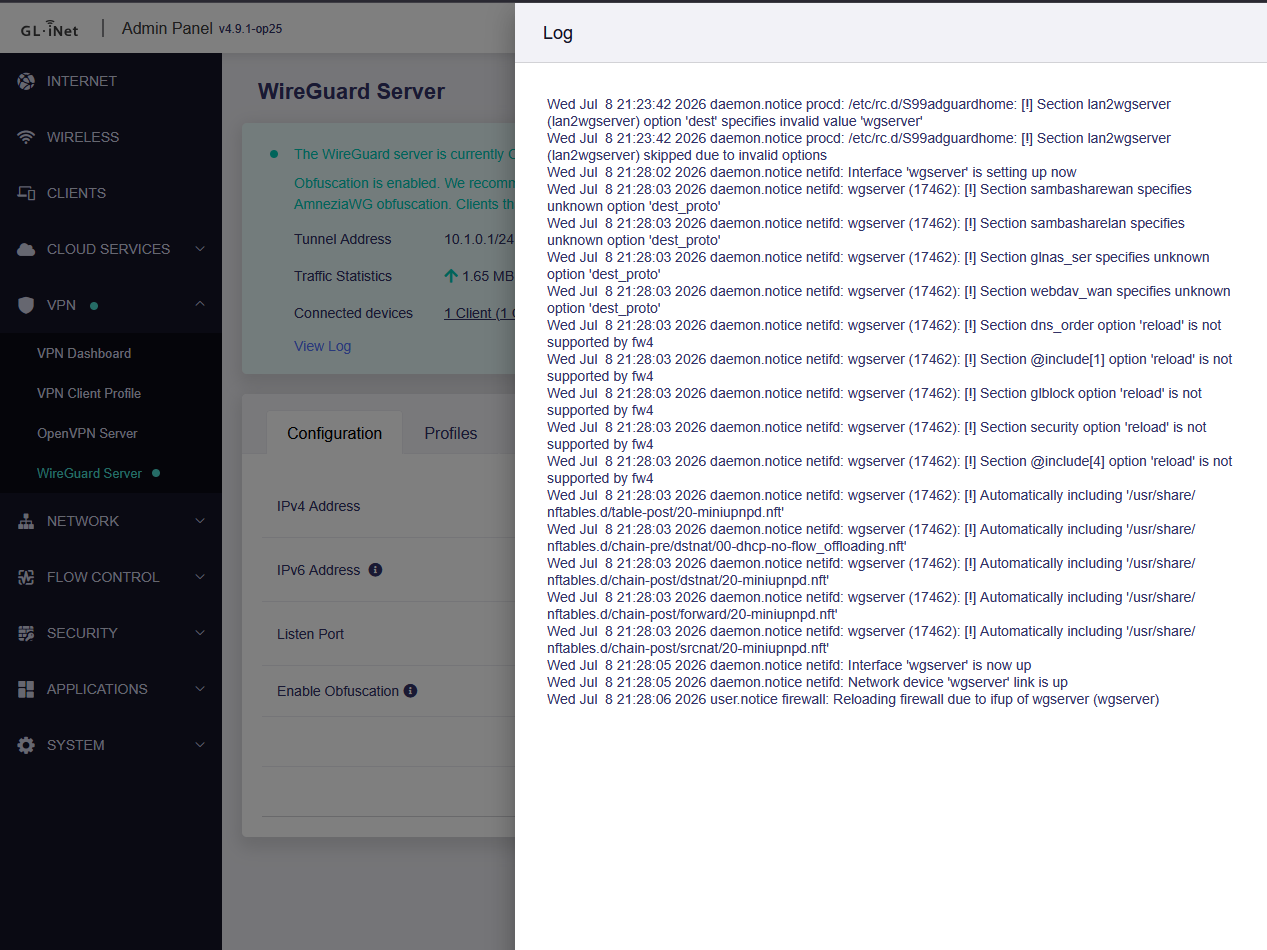
I am noticing on Flint 2 several syntax and compatibility warnings in my GL.iNet system logs right after the WireGuard server (wgserver) and AdGuard Home start up.
Here is the relevant excerpt from my log:
-
Are these major issues that could break my firewall security, routing, or AdGuard Home functionality?
-
The logs mention that the
lan2wgserversection was skipped entirely. Does this mean traffic between my LAN and WireGuard is currently unprotected or blocked? -
Since many of these look like outdated configuration options (
dest_proto,option reload) left over in the transition to fw4 (nftables), is there an official fix or update coming, or should I manually edit/etc/config/firewall?
Any help or insights on how to clean this up would be highly appreciated. Thanks!
Seems also something changed in Wpa3, some devices in my network were unable to connect anymore. When changed to wpa2 only, seems ok. Reverted back to OP24 and wpa3 is fine.
1 Like
I tried the latest firmware last night it seemed ok last night but when I got home from work today I noticed I lost connection several times had to reboot the flint 2 myself to get internet back online.
I have now gone back to OpenWrt 24 for now.
1 Like
maybe too early to tell but i had noticed the tailscale-fix script is probably having something to do with that memory leak. I factory reset the op25 and loaded my op24 config back in and thus far the issue has not come back. Will keep monitoring. Fingers crossed. Besides that the op25 works great.
Nevermind the issue came back after approximately 3h and 30 Minutes. Process Monitor shows
| [kworker/3:2+eve] at 26% CPU load |
|---|
the increased Memory footprint did not show in Luci. memory footprint looked normal.
The stock AGH from the firmware. And I’ve updated my findings that even WITHOUT AGH it still leaks memory. That time I did use DoH in the DNS setting. In the logs I provided, it’s related to dnsproxy and kernel related
The firmware file is clearly marked “beta” even if that isn’t mentioned in the description. Yes, we are guinea pigs. We’ve elected to be by loading the firmware.
2 Likes
Apologies, I didn’t see it was a beta. Makes sense why it’s crap then doesn’t it.
This was also the case for OP24-4.9.0 which was quite a bit more stable.
I suspect “Beta 2” of OP25-4.9.1 will drop in a week or so to fix our issues.
These op versions always are a beta.
I hope they can keep up with all OpenWrt changes, under the hood there are some changes which can break alot of things.
-
there was tansition between wifi-scripts to wifi-scripts-ucode
the issue I myself found in, is that still some config entries are not followed, I changed it back myself since I build my own firmware without the gl part, to me it is still experimental, although it is default now for some time, what bothers me is that it seems a full remake of what the old wifi-scripts was... rather than a port, so in long term there can still be things not implemented.
-
ipv6 changes
there are new ipv6 changes in lucis global settings like the default DUID, this surely can break isp connectivity, some isp may not follow this and people may get connection problems, deleting will help but I experienced the isp put me under a cooldown like with mac address changes.
-
maybe some netifd incompatibility
not sure about this so this is speculation, I do know about the vanilla wireguard implementation it was fully made compatible with netifd from what I understand, GL-iNet uses their own implementation on top of the wireguard binaries, therefor I don't know if something can clash here, I did readed some bug reports with logs about messages, but I don't think these are severe, likely GL-iNet already uses netfid in the past too.
Hi,
@covenant @EpsilonX @Blanched_Almond
We have been running MT6000 with AdGuard Home enabled / encrypted DNS (handled by dnsproxy in v4.9) enabled locally for some time, but so far we have not been able to reproduce the memory leak issue.
Could you please follow the tutorial below to export your backup file and send it to us via private message, so that we can import it locally and try to reproduce the issue?

2 Likes
Sent.
Please delete file once done.
2026.07.09-16:00 CET:
Running OpenWrt 25 (4.9.1) on my MT-3000 for about five hours now without any issues.
AdGuardHome (version 0.1.107.77) is up to date and handling roughly 400,000 entries smoothly. RAM usage is stable at around 53.6%.
So far, everything looks solid.
2026.07.10-07:33 CET:
Update after 18 hours: The MT6000 consumes about 3 watts more power with OP25 firmware 4.9.1. Other than that, everything has been flawless—no lag, no hangs, no memory issues. So far, the firmware has been rock solid for me.
2026.07.10-14:33 CET:
Both the MT3000 and MT6000 are running flawlessly. I haven't experienced any issues with memory usage or Wi-Fi performance. My internet connection, provided by Vodafone Germany, consistently delivers around 1080 Mbps download and 50 Mbps upload. I achieve the same speeds over both Wi-Fi and a wired LAN connection.
2026.07.11-06:38 CET:
A small update from my side: Both the MT3000 and MT6000 have now been running for more than 24 hours without any significant issues.
On the MT6000, I have a VPN and AdGuard Home enabled. It also serves as the primary DNS server in my network, and all 18 of my Wi-Fi devices are connected to it.
2026.07.11-05:40 CET:
My MT6000 became completely unresponsive this morning. The DHCP server was no longer assigning IP addresses. I'm running 4.9.1-op25 on an MT6000 and MT3000.
Initially, my iPhone was still connected to Wi-Fi, but neither downloads nor uploads were possible. Eventually, I had no choice but to unplug the router and power-cycle it.
There is definitely something wrong. I have never experienced an issue like this with the MT6000 in the past two years. Unfortunately, there are no logs available that could help determine what happened.
Reverted back to 4.8.4 until problems are solved.
1 Like
It shows 123% for me too, and I don't use AdGuard Home.
Even though I'm currently running op24 firmware version 4.9.0.
1 Like
Good to see OP25 firmware.
I read comments. FYI: recently I faced most of these problems with latest 4.9.0 OP21 firmware. The problem was AGH, after killing process ram usage became normal. After I decided to install 4.9.0 OP24 and since then I have no problem.
Now after reading all of these, I wonder if I should install it to test (this is my main router behind the ISP’s surveillance device).
Hi,
Please see our responses below:
- & 2. These log messages are normal, and the firewall rules have actually been applied correctly. Therefore, they can be safely ignored.
- Since this behavior is expected and the feature is working as intended, we do not recommend editing it manually, as doing so may interfere with the expected behavior.
Hi,
Could you provide a list of the devices that are not working, including their brand, model, and OS version? We'd like to see if we can reproduce the issue locally.
Hi,
@covenant @EpsilonX @Blanched_Almond
Thank you for providing the backup files.
Our R&D team has started investigating the issue to see whether we can reproduce it locally after importing the backups. If we are able to reproduce it, we will continue investigating the root cause and work on a fix.
We will post any updates in this thread as they become available.
1 Like