Are the only thing not working on the new openwrt25 base firmwares, I believe is due to the new .apk file system, can you take a look to it?
It doesnt recognise .apk so the package management/persistent/install page doesnt work (it still triggers opkg).
Thank for the heads up. This is on my backlog. I’ve been working on adding a couple VPN features - one already released for determining and setting the MTU programmatically. Next up is more granular VPN controls.
@phantasm22 What models are missing from your testing lineup? I have a few I can play with.
Thanks for the offer. The biggest thing I’ve found is the web-ui injections - for fan speed control and ttyd need extra attention for when firmware versions bump. If you have devices running firmware versions in-between and are able to test those two features, I’d be grateful. Most of my test lab is running on stock GL 4.9+ with the exceptions being the mt1300 on 4.3.5 and my mt3000 now running openwrt 25.
That said - I just went through a complete analysis and it appears openwrt 25 is now working with the current release. If you find a bug, let me know.
Two new major features include:
- VPN MTU Optimizer (noted above previously)
- VPN Remote LAN access configurator - more fine grain controls on how your clients and servers can access each other. This was specifically developed to enable LAN to LAN communications over vpn with or without needing masquerading.
Also have fixed a number of bugs as found in the change log: GL-iNet_utils/CHANGELOG.md at main · phantasm22/GL-iNet_utils · GitHub
Sure.. I’ve got firmware versions across the board. I can do some spot checking.
Curious about the VPN MTU Optimizer.. are you running PMTUD all the way the server endpoint, or just on the local link side? Even the local link side is useful, but it’s not quite the same as PMTUD of the native path back to the endpoint, which is what would complete the “VPN MTU” picture.
This was a good suggestion and as of the latest release (2026-07-30), the default recommendation is the calculated link-minus-overhead value, but the active probe (option 3) now runs a don't-fragment (DF) search straight to the server's public endpoint (native path, outside the tunnel), which is the endpoint-side PMTUD you're describing. It will also recognise if the DF flag gets ignored and will fall back to the calculated link.
Thank you very much for creating this extremely helpful utility.
At least in my setup, the MTU optimization does not appear to work correctly. The public IP address cannot be reached by the script nor by a manual ping from the GL.iNet terminal (in my case only some lan subnets 192.168.x.x are routed through wireguard to my home server).
However, the WireGuard endpoint itself is reachable via UDP on port 51820, as confirmed by a recent handshake and active data transfer. Therefore, the failed ICMP ping does not mean that the WireGuard UDP endpoint is unavailable.
The utility reports:
-
“No reply from the public endpoint (it may drop ICMP).”
-
“DF flag was ignored, causing test packets to exceed the tunnel’s max possible size.”
-
“Recommended stays at the Calculated 1440.”
In this situation, the MTU test seems inconclusive, but the script still keeps 1440 as the recommended value. It may be better to distinguish clearly between failed ICMP reachability, confirmed WireGuard UDP connectivity, and an MTU value that has actually been verified.
I am not familiar with the script’s internal logic in detail, but I suspect the issue may be that it does not work correctly with split-tunnel configurations. I will test it again once I have created a full-tunnel configuration.
But thanks for all of your work and sharing. appreciate it highly.
Appreciate the feedback — and you're right, a failed ICMP ping doesn't mean the WireGuard endpoint is down, and the script doesn't treat it that way. There are two values reported by the utility - 1) Calculated which is the link MTU - VPN overhead and 2) Verified which is based on largest don’t fragment (DF) ICMP packet possible between nodes. If verify isn’t conclusive, either by the end point dropping the ICMP packets or the end point reports an MTU > calculated which means DF was ignored; either way, the entire result is ignored and reverts to the dumber Calculated MTU. Spent many hours over the past couple days trying to clean up the UX output as a balance between someone with a CCNP and a casual user but definitely open to suggestions to make it clearer. I’m also adding a help menu item to try and clarify the same and am hoping to push that soon.
Thanks for the clarification — that makes sense, and I understand now that the script is deliberately discarding the inconclusive verification result and falling back to the calculated MTU.
So the underlying logic appears to be correct. My confusion was mainly caused by the wording of the output. As a user, I initially interpreted:
“Recommended stays at the Calculated 1440”
as meaning that 1440 had somehow been confirmed by the probe, even though the preceding messages said that the DF result was unusable.
Perhaps the output could make the distinction slightly more explicit, for example:
-
Calculated MTU: 1440
-
Verified MTU: unavailable
-
Verification result: inconclusive because DF was ignored
-
Recommendation: 1440, based on calculation only
Or simply:
“Verification was inconclusive. Falling back to the calculated MTU of 1440; this value has not been actively verified.”
That would probably be clearer for less technical users while still preserving the distinction for advanced users.
I also initially wondered whether the fallback probe might behave differently with a split-tunnel configuration, since only the configured remote networks are routed through the tunnel. However, in my case 10.9.0.1 is part of the WireGuard tunnel and the probe did reach it, so the split-tunnel setup may not actually be relevant here.
Thanks again for the explanation and for continuing to improve the utility.
@phantasm22 very cool. For the endpoint PMTUD I assume it’s relying on the endpoint router (often an ISP router) to be receptive to incoming WAN pings?
New release (2026-08-14) is out which addresses some user feedback and some bug findings.
- Hardware info screen, page one, now will break out cores vs threads when appropriate (e.g. MT1300)
- Hardware info screen, page three, now more accurately shows the network switch layout
- Substantial testing and update of UI glyph use for enhanced experience across terminals: mac, termius, ttyd, windows, and putty. If there is a specific terminal that you use and you experience some weirdness with the UX/UI, let me know
- VPN MTU and Remote LAN access continue to evolve with a remote lan quick scan followed by an optional full scan than scans all private IP space (30s)
- Ookla speedtest is now supported on MIPS via third party speedtest-go package
- Help across the screens continues to be built out
- Other minor UI bugs
Complete changelog here
Up next, will be adding support for bandwidth limiting on other networks other than the guest network thanks to some pre-work already done by a fellow contributor.
That is some great effort. Thanks a lot @phantasm22
Hi,
just a quick update: I tested the MTU optimization again, and the script now runs through successfully and produces a very plausible result:
-
Current MTU: 1380
-
Calculated MTU: 1440
-
Verified MTU: 1408
The fallback through-tunnel probe to 10.9.0.1 worked perfectly and clearly identified 1408 as the verified optimal MTU.
Many thanks again for your work on this very useful utility and for reacting so quickly to the feedback. Much appreciated!
tnx
I had a stab with this using a Mango with vanilla 25.12.5 with travelmate, adblock, pbr, 2 wireguard interfaces and a few other things; apk of course. It worked fairly well on most things.
- In the Memory I/O benchmark, it reports system RAM of 256MB rather than 128.
- In VPN and Crypto Benchmark it reports OpenSSL not found (although I think I am on 3.5)
- NGINX-SSL failed to install
- VPN was not found even though a Wireguard tunnel was active.
I haven’t dug under the hood at all to see the difference in the wireguard active vs. expected, but there were far less hiccups than I thought.
Thanks for the feedback. My test fleet doesn’t include the original Mango so there are gaps from what I’m able to test. If you are open, I’d like to DM you a link to some test scripts so I can get a better handle on the gaps you mentioned.
Has anyone tested this on the Mudi 7, Slate 7, and Slate 7 Pro? Any bugs or issues to be aware of? Hopefully, the Flint 4 will be supported when it's released.
New release is out which adds a major feature request:
- Guest Network Limiter has moved to a more general Network Bandwidth Limiter
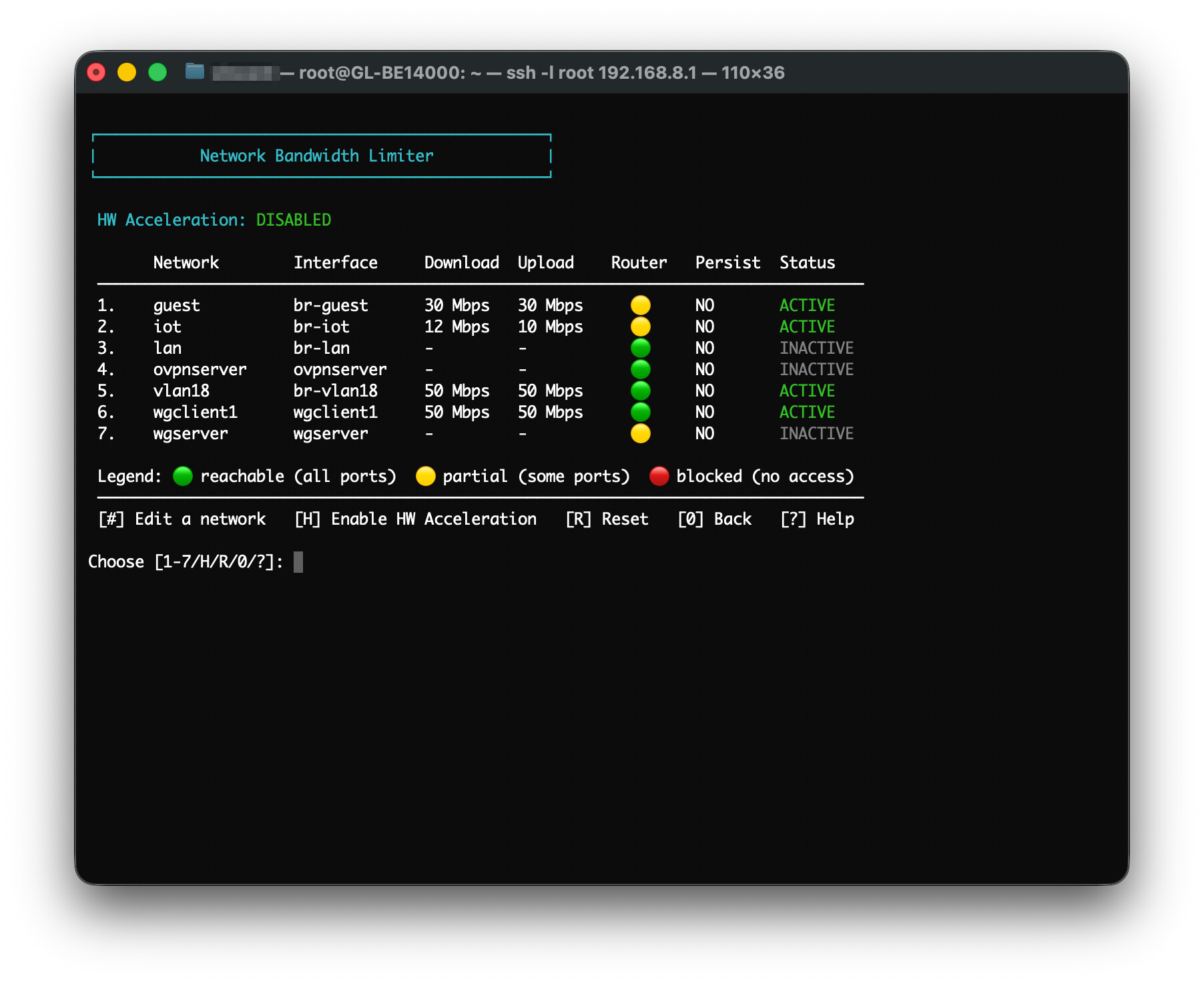
- SSH Key Management and the new Network Bandwidth Limiter are located in a renamed “Network and VPN Tools” (option 5 in the main menu) from System Tweaks (option 3 in the main menu).
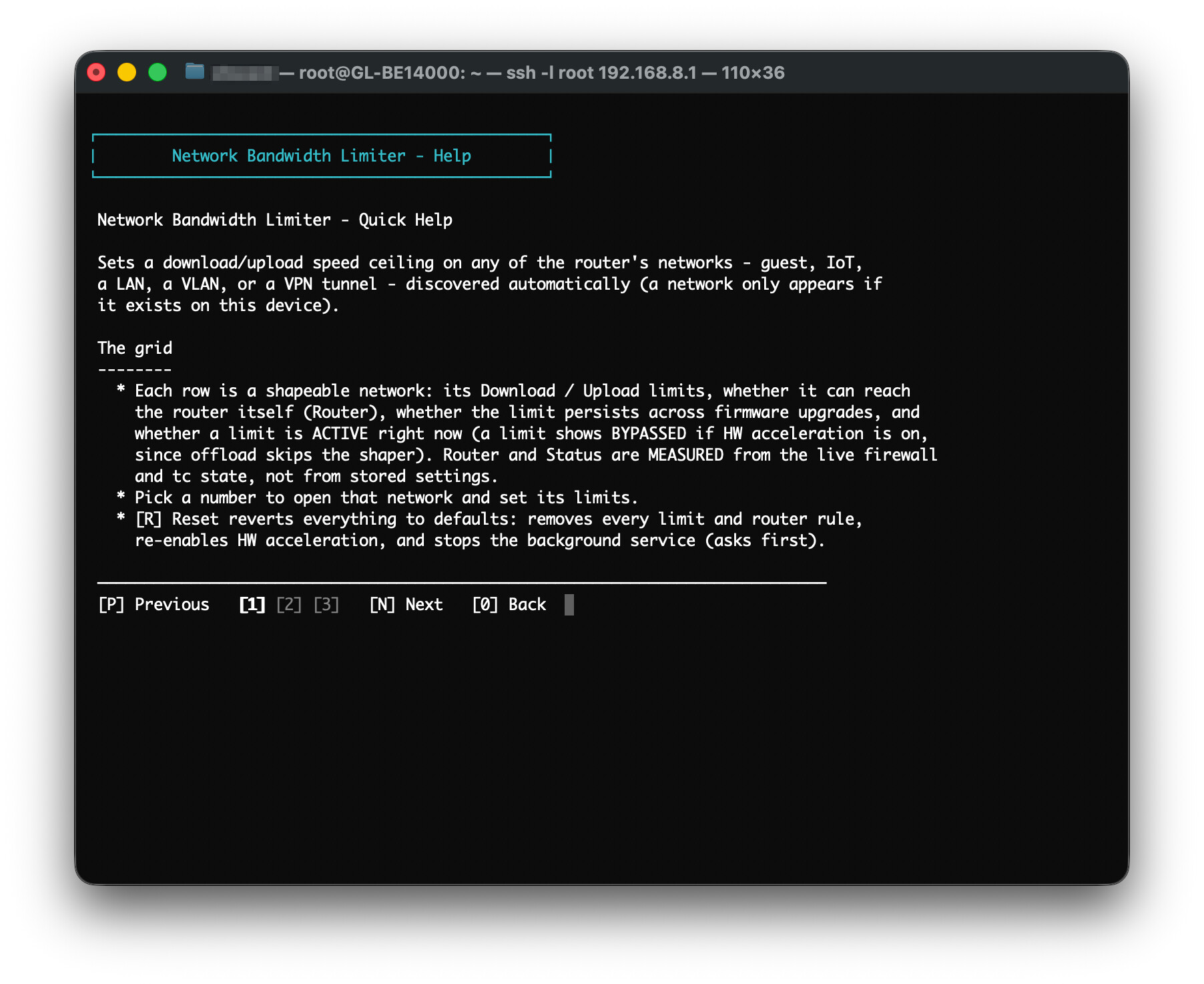
- Added a paginated help viewer function across the entire app
- Fixed the update-installer breaking in certain situations
- Fixed more UI elements to bring standardization across the app
- Complete changelog can be found here
Note: One of the things lost in this version is that you can no longer toggle ON the guest network from the app. You must go into the webUI, enable the guest network, then use the app to limit the bandwidth. Adding this feature back is on the backlog
I updated the script to the current version on my Mango on vanilla Openwrt. The active wireguard interfaces aren’t being detected, OpenSSL isn’t detected, and the memory in the optimize section is still 256. That is not a criticism. Just reporting.
I looked at the script, and there were a few things I noticed. First, I was astonished how developed this script is. Second, I appreciated the extensive explication of the approach contained in the script. I don’t understand it all, but that is a huge help. Third, I fully expected to find some issue with where the wireguard configs were being looked for, or maybe wireguard-tools, or maybe a wireguard naming convention. I can’t see it right off. So I’m still puzzled and no help. But kudos!!
did you read the title of this thread? 