This won't fix if you're infected.. It needs a full firmware reload with "keep settings" disabled. We're working on a tool to help do this remotely.
That would be amazing if you could get that working! Thanks for the hard work!
Would a factory reset followed by installing the latest firmware released today work?
I've just installed 4.10.2 on my GL-BE9300 Flint 3 units. Release notes include:
- Security: Strengthened the security of the cloud-based remote management service.
- Kernel: Incorporated the security patch for CVE-2026-98432 and CVE-2026-99288.
Question for @admon -- will the community script be updated to accommodate future checks with this updated firmware? Any initial advice?
Not like "tomorrow" but maybe it will get a rebuild with some more features and healthchecking. I won't promise anything but the idea is already in my head 
So I found that I was infected, I had Astra do a deep dive into what happened. Here is the outputs, in case the team is interested. I also have a tar file with the actual compromised files and config items, but I don't want to share that here:
# GL.iNet Comet GL-RM1 compromise: incident and remediation report
**Report date:** 2026-11-22 UTC
**Device:** GL-RM1, firmware `V1.10.1 release1`
## 1. Executive summary
A GL-RM1 on firmware `V1.10.1 release1` contained known `gl-helper`/`gb` implant
binaries, duplicated recovery scripts, a remote-command script, and a modified
`/bin/netstat` that conceals a publicly reported attacker address.
The vendor's advertised running-process indicator, `crond -i /tmp/.log`, was
**not observed**. A subsequent process snapshot also contained no matches for
the known implant names, primary/seed directories, or watchdog script names.
Nevertheless, direct file acquisition and static inspection establish that the
device contains the malware installation. A negative process-string check is
not a sufficient clean-device determination.
The attacker infrastructure is consistent with published accounts of the
November 2026 GL.iNet incident. Exploitation of cloud remote management is the
leading entry-path hypothesis, **not a demonstrated device-specific finding**.
No original delivery log, complete execution history, or cloud command record
has been recovered.
The recovered scripts can restore deleted payloads, arrange recurring execution,
restart cloud/remote-terminal services, and execute commands received through
their helper. Static code establishes these capabilities; it does not prove
every capability ran successfully on this device.
## 2. Scope, authorization, and method
The owner authorized read-only investigation, persistent administrator SSH access,
and subsequently removal/securing of this KVM with a detailed report.
The investigation used:
- The existing network controller to locate the device.
- Root SSH using a dedicated administrator key and an SSH host fingerprint
independently supplied through the owner's logged-in KVM terminal.
- Filesystem metadata, SHA-256 hashes, process snapshots, and text-only inspection
of scripts copied into private archives.
- Official GL.iNet notices/documentation and attributed community research.
No malware binary or recovered script was executed. The modified `netstat`
wrapper was read as text, never run. No community scanner, installer, cleanup
script, or attacker endpoint was executed/contacted. No evidence or identifiers
were uploaded to external services.
The exact model was read from `/proc/gl-hw-info/model` (`rm1`) and corroborated by
`/etc/version` (`RK_MODEL=RM1`, `RK_VERSION=V1.10.1 release1`).
The generic Rockchip RV1126 device-tree string alone was not used to select
firmware. A separate hardware revision has not been independently established.
The owner's previously attached Mac and other LAN devices have **not** been
examined. Current physical attachments remain unconfirmed. The owner confirmed
that local LAN web access and stable power are available for recovery.
## 3. Findings from the compromised installation
Severity here describes the security impact of the observed condition. It is not
a CVSS score or a claim that an unassigned CVE has been identified.
| Finding | Severity | Evidence and significance |
|---|---|---|
| Known implant installation | Critical | Root-owned executable `gl-helper` and `gb` files existed in both `/etc/glinet/.cache` and `/etc/config/.gl`. Copies in each location have identical hashes. |
| Concealed network connections | High | `/bin/netstat` was a 122-byte shell script that decodes `66.245.219.252` from octal and excludes matching lines from BusyBox network output. This matches the wrapper described in incident reporting. |
| Redundant restoration/watchdog code | Critical capability | Identical `run.sh` and `watch.sh` files exist in primary and seed directories. Static inspection shows payload restoration, cron repair, process launch/spoofing, and remote-service restart logic. Successful runtime persistence is not established. |
| Remote command execution channel | Critical capability | Two `wake.sh` copies use `gb` to collect state, send a request, decode a response, verify a command, and pass the resulting command to `/bin/sh`. This is code capability, not evidence that a particular remote command was executed. |
| Boot restoration script | High | `/etc/config/.gl/boot.sh` restores and invokes the primary launcher. Its presence alone does not establish that the system currently invokes this boot file. |
| Misleading timestamps | Medium, evidentiary | Several successive malware file modification times are exactly 7,919 seconds apart, consistent with the reported installer's timestamp manipulation. August file dates must not be treated as infection dates. |
| False-negative quick check | High, diagnostic | The prescribed process marker was absent despite the acquired malware installation and altered utility. |
### 3.1 Artifact inventory
Thirteen malicious artifacts were identified and preserved: four binaries, four
identical launcher/watchdog copies, two remote-command scripts, one boot script,
one hidden configuration file, and the network-output wrapper.
| Artifact | Locations / count | Size in bytes | SHA-256 |
|---|---|---:|---|
| `gl-helper` | Primary and seed / 2 | 507050 each | `795ccb39fe2fc7f96bfe0bd8e1ffaf718382988a77c94d0260e5d11d95f6a347` |
| `gb` | Primary and seed / 2 | 109720 each | `eab746b6dafc69f829ab23c11bcc80cb6b2f9206f159173e52d3e7c2083b0d7f` |
| `run.sh`, `watch.sh` | Both names in primary and seed / 4 | 3739 each | `cb33b1ecfe0dfa31389b00e8a2ecd72ed83262335c72ba5f41038a92c7d8fd94` |
| `wake.sh` | Primary and seed / 2 | 1336 each | `c2147a19c81676c0ff55a0e730dc398ea666b9e0c1290b18beb32eccb8462f7f` |
| `boot.sh` | Seed / 1 | 260 | `17c1fde32e210ffc0619e1a1033a8234e5884574858fdc81b256a28892268962` |
| `.u` | Primary / 1 | 36 | `f00074e8194d32fabc97abebbe617b66707da759dbcafd9711d93085e768d0f9` |
| Modified `netstat` | `/bin/netstat` / 1 | 122 | `5c1f84d36fb80f1b9e2388955feb5e69e24d15532c382d8b08236bb3759630b9` |
Here, **primary** means `/etc/glinet/.cache`, and **seed** means
`/etc/config/.gl`. The hidden configuration file's contents are withheld;
its presence and hash are sufficient for this public report.
Before the removal attempt, `/usr/bin/netstat` independently remained a symlink
to `/bin/busybox`. That does not establish the integrity of the BusyBox binary.
The locally recovered `/bin/netstat` variant filters output; it does not itself
contain the separate malware-launch behavior reported for other variants.
### 3.2 Static behavior corroborated on this device
The acquired `run.sh`/`watch.sh` code:
- Reconstructs the primary installation from the seed directory.
- Attempts to install a watchdog every three minutes and a `wake.sh` task every
six hours at minute 18.
- Attempts to restore missing scheduler entries and start `gl-helper`.
- Attempts process-name spoofing through `gb`.
- Can start the device's `rtty` and `gl-cloud` services.
- Contains an early-boot beacon to the known attacker address.
The acquired `wake.sh` code sends state through `gb`, handles a decoded response,
and conditionally sends a verified command to the shell. It also contains a
potentially long delay before contacting its server. A short quiet observation
window would therefore not establish absence of malicious capability.
The files were inspected as data. Their octal strings and command substitutions
were **not evaluated by a shell**, and their uninstall/watchdog routines were
not used for remediation.
### 3.3 Negative observations and inspection gaps
- The advertised `crond -i /tmp/.log` process string was not observed.
- A later privately preserved process snapshot had no matches for the known
implant names, primary/seed paths, or watchdog names.
- Ninety `/proc/*/exe` links could not be read during one inspection. The reason
is unresolved. This is not, by itself, evidence of a rootkit.
- No matching references were observed in the checked conventional startup and
crontab locations; no `/etc/kvmd/user/scripts/S??*` entries were observed.
These limited checks do not exclude encoded or alternative persistence.
- The reported fallback locations `/etc/gl_nas/.cache`, `/userdata/.gl`,
`/overlay/.gl`, and `/tmp/.gl` did not yield the specifically checked artifacts.
- Additional unauthorized SSH keys, changes to cloud settings, full filesystem
integrity, historical flows, credential exposure, and attached-host compromise
have not been comprehensively assessed.
An attacker-controlled system can falsify local observations. These limitations
are why targeted file deletion is not equivalent to restoring trust.
## 4. Timeline and preserved evidence
All collection times below are UTC. Device file timestamps are recorded
separately and are not trusted as installation dates.
| Time on 2026-11-22 | Event |
|---|---|
| 22:49 | Existing network controller observed the KVM online. |
| 23:00:49 | Dedicated, host-key-pinned root SSH login succeeded; four implant binary paths were observed. |
| 23:01:42 | Vendor process indicator not observed; suspect file metadata and hashes collected. |
| Before 23:05 | Text inspection established that `/bin/netstat` conceals `66.245.219.252`. |
| 23:11:10 | First private archive acquired: four binary copies and `/bin/netstat`. |
| 23:12:46 | Exact model/firmware confirmed; expanded checks found the duplicated scripts and hidden configuration. |
| Before 23:16 | Second private archive acquired; copied scripts examined as inert text. A further process snapshot found no named indicators. |
| 23:16:03 | Hash-gated targeted removal attempted. All 13 hash checks passed, but deletion returned 12 unexpected `No such file or directory` errors. The script stopped before its post-removal verification. |
| 23:20:59 | A separate read-only check confirmed all 12 primary/seed artifacts remain; `/bin/netstat` is absent and the shell now resolves `netstat` to `/usr/bin/netstat`. Firmware is still 1.10.1. |
| After that check | Official RM1 1.10.3 image downloaded over HTTPS and verified against the SHA-256 published by GL.iNet's download-center API. |
| Owner-reported recovery sequence | Owner installed 1.10.3 but inadvertently retained settings. They then performed a separate factory reset through the local UI and confirmed the initial setup/password screen and version 1.10.3. |
| Post-reset access setup | SSH host key changed and was independently confirmed through the owner's local terminal. Only the intended administrator public key was installed. |
| 23:36:27 | Root SSH independently confirmed `RM1`, `V1.10.3 release1`, zero known artifacts in the six checked locations, `/bin/netstat -> busybox`, no user startup scripts, and one authorized-key line. |
| Subsequent verification | The authorized-key file hash exactly matched the intended administrator public-key file; cloud enablement and running cloud processes were observed. |
| After verification | Owner declined the proposed additional local-only/key-only hardening and another KVM reboot. No such changes were made. |
Preserved archive digests:
| Archive | Contents | SHA-256 |
|---|---|---|
| `known-malware-pre-remediation.tar` | Four binary copies and modified network utility | `3580e232ddc4fb4b5a5aa6168073d59f7ea7f0b81aa82757058d32223d8d5a52` |
| `persistence-pre-remediation.tar` | Eight malicious script/configuration files plus two device startup scripts for context | `e027ef3c0984a00d21bd94b34a69ac4a028dad61047fc655de979bbce64d6160` |
Archives and raw process data are stored locally with owner-only permissions.
No malware archive has been extracted into an executable installation or shared
with an external service. The captures are a scoped collection, not a complete
disk image, RAM acquisition, or formal forensic chain-of-custody examination.
## 5. Removal and security work: actual results
### Completed
1. Established dedicated administrative SSH access after host-fingerprint
confirmation. No SSH agent was forwarded.
2. Preserved the identified malware and restoration scripts privately.
3. Performed static analysis without executing the payloads.
4. Prepared a deletion procedure restricted to the 13 exact collected paths,
requiring every file to match its acquired SHA-256 before any deletion.
5. Ran that procedure after the owner's explicit removal authorization.
6. After the incomplete deletion, verified and supplied the official RM1 1.10.3
firmware image for the owner's local upgrade.
7. After the owner reported retaining settings inadvertently, directed the
separately authorized factory reset. The owner confirmed fresh initial setup
and established a new administrator password without sharing it.
8. Re-established only the intended SSH key, independently confirmed the new
host fingerprint, and performed post-recovery checks over pinned root SSH.
### Failed in-place deletion before clean recovery
All 13 pre-removal hash checks reported success. The immediately following
deletion command returned `No such file or directory` for the 12 artifacts in
the primary and seed directories. It did not report that error for
`/bin/netstat`, but the nonzero exit stopped the script before verification.
The owner confirmed that they did not perform concurrent cleanup, upgrade, reset,
or other portal commands. A subsequent read-only check found all 12 primary/seed
files still present. It confirmed that `/bin/netstat` was removed and that
`netstat` now resolves to `/usr/bin/netstat`, without executing that command.
The reason for successful hash reads followed by deletion failures remains
unresolved. No alternative deletion tool, forced recursive deletion, or access
workaround was attempted.
At that point, removal was incomplete. Removing the connection-hiding wrapper
did not eradicate the remaining installation. The subsequent upgrade and
separate factory reset, rather than a successful alternative deletion command,
removed the known files.
### Clean recovery performed
The current official forum guidance recommends **GL-RM1 1.10.3 or later**.
GL.iNet's download-center client identifies its official firmware API as
`https://firmware-api.gl-inet.com/cloud-api/kvm?model=RM1&type=release\`.
That API returned the stable 1.10.3 image below. Its locally downloaded bytes
match both the published size and SHA-256:
- Image: `glkvm-RM1-1.10.3-1122-1795339241.img`
- [Official HTTPS download](https://fw.gl-inet.com/kvm/rm1/release/glkvm-RM1-1.10.3-1122-1795339241.img)
- Size: 189282840 bytes
- SHA-256: `8c26a2baf83ff3788e902f3ca4099fd714de58d2b1dedaecf1fd1c627849fe6a`
This is official-origin HTTPS and checksum verification, not an independent
firmware-signature or secure-boot verification.
The owner used the local upgrade UI and then reported `V1.10.3 release1`.
Because **Keep settings was accidentally left enabled**, that update was not
treated as completed eradication. The owner then used the documented
**Settings -> System -> Reset Device** procedure, confirmed the initial setup
screen, created a new administrator password, and confirmed firmware 1.10.3
remained installed. No configuration backup was restored as part of this work.
The original SSH host key was replaced with a new key, independently confirmed
through the owner's local terminal before accepting it. The workstation's
private administrator key had never been transferred to the KVM; only its
intended public key was added to the fresh installation.
An operational error during access setup is recorded for completeness: the
assistant initially supplied `/etc/init.d/S50dropbear enable`, based on a
different examined firmware version. This firmware does not support that
action; the command failed, and `set -e` closed the terminal. The owner supplied
the actual service script, which supports `start`, `stop`, and `restart`.
SSH was already running, so no service-start workaround was needed. The owner
then installed the public key without that unsupported action. This was an
instruction error, not evidence of malware or a KVM reboot.
### Verified post-recovery state
| Check | Result |
|---|---|
| Root access and firmware | Pinned key-authenticated SSH returned UID 0 and `RK_MODEL=RM1`, `RK_VERSION=V1.10.3 release1`. |
| Known malware locations | Zero matches for the checked binary, script, and hidden-state names across primary, seed, and four reported fallback locations. |
| Network-output utility | `/bin/netstat` is a symlink to `busybox`; the malicious shell wrapper is absent. `/usr/bin/netstat` is absent in the fresh image. |
| User startup hooks | No `/etc/kvmd/user/scripts/S??*` entries observed. |
| Administrator keys | One line in `/root/.ssh/authorized_keys`; its whole-file SHA-256 exactly matches the intended public-key file. `/etc/dropbear/authorized_keys` is absent. |
| Authorization permissions | `/root/.ssh` is root-owned mode 700; `authorized_keys` is root-owned mode 600. |
| Local management | Owner completed local web setup; independent root SSH succeeded. TCP listeners include local management on 22/80/443. |
| Cloud client | `.enable` remains `true`; both the cloud client and its status supervisor were running. No `rtty` process PID files were present. |
The full known installation was removed **as observed after recovery**, not
through the failed in-place deletion. A factory reset occurred and the checks
were performed after its restart. No additional reboot/long-duration recurrence
test, complete firmware-partition comparison, secure-boot validation, or broader
network forensic examination was performed.
### Additional hardening explicitly declined
After presenting the confirmed clean-recovery observations and still-running
cloud client, the assistant proposed disabling cloud management locally,
enforcing key-only SSH, and rebooting this KVM once to verify persistence.
The owner declined. Therefore:
- Cloud enablement was not changed and cloud processes were not stopped.
- SSH password authentication was not separately disabled or proven disabled.
- No additional reboot, VLAN, firewall, switch-port, or network-isolation change
was performed.
- No router, hypervisor, attached Mac, or other homelab system was changed.
The vendor security update and reset are completed; the additional exposure
reduction is not. Do not describe this device as locally isolated or fully
hardened.
## 6. Why the published detection guidance is insufficient
### A. One process string missed this installation
The main advisory's process check did not identify the files and modified
utility found here. The main advisory does qualify its negative-result advice
with the absence of other reasons to suspect infection; this report does not
omit that qualification.
The separate official KVM quick-check forum post is stronger: it says a negative
or different output "means your device is secure and you can still use it with
confidence." This device is a concrete counterexample to using that observation
as a clean-device conclusion.
That same forum post now has an update directing users to a broader community
diagnostic. This improvement should be acknowledged, while the conflicting
reassurance still present in its body should be corrected.
### B. Dormant files, multiple locations, and restoration code matter
This device contained seed copies, watchdogs, boot restoration, and a command
channel even when the advertised process string was absent. A complete incident
check must consider files, their contents, scheduler/startup hooks, access keys,
and system-tool integrity, not only a process title.
### C. The diagnostic tools may be altered
The acquired `/bin/netstat` intentionally filters a known attacker address.
Normal-looking output from such a tool cannot establish absence of connections.
Documentation should specify how to assess utility integrity and distinguish
different observed `netstat` variants.
### D. Retained configuration can retain attacker state
Official upgrade documentation emphasizes that keeping configuration preserves
cloud account binding. The incident-specific implications need equal prominence.
Community testing of RM1 1.10.2 found retained SSH keys, passwords, and the user
configuration tree. Firmware analysis found that user startup scripts run from
that retained tree.
Those published results concern the tested models/versions; this report does
not claim identical behavior for unexamined 1.10.3 firmware. GL.iNet should
document exactly what each security release removes and preserves.
### E. Model and pathname differences prevent blanket cleanup claims
Community analysis found different cleanup behavior between RM1 and RM1PE
1.10.2. The described RM1PE cleanup targets `/usr/bin/netstat`, whereas this
device's acquired malicious wrapper is `/bin/netstat`. The RM1PE routine was
not tested on this RM1 and is not claimed to apply to it.
### F. Fixing entry does not remove an installed command channel
Blocking the exploited cloud route is not equivalent to revoking every
attacker-established path or erasing on-device malware. The vendor itself
acknowledges this distinction. The acquired scripts provide concrete examples
of why it matters.
### G. Evidence and time handling need clearer instructions
An update/reset can destroy useful incident evidence. File modification dates
can be deliberately altered. Guidance should distinguish safe evidence
preservation, containment, eradication, and post-recovery validation, and avoid
presenting a file date as an infection timestamp.
### H. Cloud binding is not the same as disabling the client
Forum users report continued cloud connections after account unbinding.
An explicit bind-then-unbind experiment was not performed on this unit.
However, after the owner's factory reset and fresh setup, this unit's native
cloud setting was `true` and its cloud process and supervisor were running.
The 1.10.3 `rtty` startup script separately checks cloud enablement and binding
information. Running a cloud client does not, by itself, prove that it accepts
unauthorized commands.
The recovered malware scripts can restart cloud and remote-terminal services.
Service state and actual authorization therefore need separate assessment.
A normal-looking portal does not prove that prior compromise did not occur.
## 7. Likely entry path, purpose, and possible wider impact
**Leading hypothesis:** the acknowledged GL.iNet cloud remote-management
incident delivered this malware, or closely related access delivered the same
installer family. Supporting evidence includes the matching binary/seed layout,
wrapper behavior, attacker address, and recovered launcher/command scripts.
This is not proof of the precise exploited endpoint, time, or actor. The
community-reported router AstroWarp command-injection path must not be asserted
as the root cause on this KVM. No CVE or attacker nationality is assigned here.
Chinese-language comments do not establish an operator's location or identity.
Published reporting describes another infected KVM contacting many residential
addresses and a blockchain API. Peer-to-peer activity is plausible; confirmed
botnet, proxy, cryptocurrency-mining, or DDoS use is not established by the
evidence on this device.
An attacker with control of a networked KVM could interact with reachable LAN
services and an attached computer. The acquired remote-command capability makes
that a real concern, but **no lateral movement, data theft, or Mac compromise has
been demonstrated**. Conversely, no investigation sufficient to rule those out
has been completed. Absence of a currently attached computer would not eliminate
the KVM's own network exposure or historical exposure of a previously attached
computer.
No.. It needs to be firmware reinstall with "keep settings" set to NO. - all at once If you 2-step it, the issue can persist
The reset leaves the infection in ROM, which it can then promptly modify files in overlay at first boot.. then upgrading firmware with keep settings will keep the infected files in overlay (and overlay can rewrite back into rom so another reset is useless - round robin).
There can be no-crossover. The overlay and the rom have to be fresh at the same time.
Thank you for your reply and for the instructions!
This is so annoying, though. I spent several hours yesterday doing a factory reset and setting up the router. Now I will have to do everything again.
Today I also installed the latest router firmware on all three of my devices again; it was an endless job, but there's really no other option.
What I noticed is that Beryl AX and Mango 2 also have certificate updates and fixed two kernel cve issues, but Flint 4 doesn't have the cve kernel fixes.
@alzhao @AdamK @bruce @will.qiu
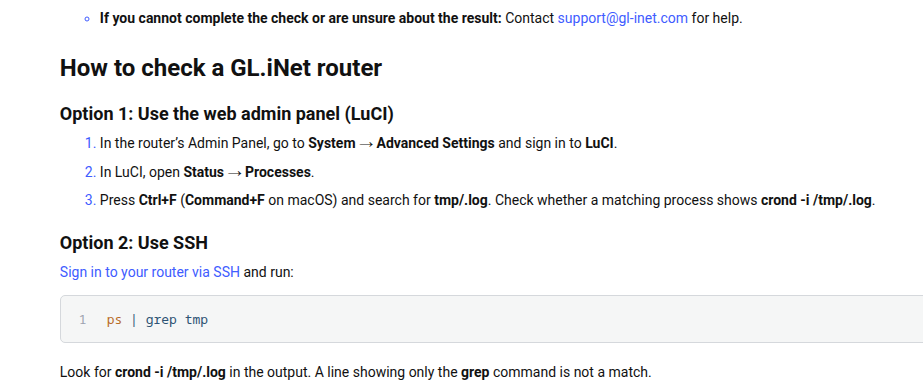
How is the Lord's name is this page still up? If you don't have replacement text, that's fine. Just remove the misinformation. Put in "coming soon", "we don't know".. a blank white space - ANYTHING else. - or just link to the Admon site for actual value.
Just get this "tmp" off the site, please!! I still have customers - YOUR customers - messaging me by the minute with screenshots of running these useless instructions and asking if they're okay?
Linking to a community source is 10000000x less embarrassing than this. Right now I'm having to essentially tell your customer that you are intentionally lying to them. They do not understand why GL's official page would have bad info - and who can blame them.
We have updated the firmware for most models. Please update your device accordingly.
Models not included in this list will continue to be released incrementally over the coming days.
Download and install the security update
Install the latest stable security firmware for your exact model as soon as possible, even if the checks below find no signs of infection. The security firmware update removes the malware identified in this incident without requiring a factory reset. You can keep your existing settings during the update.
Router security firmware downloads
- GL-MG1300, GL-MT3000, GL-MT6000 (4.11.1 or later)
- GL-E5800 (4.10.3 or later)
- GL-BE3600, GL-BE9300 (4.10.2 or later)
- GL-BE14000 (4.9.3 or later)
- GL-BE6500, GL-MT3600BE, GL-MT5000 (4.9.1 or later)
- GL-BE10000 (4.8.7 or later)
- GL-AX1800, GL-AXT1800, GL-SFT1200, GL-X3000, GL-XE3000 (4.8.4 or later)
- GL-MT2500 / GL-MT2500A, GL-X2000 (4.7.14 or later)
If your router is not listed, check the GL.iNet Download Center or email support@gl-inet.com. Do not install firmware for another model. An unlisted model is not necessarily unaffected.
KVM security firmware downloads
If you installed a security beta, upgrade to the latest stable firmware for your model.
Just checked my MUDI7... I see:
/usr/sbin/crond -f -c /tmp/gl_crontabs -l 10
Would they need to gain access to the computer as well? In other words, they have access to the KVM, but they would need to find a way to access the computer behind the KVM. Hopefully nobody has it left open without password protection.
So this removes the compromise in addition to patching it from future same compromise, or it only prevents future compromise? Several users are posting that a firmware update (even if not retaining the settings) will not remove the compromise. Curious what the official response is.
Running a GL-B3000, wasn't prompted for a new firmware, should I be concerned?
ps | grep tmp shows no sign of infection
---------------------------------------------------------------
   For those about to rock... OpenWrt 19.07-SNAPSHOT, r0-eb1338edd
 ---------------------------------------------------------------
root@GL-B3000:~# ps | grep tmp
 2971 root      6664 S    hostapd -g /var/run/hostapd/global -B -P /var/run/hostapd-global.pid -f tmp/hostapd.txt
 3160 root      1352 S    /usr/sbin/crond -f -c /tmp/gl_crontabs -l 10
 9740 root      1356 S    grep tmp

root@GL-B3000:~#
That command that Glinet keeps telling everyone to run is not sufficient. There are 3 different types of malware that have been found running on devices and that command only finds 1 of them in very specific situations. If you want a much more comprehensive check, run Admon's script. It checks for dozens of indicators of compromise: GitHub - admonstrator/glinet-csa-2026-01: Detection & Mitigation script for the CSA-2026-01 security incident on GL.iNet Routers and KVM devices. · GitHub
I updated MT6000 Flint 2 to 4.11.1 from 4.8.3 - I noted that all the 5 Ghz radios were then assigened the same MAC number and all the 2.4 Ghz radios were assigned another MAC number. (I have 3x VLAN with their own 5GHZ and 2.4GHZ radios). I had to change MAC numbers on 4 of the radios to get my network running.
Hopefully GLiNET can make sure future upgrades don't do this and others can be warned.
Prior to the upgrade I had to physically disable goodcloud from the CLI. The console switches showed it wasn't set up but scans showed it was on. I'm not surte if the latest software upgrade fixes that
The Community scan for GLI helper shows it is clear
This is unequivocally false - and we have receipts.
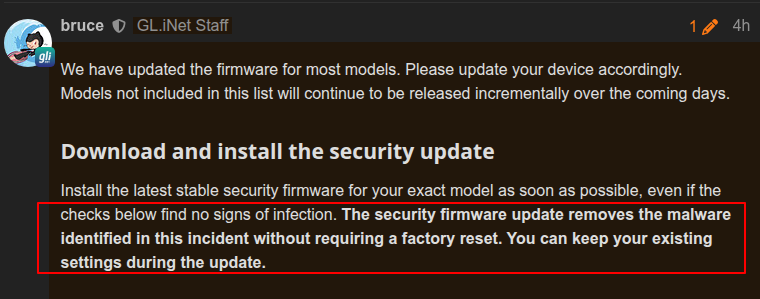
It's amazingly disappointing to see this misinformation repeated here. Please correct this.
For anyone reading - please find corrected information with examples of just how badly wrong this is here:
Is there an ETA for the security fix on the X3000 beta/snapshot branch (currently 4.11.0 beta3)? Only 4.8.4 stable lists it so far.