How to enable the 802.11r (Fast Roaming) for WiFi in Flint 3 (GL-BE9300)

Flint 3 (GL-BE9300) WiFi supports 802.11r, it requires to SSH to the router and enabled by executing commands.

We found that 802.11r does not work on Luci, like say if manually enabled the "802.11r Fast Transition" in Luci, WiFi (AP) will disappear (no broadcast).
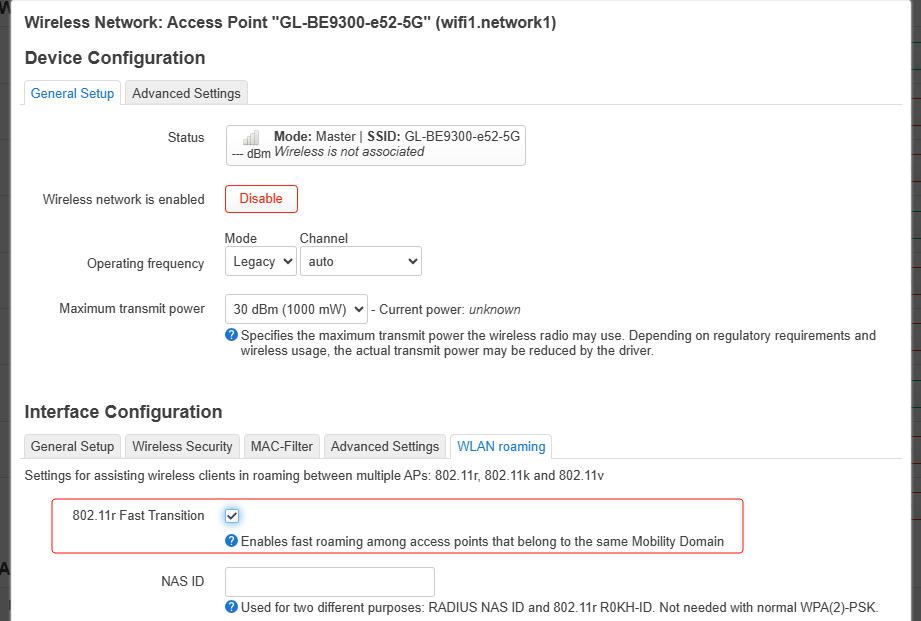
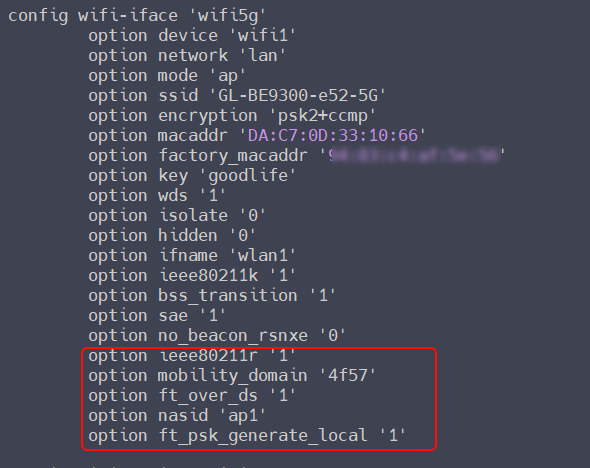
In order to enable 802.11r for Flint 3, we need to SSH to the router, and execute the following uci commands to enable 802.11r, WiFi works without issue in this way.

Kindly note:
Before executing these commands, recommended to archive backup first in Luci, to restore to the original state without restore the factory settings if encounter some errors during configuration.

Enable 802.11r for 6GHz WiFi:

uci set wireless.wifi6g.ieee80211r='1'
uci set wireless.wifi6g.mobility_domain='4f57'
uci set wireless.wifi6g.ft_over_ds='1'
uci set wireless.wifi6g.nasid='ap1'
uci commit wireless
/etc/init.d/network restart

Enable 802.11r for 5GHz WiFi:

uci set wireless.wifi5g.ieee80211r='1'
uci set wireless.wifi5g.mobility_domain='4f57'
uci set wireless.wifi5g.ft_over_ds='1'
uci set wireless.wifi5g.nasid='ap1'
uci commit wireless
ubus call network restart

Enable 802.11r for 2.4GHz WiFi:

uci set wireless.wifi2g.ieee80211r='1'
uci set wireless.wifi2g.mobility_domain='4f57'
uci set wireless.wifi2g.ft_over_ds='1'
uci set wireless.wifi2g.nasid='ap1'
uci commit wireless
ubus call network restart

In addition, if your WiFi encryption is included "WPA2 PSK", it is required to further execute these commands:

6GHz WiFi:

uci set wireless.wifi6g.ft_psk_generate_local='1'
uci commit wireless
ubus call network restart

5GHz WiFi:

uci set wireless.wifi5g.ft_psk_generate_local='1'
uci commit wireless
ubus call network restart

2.4GHz WiFi:

uci set wireless.wifi2g.ft_psk_generate_local='1'
uci commit wireless
ubus call network restart

Command ubus call network restart will reinitialize the network configuration, causing a temporary short interruption of wired and wireless clients. You can execute commands other than that, and then execute ubus call network restart in the end.

This configuration is only valid for Flint 3, and it does not lose if router restarts or upgrade firmware. Only reconfigure if reset the firmware settings.

If encounter configuration errors, please restore the previous backup and reconfigure again or brand-new configure.
6 Likes

Hi, this is probably a stupid question but am I executing these commands on the primary main router or the secondary AP?

Also, my secondary router AP has an ethernet backhaul to the primary. Does this make any difference?

Hi,

Execute these commands on all Flint3 that need to enable Fast Roaming, like say if the main router is Flint3 or the secondary AP is Flint3, or both of them are Flint3.

There is not any difference. Yes, I think the most reliable connection is the wired connection.

If my SSIDs are already broken due to enabling roaming in the GUI, will this fix them?

Probably not, but you can try it first.

If no luck, you need to reset the firmware.

I faffed about for a bit with the broken SSIDs in Luci and somehow managed to get them working again (without roaming enabled)

How is it? Does the roaming work well?
Can we get rid of our Meshes?

Hello,

As long as the wireless clients support IEEE 802.11 k/v, it can actually meet the ability to roam between multiple APs. But 802.11 k/v/r cannot quite compete with mesh.

You mentioned this only works with flint 3? So it would not work with Flint 2? I have two Flint 2’s One as router and one as dumb Wireless AP.

You just need to enable fast roaming + configure dawn. Here is an example:

Likely it will work, the most important is that the ssid, mobility domain and password and crypto match, wpa3 or sae will be a bit more complicated if that fails use wpa2, the channel must be different.

It can may fail on mtk sdk because luci is not compatible with the non open source wifi drivers.

On OP24 it should work, however if you also want to use multi psk this is currently broken, please see this post here.

With the patches it will work, but you need to compile on normal OpenWrt.

Hello,

is it posible to set ft_over_ds='0' and dtim_period=’3’ I have read ft_over_ds='0' is faster and dtim_period=’3’ should be netter for Apple Devices also is the nasid='ap1' the same on alle Flint 3 in the network or must I set a different nasid for each Flint 3 in the network.

Thanks for the HowTo

I am going to test this now. I am running the stock flint 2 firmware latest snapshot from yesterday.

Is it possible to make dawn available in the repo for Flint 3? For now only luci-app-dawn seem to work. Dawn itself rejects to be installed.

2 Likes

Hello,

Checking and compiling (if available) the dawn is already in the plan.

Please wait for a while.

The plugin dawn main program has been added to the repo.

Is it possible to install wpad‑openssl on the Flint 3 router?

I have tested a bit 802.11r with 4.8.4 (if I recall 4.8.3 behaved the same) and it’s a perfect way to prevent radios from going up. I was adding those lines to the config:

config wifi-iface 'iot2g'
option network 'iot'
option device 'wifi0'
option mode 'ap'
option encryption 'psk2'
option key 'passcode'
option ssid 'bmg'
option macaddr 'xx:xx:xx:xx:xx:x'
option factory_macaddr 'xx:xx:xx:xx:xx:xx'
option disabled '0'
option wds '1'
option isolate '0'
option hidden '0'
option no_beacon_rsnxe '1'
option ifname 'wlan0'
**option ieee80211r '1'
option mobility_domain 'b00f'
option ft_over_ds '1' # or 0 - doesn’t matter
option ft_psk_generate_local '1'
**
Are you sure it should work?

For example:

i also set for wlanmld2g wlanmld5g wlanmld6g and seems working

1 Like