Thank you for the work you’ve done!
Bruce, thanks for your reply.
I see at ax-1800 firmware page that their is a legacy firmware added 3.214 it has date stamp 2025-7-2 (so 3 days ago).
Is that the latest one with working hardware acceleration for ax-1800(flint1)
So the 3.216 with higher number but older date stamp is not better?
Hi,
Sorry, it caused a misunderstanding. There was a bug in the firmware center services, this firmware was displayed incorrectly. We didn't actually release this firmware.
We have fixed this bug.
I see at Flint1 (GL AX1800) firmware downloads a beta firmware that it is 4.8.0 (like weeks ago the 4.8.0 beta 5), but the firmware date is 2025-07-24 (5 days ago). It this a new beta 6 release of 4.8.0 ?
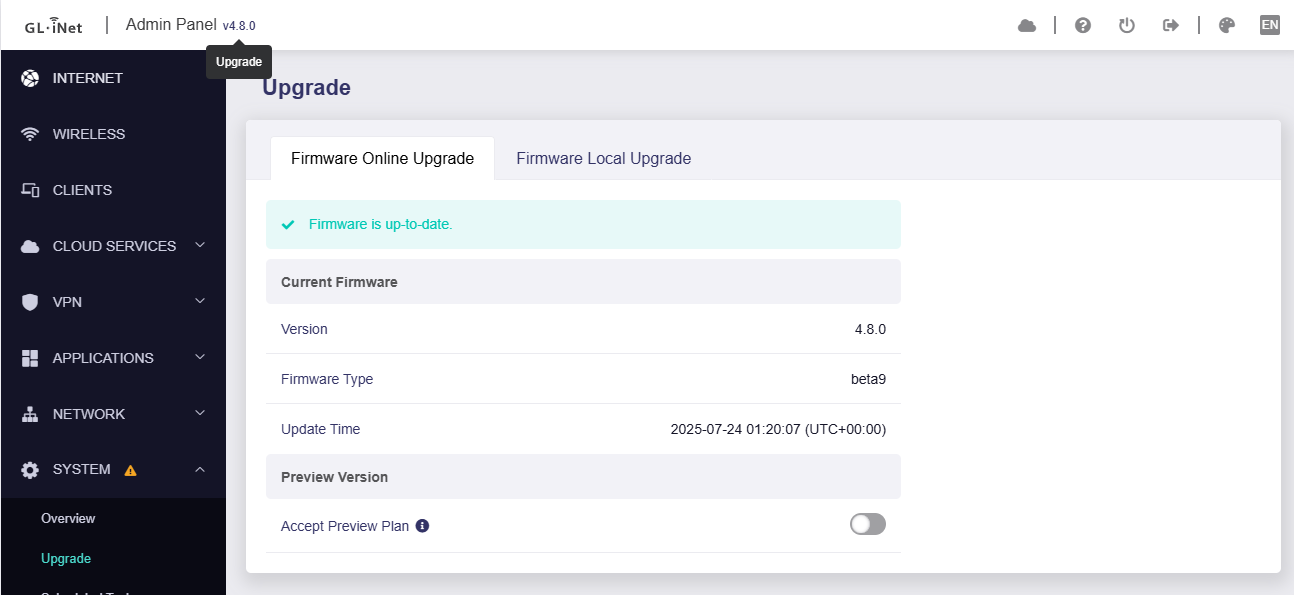
Do we have a new eta for a stable release for the slate AX GL-AXT1800 for 4.8, given that it was aimed to be Q2 2025 and that has now passed? I need the new VPN functions, but use my Slate as a primary router so am not certain on how safe beta9 4.8 is to go ahead and upgrade to.
1 Like
Thank you Bruce & team.
Got beta9 running of 4.8.0 on AX1800/Flint1
I always remove cloudservices and adguard. Had dns issues. But after pressing reset button it is now all working fine, and i configure it now manually (half a hour work  ), instead of upload luci settings.
I see that luci is not installed by default at beta9 (4.8.0), is that with a reason?
@ Johnnym, 4.8.0 beta9 is stable and running smooth on my flint1. But i did manual configuration after ugrade without keeping settings(and reset button after upgrade). I also remove cloud services (4) and adguard, so i'm not a average user, i strip it down.)
For security, Luci will not pre-install in firmware, but you can install if you need to configure in Luci.
I found an interesting issue with flint1/GL-AX1800 and firmware 4.8.0 beta9:
5GHz and 2.4GHz wifi works fine.
When connecting usb drive and share it (samba) then the 2.4GHz is gone (wifi clients only show 5GHz wifi).
Also Samba anonymous read and write doesn't work on older windows workgroup/samba devices (like older Oppo UDP205 player) the UDP205 player keep popping up username and password and it is always wrong, with anonymous login it should work without username and password.
On Linux (uptodate) i get a popup to access anonymous login.
Can anonymous login be configured without popup verification to login, so older devices can use drive share on flint1.
Set the USB to 2.0
There is a toggle in somewhere to switch between USB 2.0 and 3.0
Considering that Linux can log in anonymously without problems, we think this maybe a compatibility issue with older Windows workgroup/Samba devices.
Please try SSH into the router and enable SMB1 support using the following command to see if that gets them working again.
sed -i 's/SMB2/NT1/g' /etc/samba/smb.conf.template
/etc/init.d/samba4 restart
Command to restore minimum SMB2:
sed -i 's/NT1/SMB2/g' /etc/samba/smb.conf.template
/etc/init.d/samba4 restart
Thank you so much guys and girls.
It all works.
I really appreciate this feedback.
In Flint1 system overview (gl inet webview) is the usb 2.0 / 3.0 switch.
Usb 2.0 can go up to 480Mbps, so tht is fine for file access and storage devices.
I never knew that usb3.0 has 2.5GHz field around cable. (and so interference with 2.4GHz wifi).
Also the ssh command to use smb1 works perfect. My "audiophyle" oppo UDP205 can play the rediculous high quality flac audio files, and the movie files allstored on two external harddrives (with ext4 filesystem, so flint kernel support).
I suppose using samba1 isn't a security issue, when it is only accessible on lan/wlan (own devices).
Many thanks.
Oh one tiny question, about "Network storage".
Everytime i don't use the external drives, i "Eject" them in flint1 gl int webintrface, before i actually power off the drives.
Is this really nessesary, or can i just poweroff drives without ejecting (is that bad for firmware stability)
Normally, this will not affect the stability of the device firmware.
However, please note that if you are writing data, or if the data has not been completely written from the cache to the external drives, then this data may be lost if you directly turn off the power/unplug without clicking "Eject".
Hello good people.
I have a Flint1/AX-1800 question about the DNS settings:
In GL-Inet admin panel - Network - DNS -
Mode : Encrypted DNS
Encryption type : Oblivious DNS over HTTPS
Servers : select servers
Is their a way to update the servers list? Or to manually add a server?
I don’t see option in Luci. Or can this be done in SSH busybox?
Because their are servers in the list that are not working anymore (no IP address found for [odoh-noads-se.alekberg.net]). I use fw 4.8.2 (19-8-2025)
Or is that all their is with this kind of dns servers?
In past, their was a small app with name “NameBench” i used that on my Linux desktop, It measure many dns servers and came up with the fastest one (and has filter with of no log, private). The app development is stopped. Is it possible that something like that get integrated in router firmware? So that you have option in server list that fastest is on top.
Hi
You can manually add a server via SSH as follows.
Just create a DNS stamp for Oblivious DNS over HTTPS instead of DoH.
1 Like
About this.
In fw 4.8.2 (beta1) i need to do
sed -i 's/SMB2/NT1/g' /etc/samba/smb.conf.template
/etc/init.d/samba4 restart
Everytime i mount a usb drive, or reboot ax-1800 (that is already configured in GL-inet network share).
The samba is back to newest version after remount or reboot (so incompatible with mediaplayers that doesn’t support newest samba version, because their player firmware isn’t updated -Oppo discontinue Bluray/network players-)
Can you make a setting in gl-inet webinterface, that you can swith samba to different version, so that sed -i 's/SMB2/NT1/g' /etc/samba/smb.conf.template is permanent, also after remounting drive or rebooting the device. (like the usb2/3 setting)
Also DLNA can share only one drive. Can you change that so it can share multiple drives on a usb hub , like samba can.
Also it seems that “Oblivious DNS over HTTPS” (DNSSEC / filter / nolog) is not always working (no internet in clients webbrowser), then i need to reboot the flint1/AX-1800 with 4.8.2. beta1 and it works again.
grep 'NT1' /etc/samba/smb.conf.template should show the corrected lines & confirm the file was modified per @will.qiu 's sed command. The -i is for 'edit in-place.'
I double-checked this on my side.
Please try the following updated command (template → template4).
It should work after a reboot:
sed -i 's/SMB2/NT1/g' /etc/samba/smb.conf.template4
reboot
Thank you for your suggestion. We will forward these to our product team for evaluation and consideration in future releases.
When the issue happens, could you please try these two checks?
- Run a ping test to
8.8.8.8to confirm whether the internet connection itself is stable. - Run a ping test to
Oblivious DNS over HTTPS serverto confirm whether the DNS server is working.
I think it is time to answer this to people. Whats going on at Glinet?
Brume 2:
last update 2025-03-28
Flint:
last update 2024-10-17
Opal:
Last update 2025-03-07
1 Like
No major CVE’s have been patched forcing them to update the whole stack at once.
Brume 2 will get 4.8.x eventually, but at least got 4.7.0 & 4.7.4
Flint had issues with 4.7 so stayed on 4.6.8 until it gets 4.8.x at some point.
Opal should be considered on maintenance, GL should discontinue it already; there is no way it ever gets 4.8, but a 4.3.28 release will probably happen when CVE’s warrant it, do not expect any additional features, these aren’t like iPhone apps that need an update once a week…